CHAPTER 26 CLICK 330/331 221
Status Meaning
On Supply voltage is in an acceptable range
O Supply voltage is too low
Table 25.1 – Power Monitor LEDs
Each Ethernet port has two LEDs that show the data transmission speed of that port,
as shown in Table 25.2. ese LEDs are labeled 100/ACT and 1000/ACT. If the LED
is on, there is an electrical link. If the LED blinks, there is currently network trac at
that speed.
LED 10 Mbps 100 Mbps 1000 Mbps
100/ACT On or blinking On or blinking O
1000/ACT On or blinking O On or blinking
Table 25.2 – Ethernet Port Monitor LEDs
e ber ports on the Click 331 each have an LED labeled 1000 LNK/ACT. If this LED
is on, there is a valid connection through that port. If the LED blinks, there is currently
network trac at 1000 Mbps.
Installation
Unlike many other Click devices, the Click 330/331 do not mount over the T-bus, meaning
that power and communications will have to be wired in.
Wiring Power and Communication
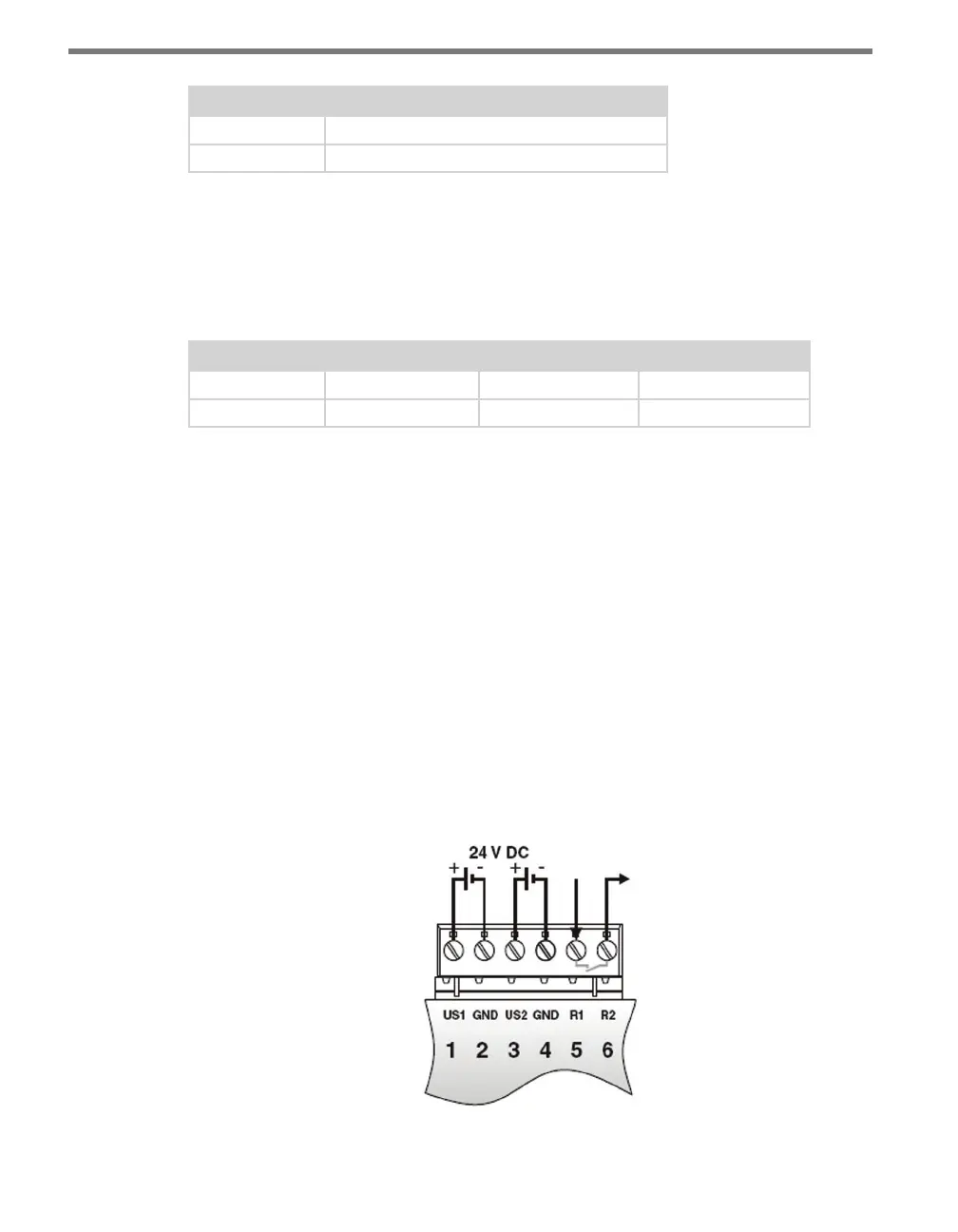
e rst four screw terminals, marked US1, GND, US2 and GND, are for wiring in power.
e other two, which are labeled R1 and R2, are for security and functionality alarm pur-
poses (see Figure 25.3).
Figure 25.3 – Wiring the Click 330/331



 To Next Page