72 CHAPTER 7 CHANNELS-ALERTS-ZONES
Channel 1
Alert 1
Zone
1
Alert 2
Alert 3
Alert 4
Zone
2
Zone
3
Zone
4
Zone
4
Zone
3
Zone
2
Zone
1
Zone
1
Zone
2
Zone
3
Zone
4
Zone
1
Zone
2
Zone
3
Zone
4
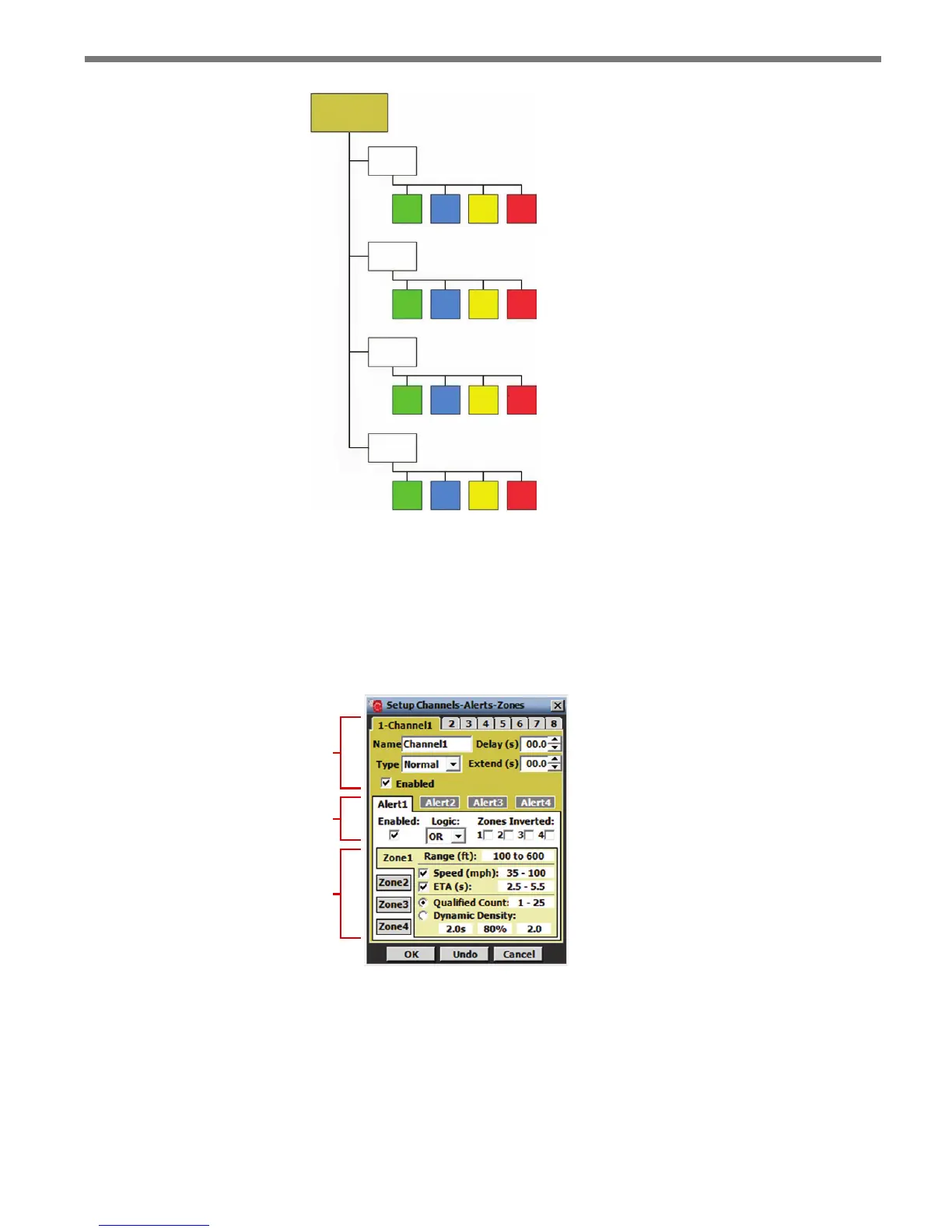
Figure 7.8 – Normal Channel Hierarchy
e CAZ Setup screen below shows a tabbed view of each detection channel and its as-
sociated alerts and zones (see Figure 7.9). e eight tabs at the top of the screen represent
the sensor’s eight channels, with the selected tab showing the channel number and channel
name; the middle portion of the screen contains alert conguration parameters; and the
lower portion of the screen contains zone conguration parameters.
Channels
Alerts
Zones
Figure 7.9 – Setup Channels-Alerts-Zones Screen
e OK, Undo and Cancel buttons pertain to ALL changes made in the CAZ Setup job
and not to individual channels, alerts or zones. e OK button saves the settings to the
sensor; the Undo button restores the settings to the screen’s initial values; and the Cancel
button closes the screen without saving any changes.



 To Next Page