Take the following steps to set video lost alarm:
Step 1 Setting>NVR Setup>Channel>video lost Alarm ,
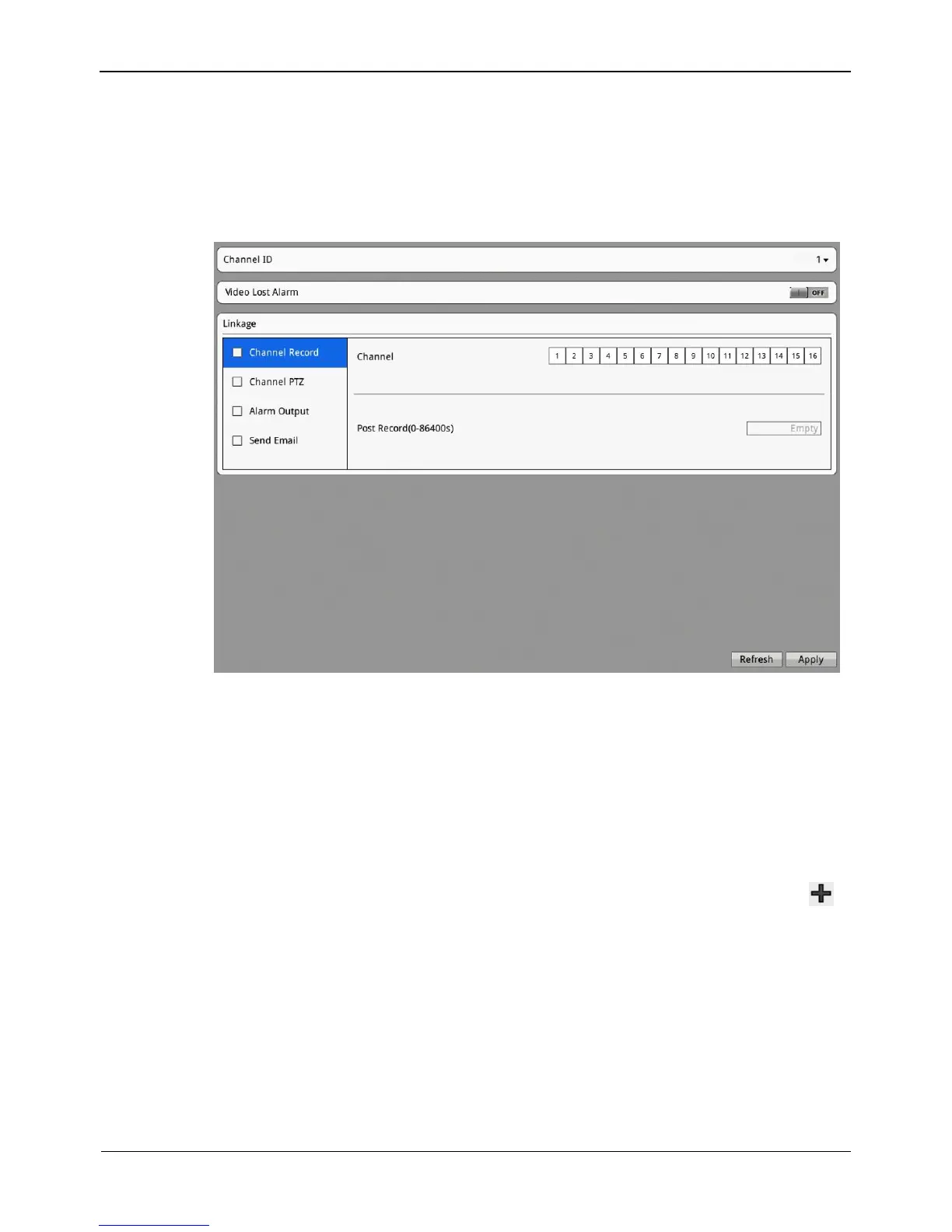
The video lost alarm interface is displayed, as shown in Figure 8-16.
Figure 8-16 Video Lost Alarm interface
Step 2 Select channel ID.
Step 3 Click video lost alarm button to enable video lost alarm.
Step 4 Set schedule.
For details, see 8.3.7 Step 6 Set motion alarm schedule.
Step 5 Check Channel Record. Select a channel ID, input the post record to enable record
linkage.
Step 6 Check Channel PTZ. Select a channel ID and preset to enable PTZ linkage. Click
to add another Channel PTZ.
Step 7 Check Alarm Output. Select alarm output channel ID and alarm output time(s) to
enable alarm output linkage.
Step 8 Check Send Email to enable email linkage.
Step 9 Click Apply. The message "Apply success" is displayed.
Step 10 Click OK. The system saves the settings.



 To Next Page