EasyManua.ls Logo

WBOX Technologies 0E-4CHNVR1TB - Smtp

Default Icon
97 pages
Print Icon
To Next Page IconTo Next Page
To Previous Page IconTo Previous Page
Loading...
8 Setting
Network Video Recorder(NVR)
User Manual
66
Issue V1.0 (2018-05-11)
8.6.3 SMTP
If the Simple Mail Transfer Protocol (SMTP) function is enabled, the device
automatically sends JPG images and alarm information to specified email addresses
when an alarm is generated.
Step 1 Choose Setting > NVR Setup>Network Service>SMTP.
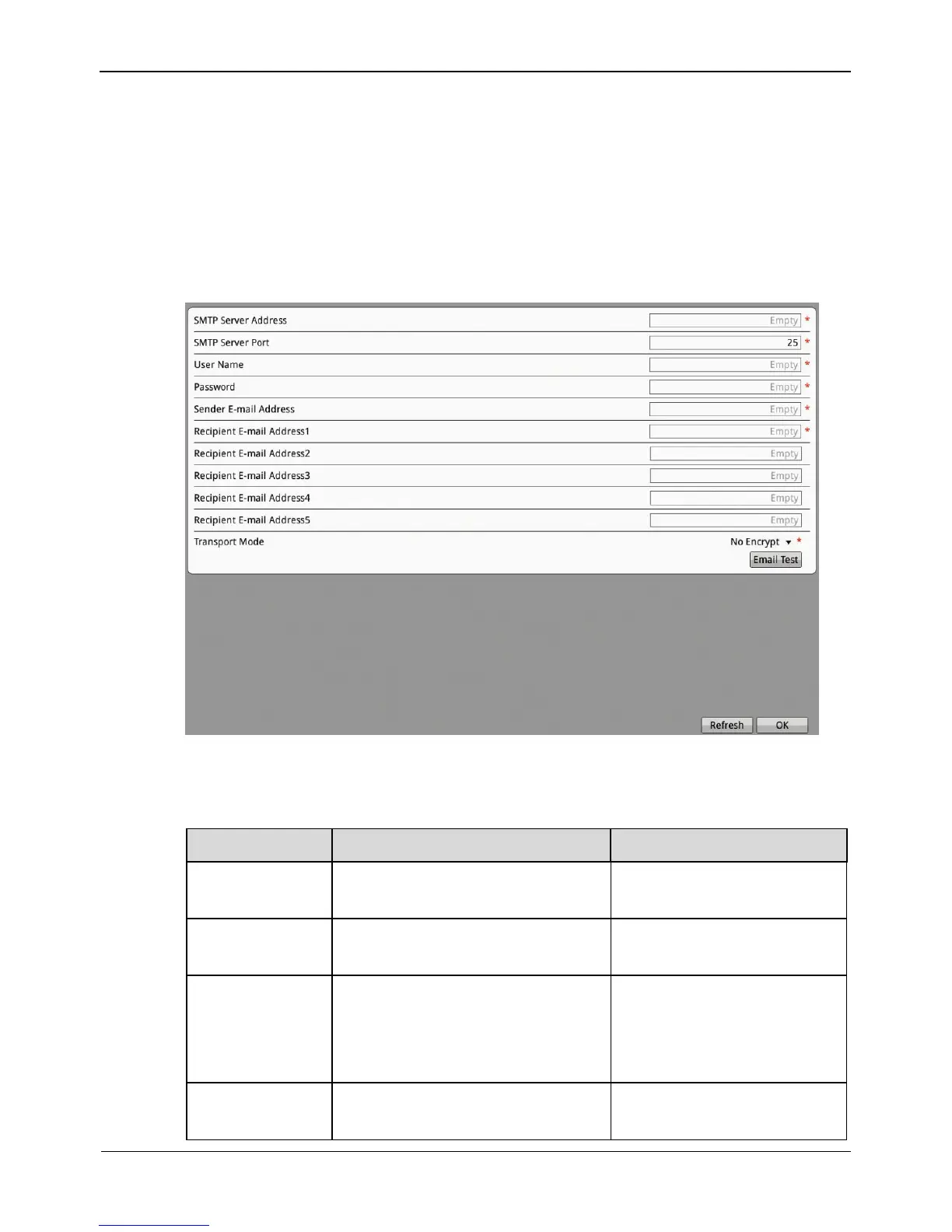
The SMTP interface is displayed, as shown in Figure 8-27.
Figure 8-27 The SMTP interface
Step 2 Set the parameters according to Table 8-9.
Table 8-9 SMTP parameters

Parameter
Description
Setting
SMTP
N/A
[Setting method]
Select the check box.
SMTP Server
Address
IP address of the SMTP server.
[Setting method]
Enter a value manually.
SMTP Server
Port
Port number of the SMTP server.
[Setting method]
Enter a value manually.
[Default value]
25
User Name
User name of the mailbox for
sending emails.
[Setting method]
Enter a value manually.

Other manuals for WBOX Technologies 0E-4CHNVR1TB

Related product manuals