SIDE BURNER MAINTENANCE
WARNING: All gas controls and supply valves should be in
the OFF position.
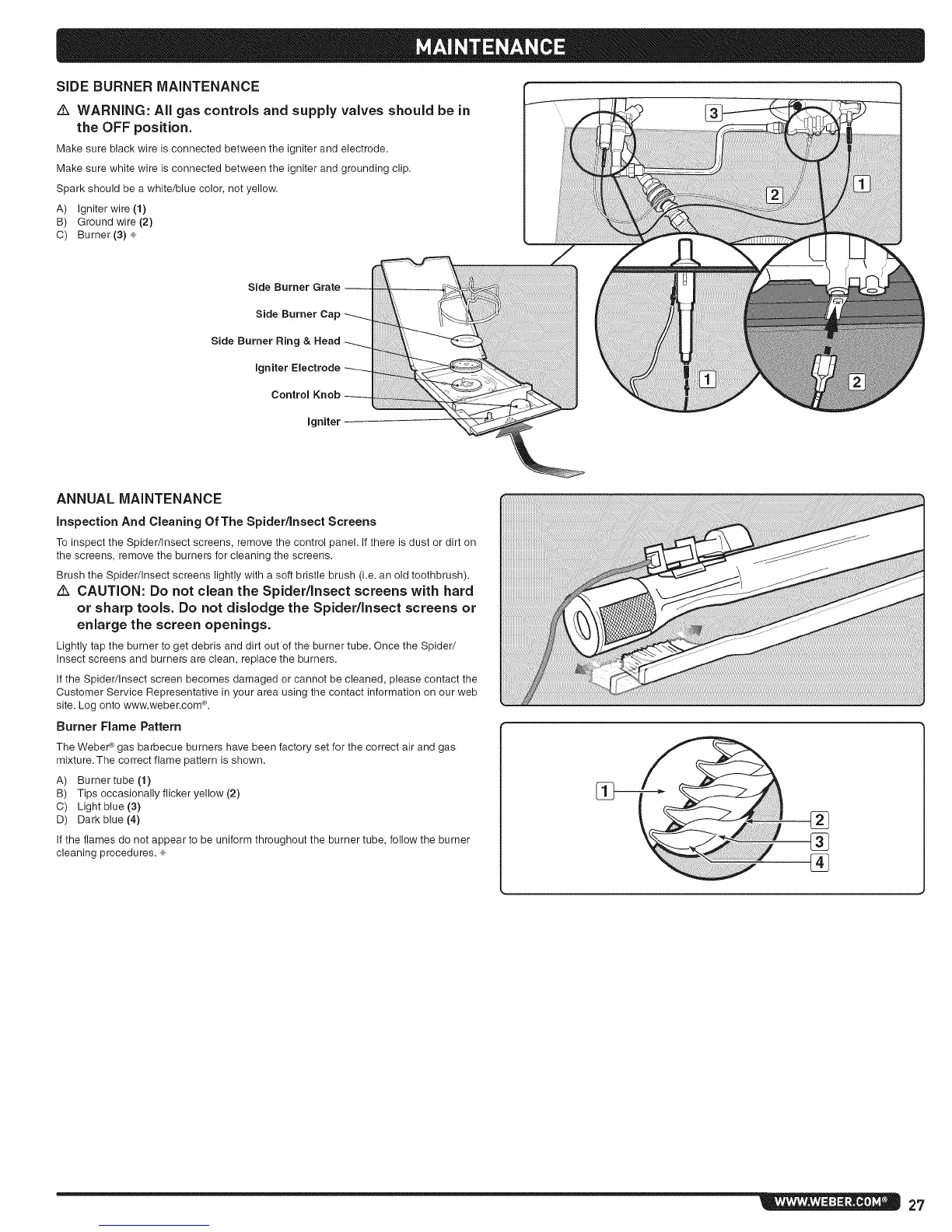
Make sure black wire is connected between the igniter and electrode.
Make sure white wire is connected between the ignitor and grounding clip.
Spark should be a white/blue color, not yellow.
A) Igniter wire (1)
B) Ground wire (2)
C) Burner (3) ®
Side Burner Grate --
Side Burner Cap
Side Burner Ring & Head
Igniter Electrode
Control Knob
Igniter
ANNUAL MAINTENANCE
inspection And Cleaning Of The Spider/Insect Screens
Toinspect the Spider/Insect screens, remove thecontrol panel. If there isdust or dirt on
the screens, removethe burners for cleaningthe screens.
Brush the Spider/Insect screens lightlywith a soft bristlebrush (i.e. an old toothbrush).
Z_ CAUTION: Do not clean the Spider/Insect screens with hard
or sharp tools. Do not dislodge the Spider/Insect screens or
enlarge the screen openings.
Lightly tapthe burner to get debris and dirt out of theburner tube. Oncethe Spider/
Insect screens and burners are clean, replacethe burners.
If the Spider/Insectscreen becomes damaged or cannot becleaned, please contact the
Customer Service Representativein your area using the contact information on our web
site.Log onto www.weber.com®.
Burner Flame Pattern
The Weber ¢ gas barbecue burners have been factory set for the correct air and gas
mixture. The correct flame pattern is shown.
A) Burnertube (1)
B) Tips occasionally flicker yellow (2)
C) Light blue (3)
D) Dark blue (4)
If the flames do not appear to be uniform throughout the burner tube, follow the burner
cleaning procedures. ®
%
®
27




 To Next Page