We recommend protecting access to the WiFi module by
setting a password.
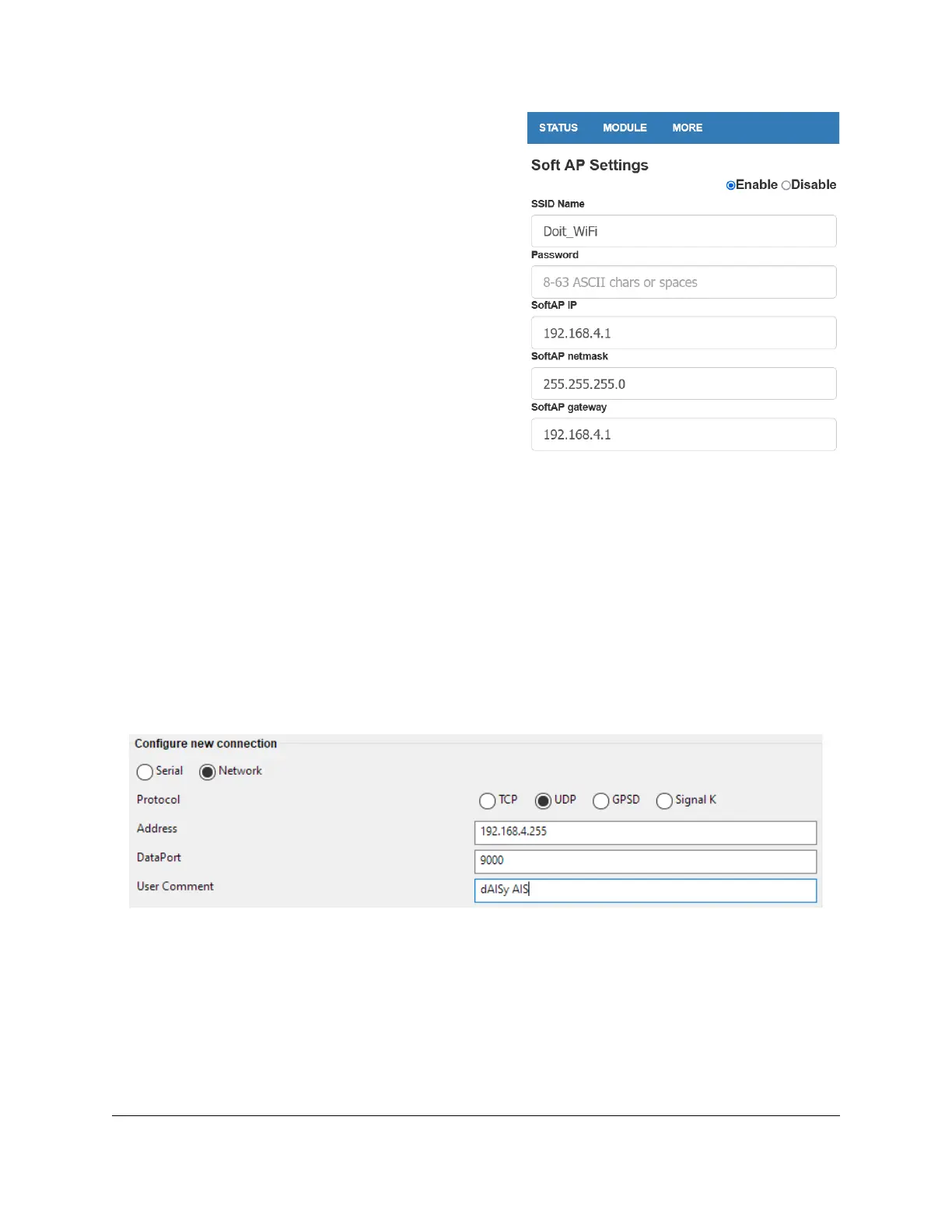
Navigate to MODULE > WiFi. In the section SOFT AP
Settings enter the desired password into the field
Password. The password must be 8-63 characters.
Optionally, you can change the name of the WiFi module
by updating the field SSID Name.
Leave the other fields unchanged.
Scroll to the bottom of the page and click Save.
If you ever forget the password, you can reset the WiFi
module to factory configuration by keeping the button
labelled G pressed until the LED turns off.
To activate the settings the module needs to be restarted. Navigate to MORE > Restart. The settings
you’ve made are now active.
5.1.4 Configure OpenCPN
Applications that process the AIS data must be configured to receive data from the UDP with the IP
address and port you noted down. Here we use OpenCPN, but the procedure will be similar with other
applications.
Connect your computer or mobile device to the WiFi access point of the dAISy 2+ AIS receiver.
Start OpenCPN. Go to Options > Connections. Click Add Connection to create a new connection. Select
the Network radio button, and under Protocol select UDP. In the field Address, enter the IP address you
noted down. In the field DataPort enter the port you noted down.
Optionally, you can give the connection a name by entering the desired name in the field User
Comment.
Leave the remaining fields at their defaults. Press OK to save and activate the new connection. If there
are AIS targets in range, OpenCPN will now start receiving AIS data.


 To Next Page