13
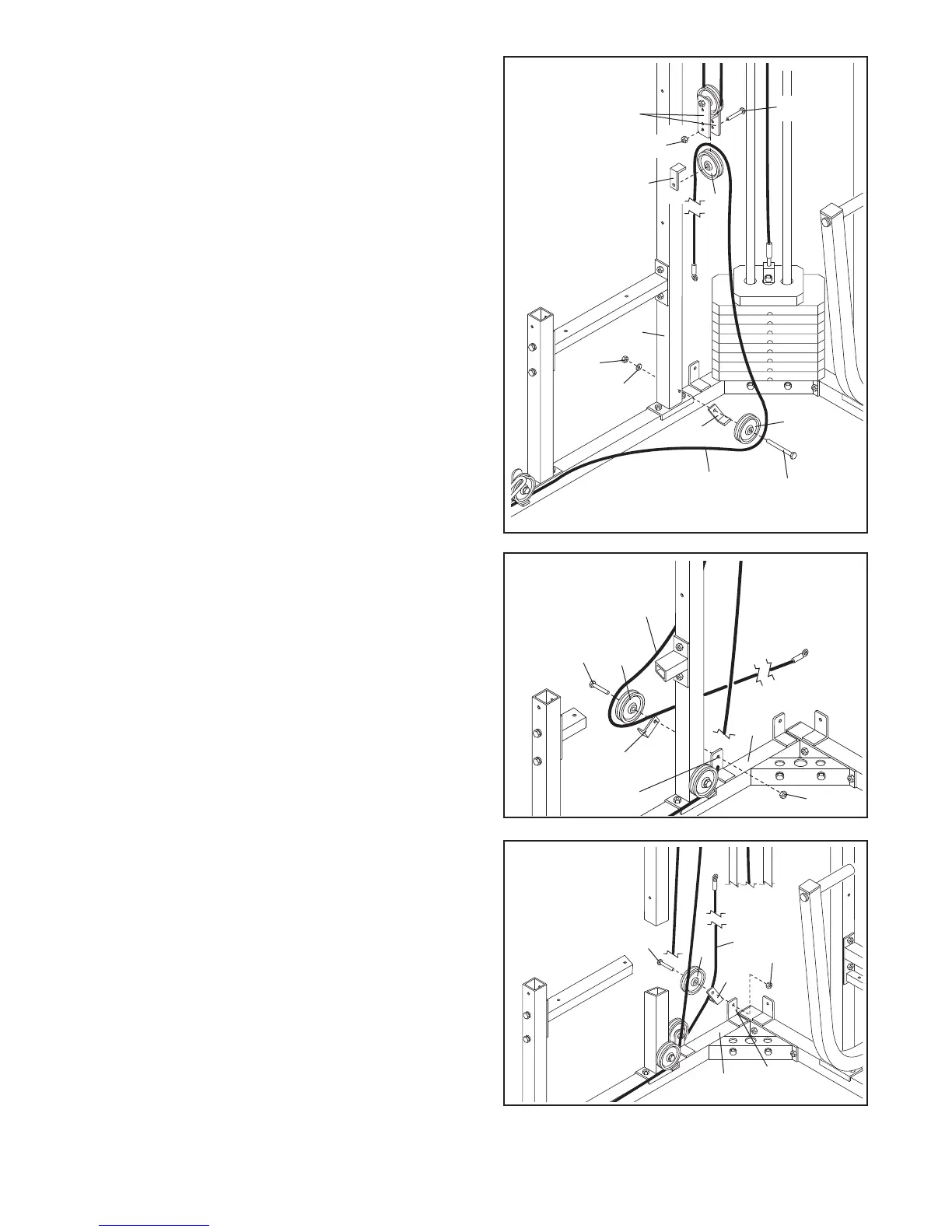
24. Wrap the Long Cable (73) around a 3 1/2” Pulley (5).
Attach the Pulley and a Cable Trap (39) to the indicat-
ed bracket on the Butterfly Base (61) with a 3/8” x 2”
Bolt (35) and a 3/8” Nylon Locknut (4).
23. Wrap the Long Cable (73) around a 3 1/2” Pulley (5)
in the direction shown. Attach the Pulley and a Cable
Trap (39) to the indicated bracket on the Butterfly
Base (61) with a 3/8” x 2” Bolt (35) and a 3/8” Nylon
Locknut (4).
22. Wrap the Long Cable (73) around a 3 1/2” Pulley (5)
i
n the direction shown. Attach the Pulley and a Cable
Trap (39) to the Butterfly Upright (62) with a 3/8” x
3 3/4” Bolt (7), a 3/8” Flat Washer (17), and a 3/8”
Nylon Locknut (4). Make sure the Cable Trap is ori-
e
nted as shown.
Wrap the Long Cable (73) over a 3 1/2” Pulley (5) in
the direction shown. Re-attach the Pulley and a Cable
Trap (39) to the lower hole in the Adjustable Pulley
Plates (44) with a 3/8” x 2” Bolt (35) and a 3/8” Nylon
Locknut (4). Make sure the Cable Trap is oriented
as shown.
24
4
35
39
73
5
61
23
5
73
35
39
61
4
Bracket
Bracket
7
4
44
3
9
62
17
4
5
5
35
73
39
22


 To Next Page