11
January, 2017
HOPPER ASSEMBLY
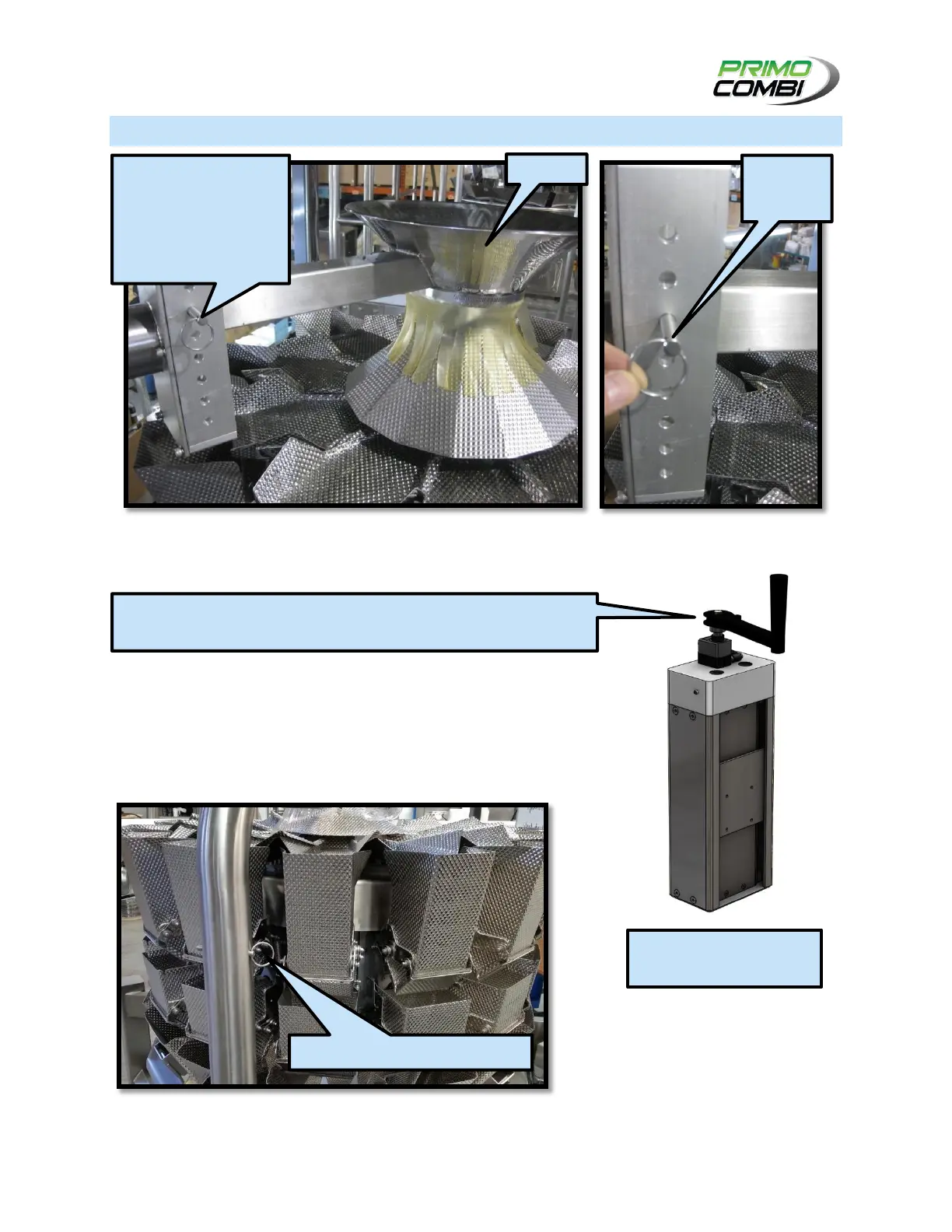
To adjust the height of the Hopper, remove the Hopper Bracket’s pin (as seen in the image above) and
slide the Hopper up or down before inserting the pin again. Take care not to misplace the pin.
The Hopper Post can be rotated out of the way to facilitate cleaning.
To do so, remove the Hopper Post Pin and rotate the post away from the
machine. Take care not to misplace the pin. Rotate the Hopper Post back in
place and re-insert the pin once cleaning is complete.
REMOVE THE PIN FROM
THE HOPPER BRACKET
TO SLIDE THE HOPPER
UP AND DOWN.
REPLACE THE PIN TO
FIX IN PLACE.
HOPPER SUPPORT
AND BRACKET
REMOVE PIN TO ROTATE HOPPER
THE HOPPER MAY BE EQUIPPED WITH A HAND CRANK FOR ADJUSTMENT,
INSTEAD OF THE HOPPER BRACKET
HAND CRANK HOPPER
ATTACHMENT (OPTIONAL)



 To Next Page