96
January, 2017
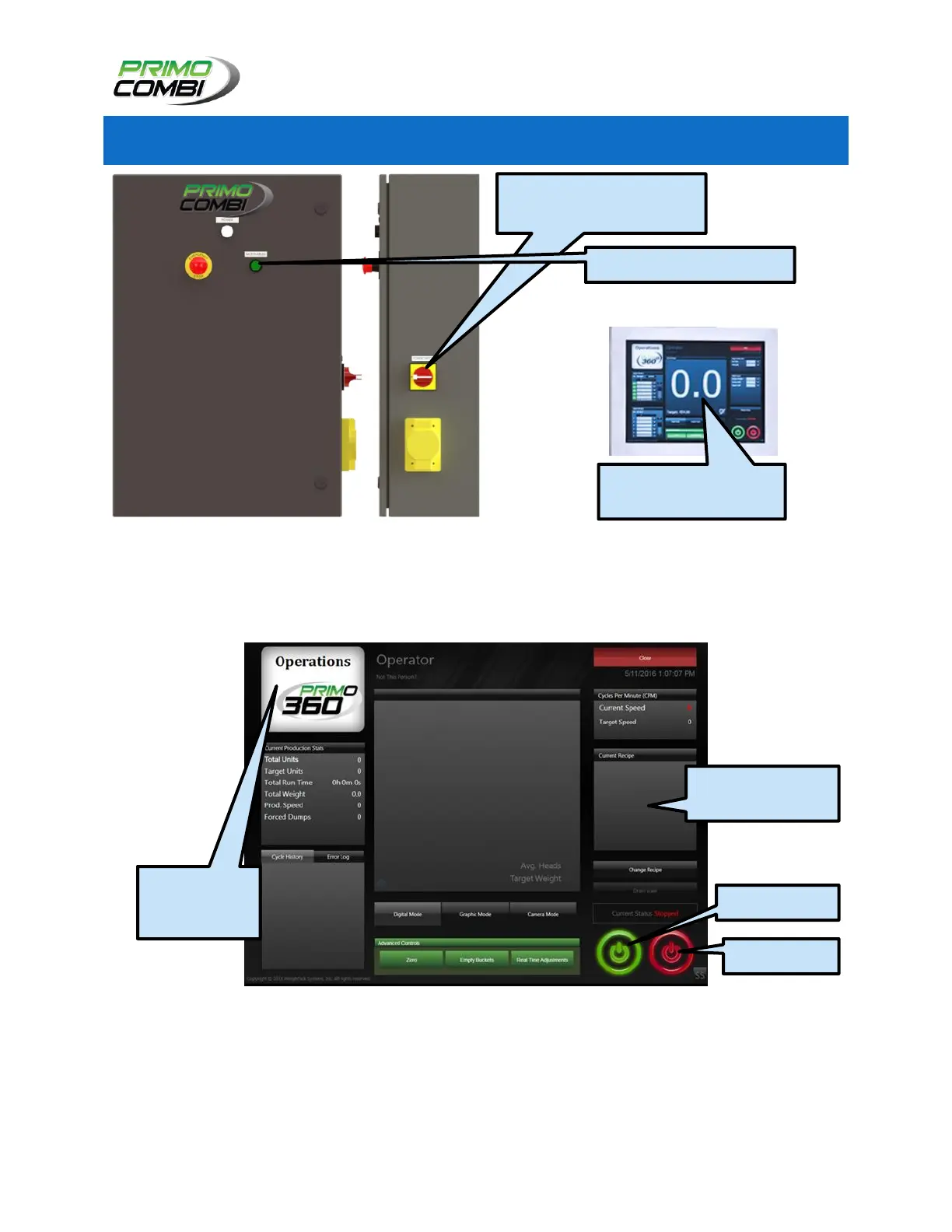
1. Locate the Power Switch on the Control Box. Turn the Power Switch to the “ON” position. Press
the green M.C.R. button. It will take a few minutes for the H.M.I. Touch Screen to boot up.
2. Navigate to the H.M.I.’s Operate Screen. Ensuring that the machine is loaded with the correct
Recipe.
3. If not interfaced with a Bagger, then the Operator must press the green “Start” button to begin
the product dumping cycle. The operator should ensure that the “enable dump request” option
under hardware settings is not selected.
If interfaced with a Bagger the operator must press the green “start” button, then the
PrimoCombi Scale will begin product dumps as soon as it is signaled by the interfaced Bagger.
CHECK THE RECIPE
SELECTION
NAVIGATE TO
THE OPERATE
SCREEN
III.) WAIT FOR H.M.I.
TOUCH SCREEN TO LOAD
I.) TURN THE POWER SWITCH
TO THE “ON” POSITION
II.) PRESS THE MCR BUTTON



 To Next Page