95
January, 2017
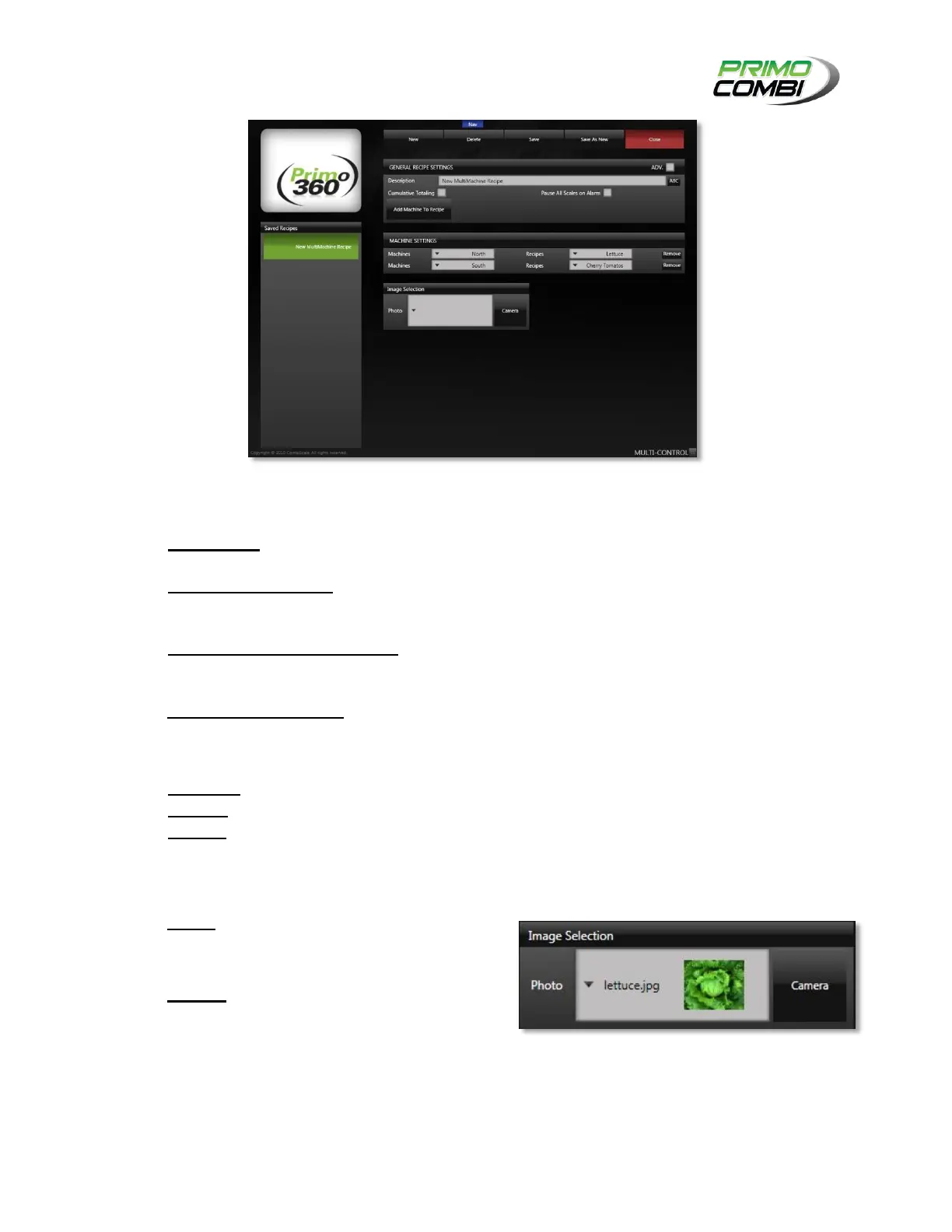
Multi Machine Recipe Screen
GENERAL RECIPES SETTINGS
DESCRIPTION – This is the description of the multi-machine recipe. It is recommended that you
give the configuration a description allowing easy recognition of the settings.
CUMULATIVE TOTALING – This indicates if the combinations from each PrimoCombi will be
combined into a total weight. This is useful if you have multiple machines dumping into a single
ancillary machine.
PAUSE ALL SCALES ON ALARM – Selecting this option will cause all machines to enter the
paused state should one or more PrimoCombis yield an error or alarm. This is useful if you are
using cumulative totaling.
ADD MACHINE TO RECIPE – Clicking this button will add a machine.
MACHINE SETTINGS
MACHINES – Select a machine to use in the multi-machine recipe from the drop-down list.
RECIPES – Select a recipe to run on the respective machine.
REMOVE – If you added too many machine settings, click Remove to remove an item from the list.
IMAGE SELECTION
PHOTO – This field is a drop-down list of all
available images that a user can choose from.
These are located in the Product Images folder.
CAMERA – If there is a webcam attached to the
360 Operating System this button will be
enabled. Clicking this button will open the
Picture Taker screen.



 To Next Page