87
January, 2017
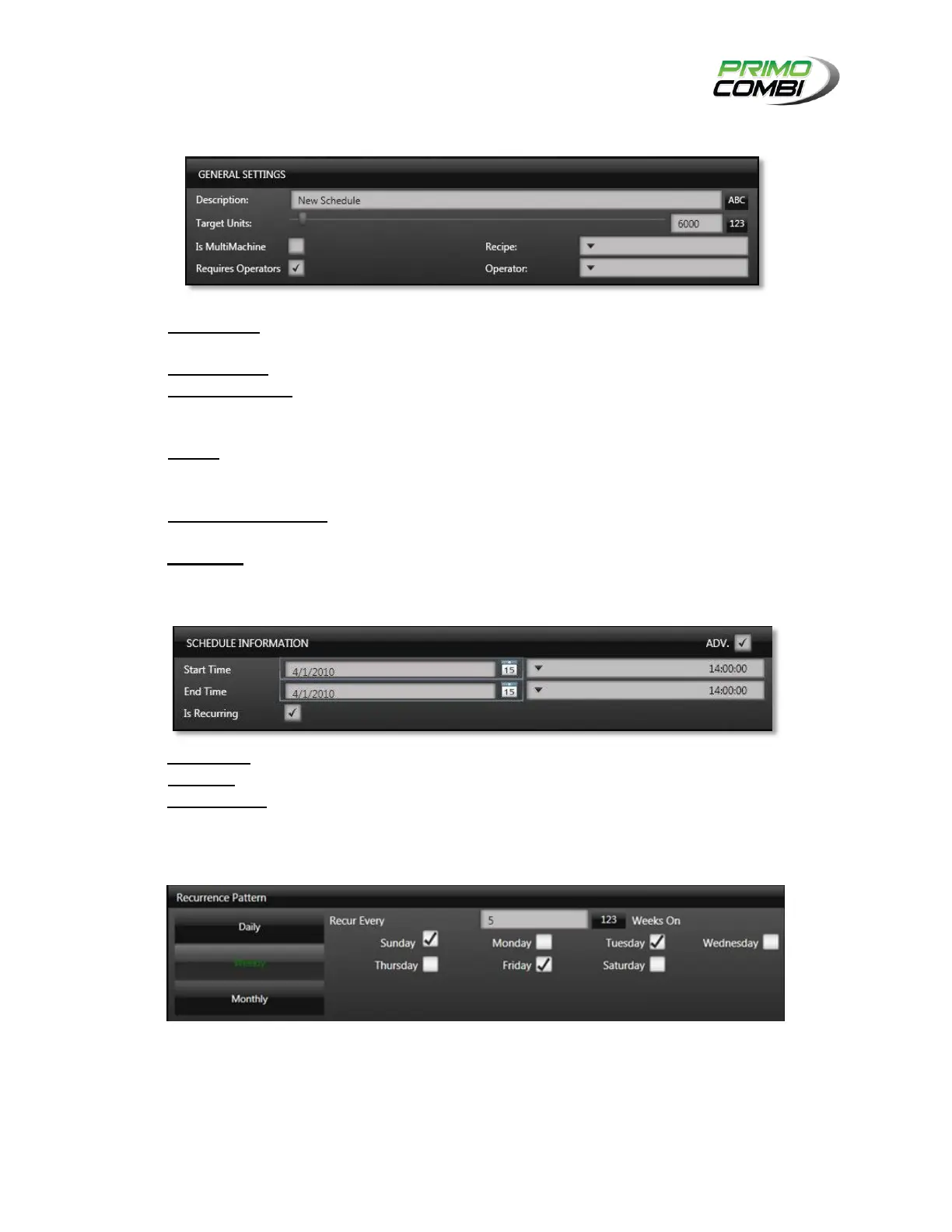
GENERAL SETTINGS
DESCRIPTION – This is the description of the schedule. It is recommended that you give the
schedule a description that allows easy recognition of the settings.
TARGET UNITS – This is the number of units that you wish to produce during the scheduled run.
IS MULTIMACHINE – If you are running several different machines that work together, select this
option and you will be able to choose from a list of MultiMachine recipes. Otherwise you choose
from the normal recipes.
RECIPE – If you are not running a MultiMachine this is where you select which recipe you wish to
load when the schedule elapses. If you are running MultiMachine this is where you choose the
MultiMachine recipe you wish to load on all machines when the schedule elapses.
REQUIRES OPERATORS – If you have users enabled you may choose whether a specific operator
needs to be logged in to run the schedule.
OPERATOR – This is where you choose which operator is able to run the selected schedule.
SCHEDULE INFORMATION
START TIME – Here you select the date and time when you wish to start this schedule.
END TIME – Here you select the date and time when you wish to end this schedule.
IS RECURRING – Selecting this option will bring up the recurrence options, which lets you select
the frequency and occurrences of the schedule. (This is an Advanced Setting)
RECURRENCE PATTERN
Recurrence patterns allow you to have a schedule repeat itself on a daily, weekly or monthly
basis.



 To Next Page