Home
Weiser
Locks
Smartcode 5
Page 6 (3. Install the exterior keypad, mounting plate, and spindle)
Weiser Smartcode 5 - 3. Install the exterior keypad, mounting plate, and spindle
15 pages
Manual
Save Page as PDF
To Next Page
To Next Page
To Previous Page
To Previous Page
Loading...
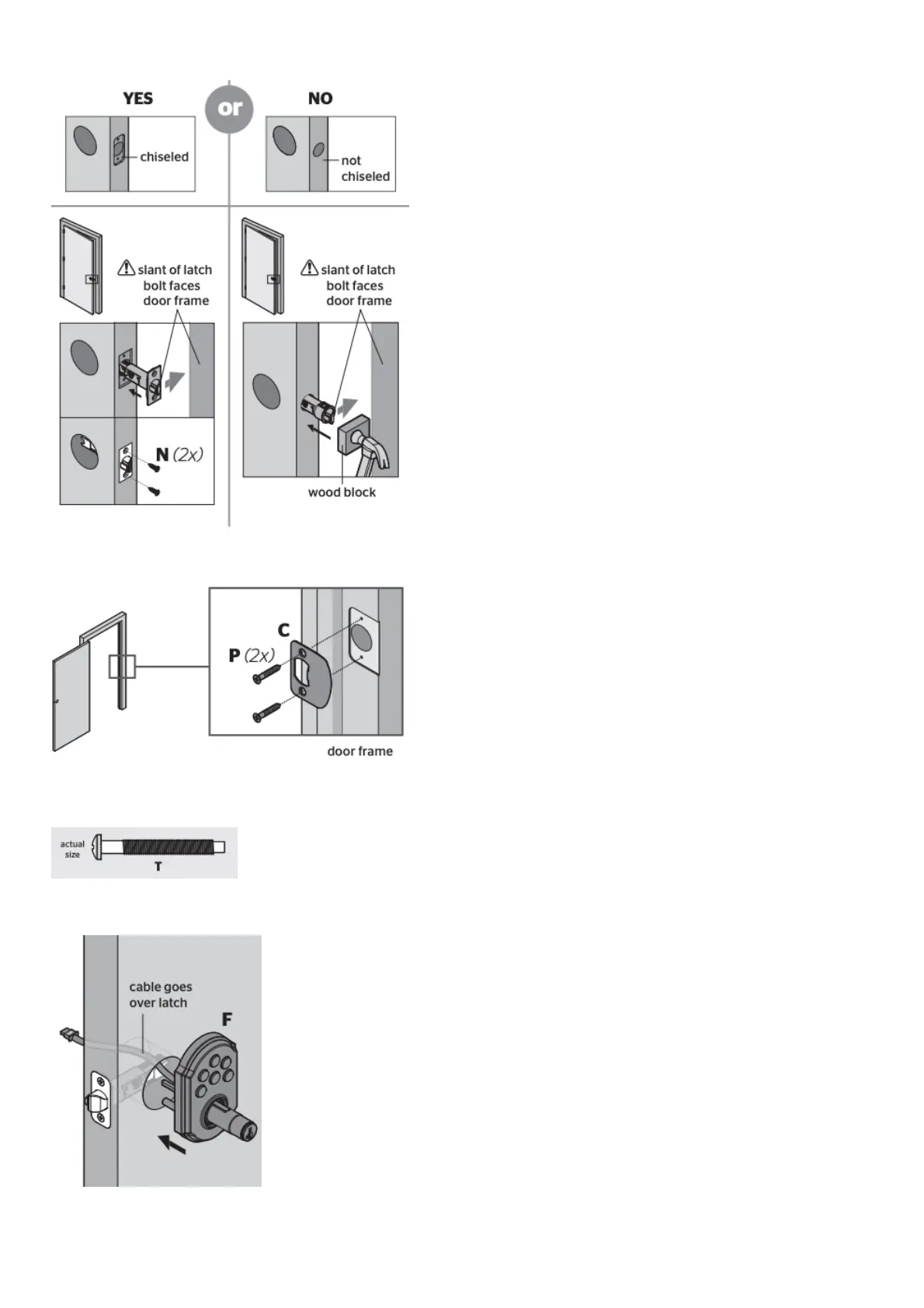
D.
Is the
door ed
ge chis
eled?
E.
Install
strike o
n the do
or frame
.
3. Insta
ll the ext
erior key
pad, mou
nting pl
ate, and
spindle
A.
Install
exterior
keypad
.
B.
Route cable
throug
h mount
ing plate
.
5
7
Table of Contents
Main Page
SmartCode 5 Touchpad Electronic Lever GED1450 User Manual
1
SmartCode 5 Touchpad Electronic Lever GED1450
2
Installation and User Guide
2
1. Prepare the door and check dimensions
3
2. Install the latch and strike
4
3. Install the exterior keypad, mounting plate, and spindle
6
4. Install interior assembly
7
5. Install levers
8
6. Test latch operation
9
7. Add user codes (8 max)
10
8. Test the lock (review normal operation)
11
9. Re-key the lock (if needed) and install the battery cover
12
Reference Guide
13
SmartCode at a Glance
13
System Alerts
13
Switches and Status LED colors
13
Deleting a user code
14
Troubleshooting
14
Battery Replacement
14
Factory Reset
14
Important Safeguards
15
Related Manuals:
15
Other manuals for Weiser Smartcode 5
Installation Guide
2 pages
Installation And User Guide
8 pages
Related product manuals
Weiser SMARTCODE5
28 pages
Weiser HALO
14 pages
Weiser Kevo
4 pages
Weiser PREMIS
11 pages
Weiser Halo Touch
2 pages
Weiser Halo Smart Lock
2 pages


 To Next Page