24
6
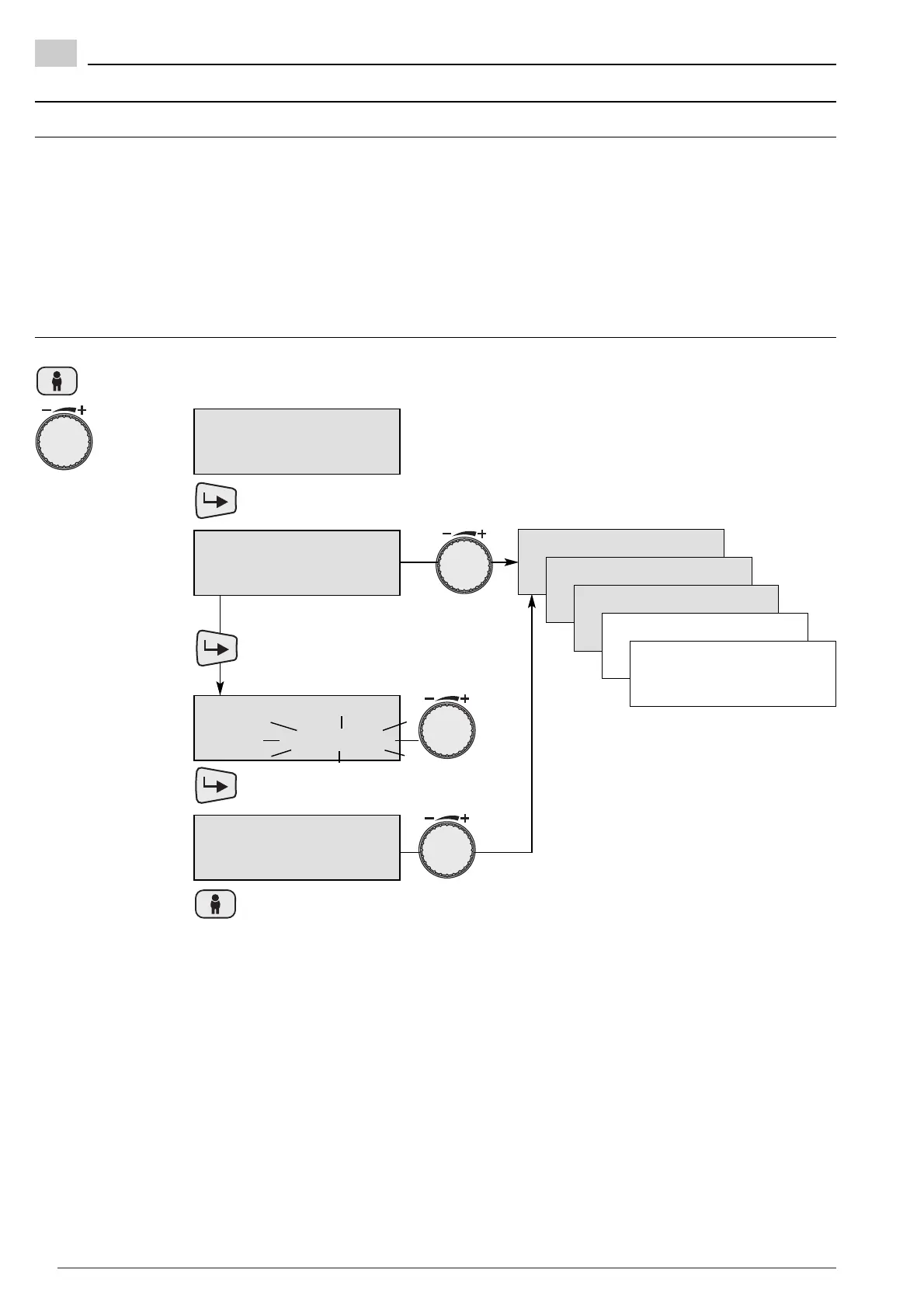
6.12 Type of operation
Why?
Setting types of operation for additional heating
circuits with the central operating unit at
address 0 and 2*, see Ch. 7.1.
Display error conditions in the selected heating
circuits.
Display burner operating hours and starts for burner
stage 1 or 2.
Types of operation (see Ch. 5.4)
Program1
Program2
Program3
Normal temp
Economy temp
Summer
Standby
1:Operator -/+
Type operation
Type operation
70 Program1
Type operation
70 Program1
Type operation
70 Summer
Error message
71 $$$
Burner runtime1
72
Burner start 1
731 $$$
Burner runtime2
74 $$$
Burner start 2
75
- or - next parameter?return?
Press
Turn until
display shows
Note: Burner run time and burner starts cannot be
reset. The type of operation can only be
altered at addresses “0” and “2*”, if the
heating circuit has not been assigned with a
separate operating unit.
Address setting see Ch. 7.1.
Press to change the type of
operation
Press to confirm the setting
6.12.1 Set type of operation / display error messages / display burner run time


 To Next Page