8
4
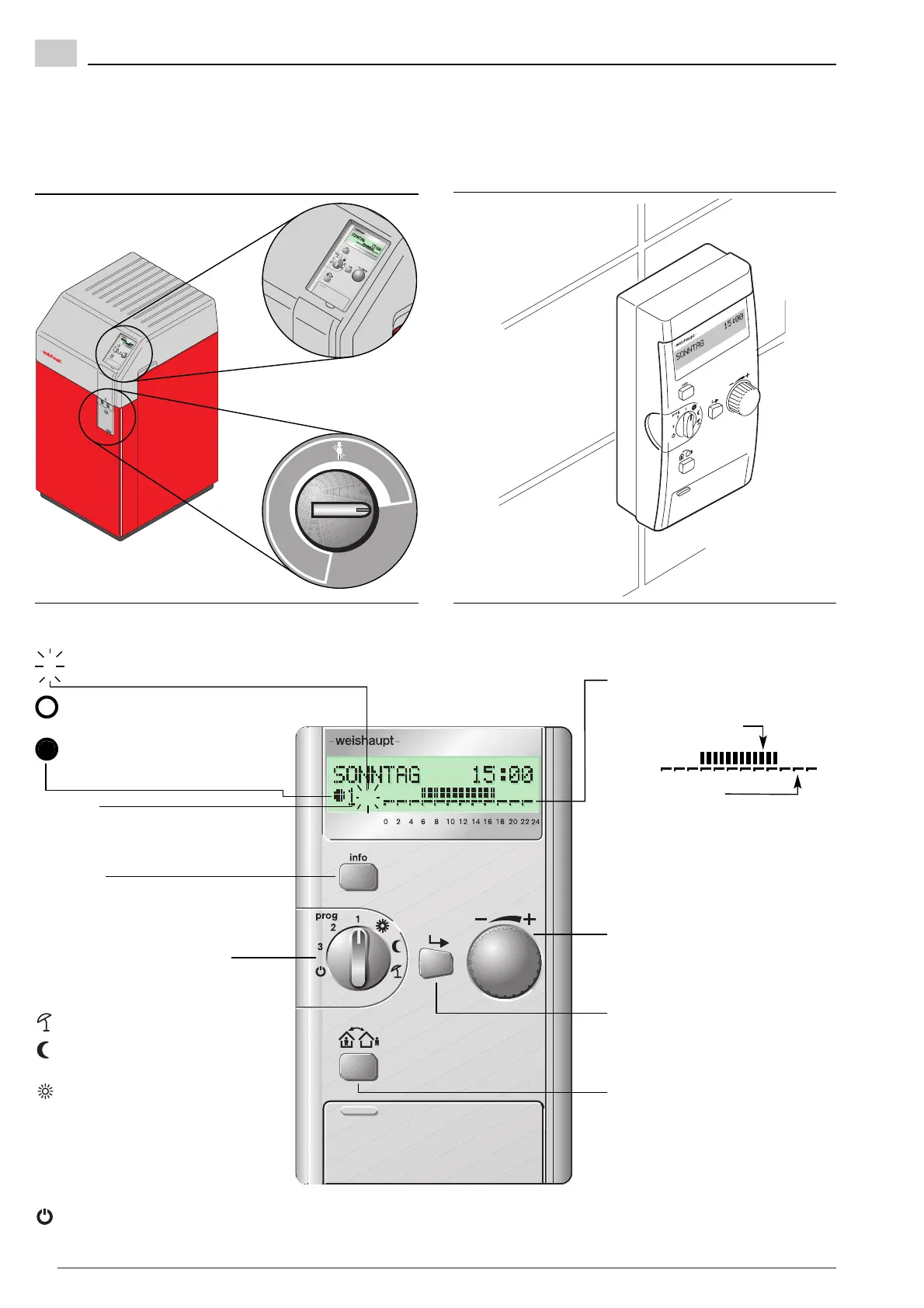
Operating and display elements of the direct setting level
Time indicator
Shows the time of day, during
which the heating is operated in
normal mode
or
economy mode.
Selection switch for type of
operation
to select types of operation:
Summer operation
Operation in economy
mode
Operation in normal
mode
prog 1 Heat program 1
2 Heat program 2
3 Heat program 3
Standby operation
Info key
• Each time it is pressed a current
actual value is displayed
• Reset to basic display
Attendance/absence key
Temporarily interrupts or extends
the heating program
Enter key
Selections or changes are
confirmed by pressing this key
Dial knob
By turning the current temperature
setpoint can be displayed
#
Error condition or
service required
Heating currently operating
in economy mode
Heating currently operating
in normal mode
Symbols on the display
When operating the direct setting level please note:
❑ The operating unit must be fitted to the boiler cover or the wall bracket.
❑ The boiler controller on the boiler control panel must be set to “auto”.
(The cover of the boiler control panel can only be closed in this position)
Operating unit in boiler cover – boiler controller to “auto”
Operating unit in wall bracket


 To Next Page