_______________________________________________________________________________________________________________________________
Merrychef eikon
®
e2s Installation and User Manual
_______________________________________________________________________________________________________________________________
Add a cooking profile in a group of cooking profiles
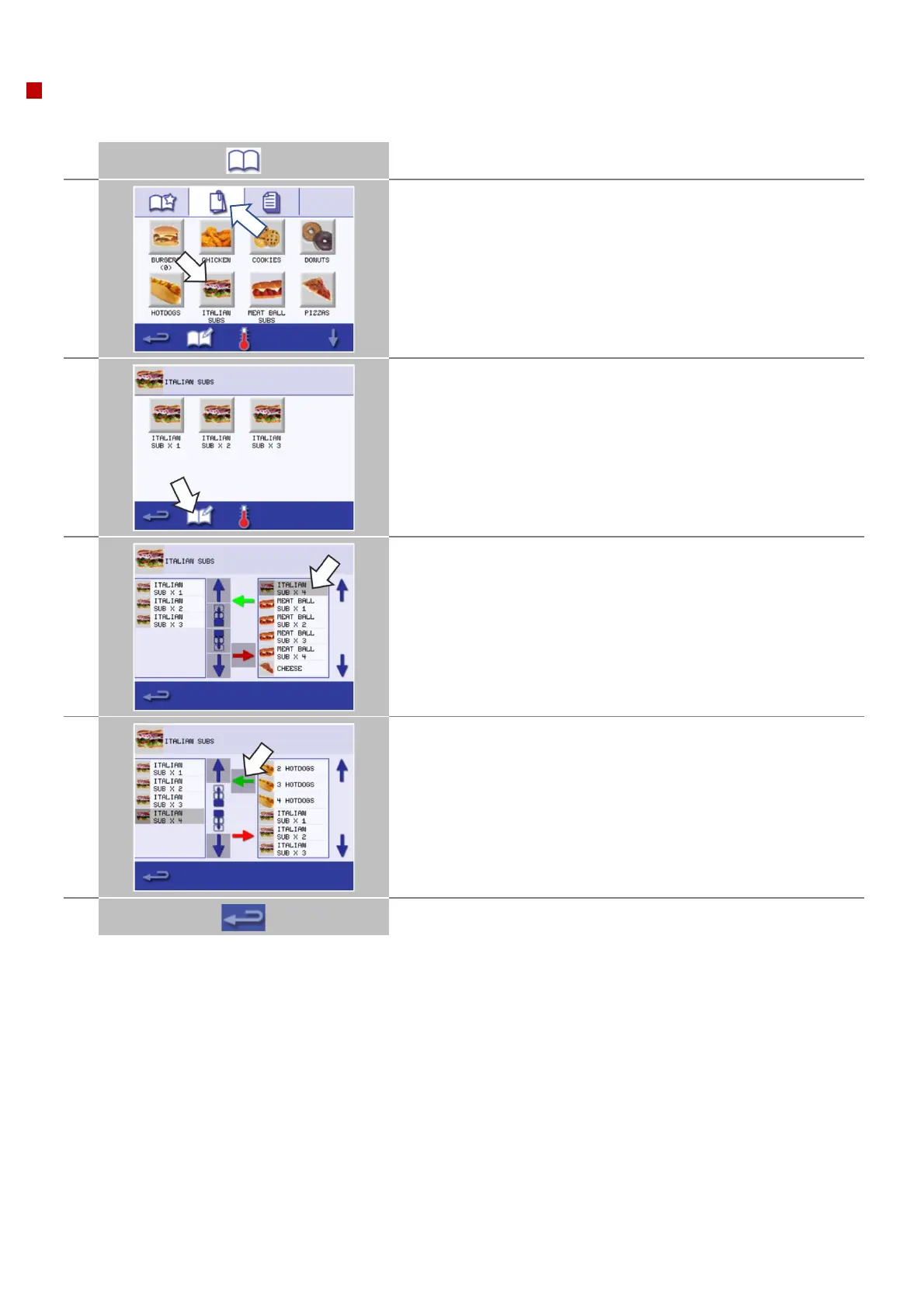
Example: Add a cooking profile 'ITALIAN SUB x 4' to the group of cooking profiles 'ITALIAN SUBS'.
Select 'cookbook' from the main menu screen.
Select the group of cooking profiles 'ITALIAN SUBS'.
Select the 'edit cookbook' symbol.
Two lists are displayed.
The list on the left shows the cooking profiles within the ‘ITALIAN
SUBS’ profile.
The list on the right show other cooking profiles which are available.
The large up/down arrows to the side of the lists allows for scrolling
up and down.
Use the up/down scroll arrows on the right side on the right part of
the screen to find and select the 'ITALIAN SUB x 4' cooking profile.
Select the green 'left' arrow to add the ‘ITALIAN SUB x 4’ cooking
profile to the group of cooking profiles in the left part of the screen.
Then select backspace to return to the cooking profiles.
Select backspace to go back to the 'cookbook'.



 To Next Page