_______________________________________________________________________________________________________________________________
Merrychef eikon
®
e2s Installation and User Manual
_______________________________________________________________________________________________________________________________
8.2.3 Creating a cooking profile
Creating a cooking profile
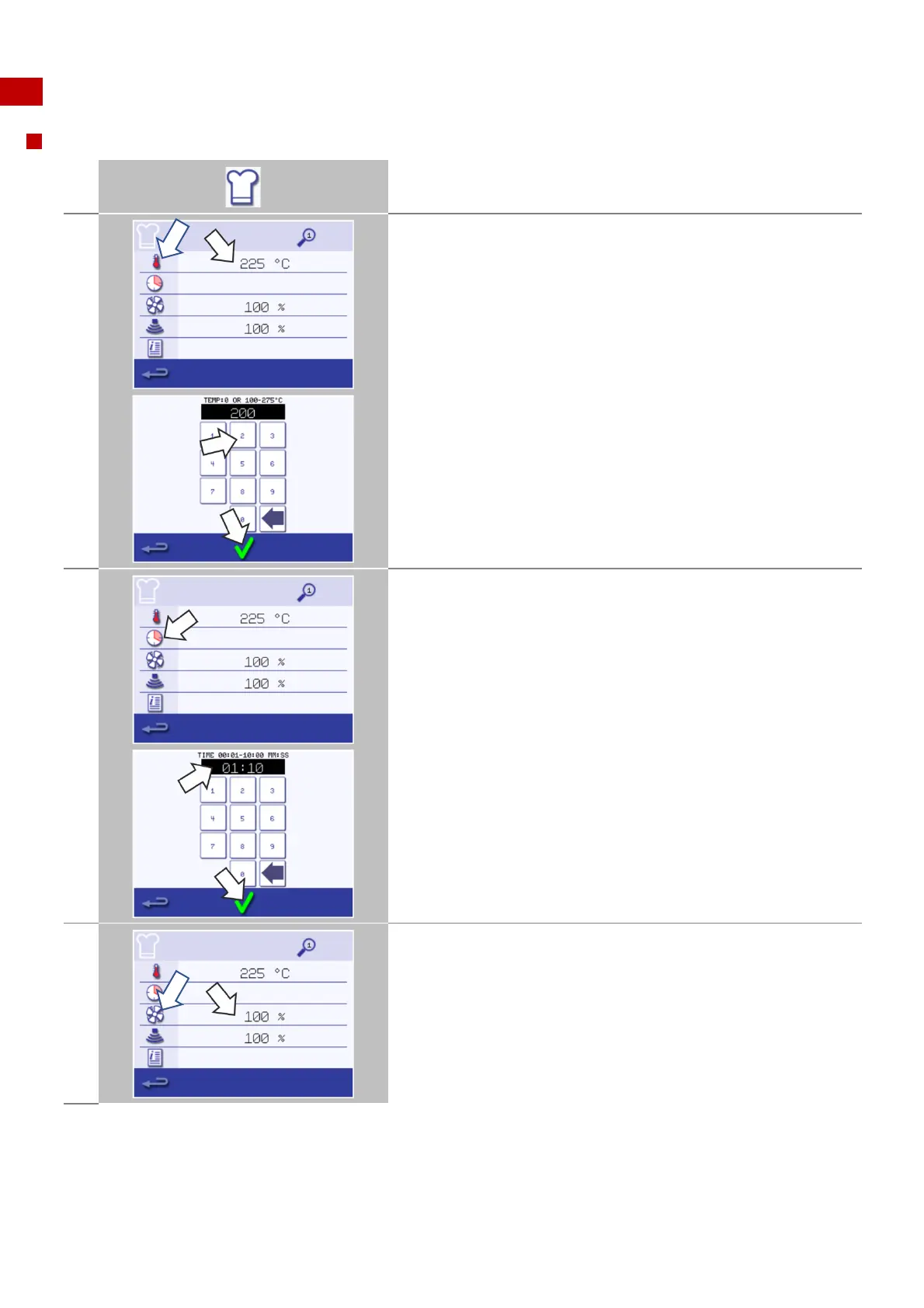
Select the 'chef's hat' symbol from the main menu screen to enter the
Development Mode. Note: the oven must not be set in Manual Mode.
The temperature value displays the set temperature for preheating
the cavity.
To increase or decrease the temperature required, select the
'temperature' symbol.
Enter a temperature value in the keypad within the limits displayed.
Select the green check mark to continue.
Select the 'clock' symbol.
Enter the cooking time in the keypad up to a maximum of 10 minutes
for each stage.
Example: Enter 110 (for 1 minute and 10 seconds).
Select the green check mark to save the inserted value.
Select the 'fan' symbol to set the fan speed within the limits shown on
the screen.
Set the fan speed in the keypad (10-100%)
Select the green check mark to save the inserted value.



 To Next Page