THE DASHBOARD AT A GLANCE
17
MY CLOUD USER MANUAL
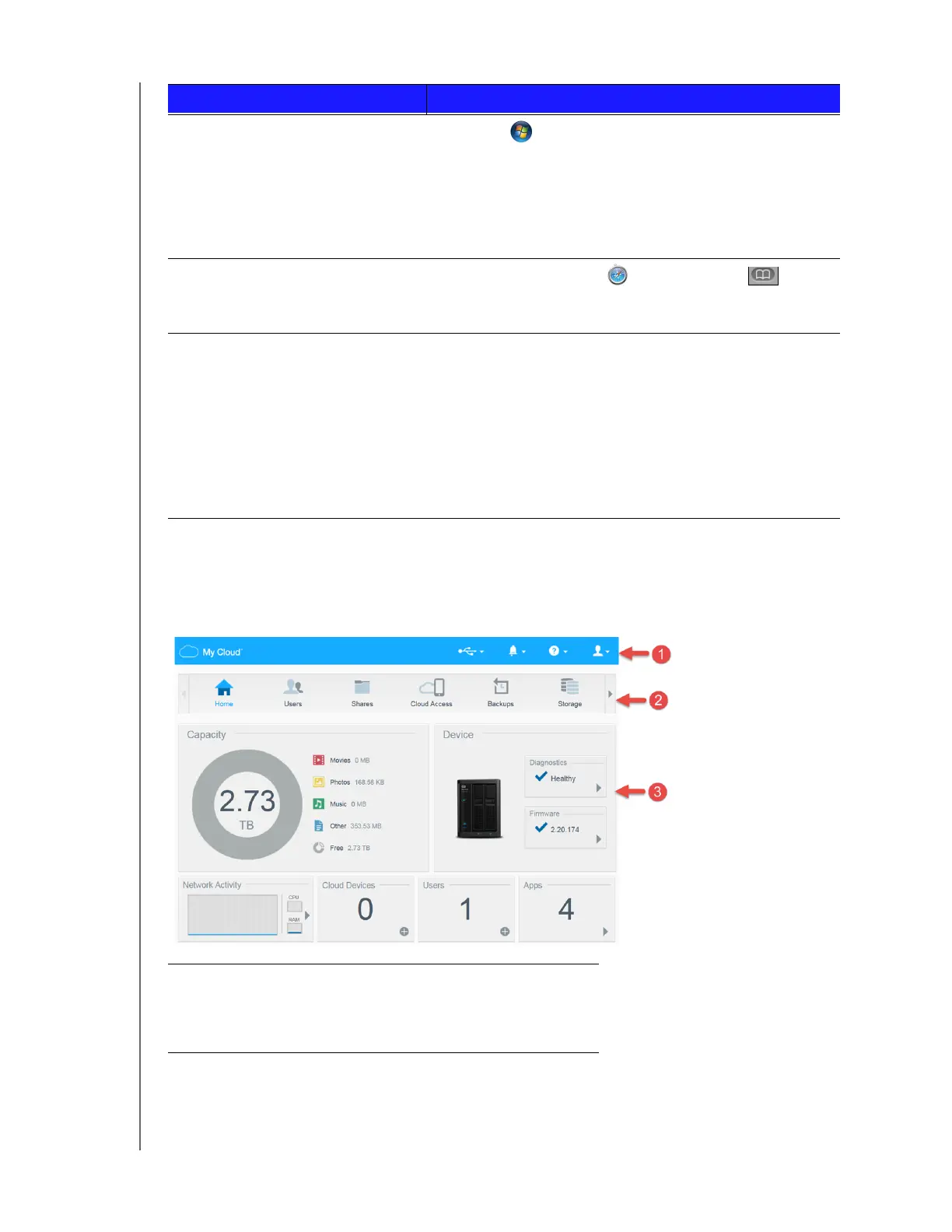
The Dashboard Home Page
The My Cloud Home page has an information bar at the top, a navigation icon bar across the page,
and an instant overview of the status of the device’s main functions with links for updating
settings.
Windows 7 1. Click > Computer.
2. In the left panel, select Network.
3. In the right panel, locate your My Cloud device under
Storage.
4. Double-click the device, or right-click and select View
device webpage from the resulting menu.
Mac OS X 1. Click the Safari icon > bookmark icon >
Bonjour.
2. Double-click the My Cloud device on the network.
Mobile Devices
iOS Devices:
1. Open a browser.
2. In the Address bar, enter
http://<device name>.local.
Android Devices:
1. Open a browser.
2. In the Address bar, enter http://<device name>.
1
Information Icons
2
Navigation Icons
3
Status and Update Panels
IF you want to launch from . . . THEN . . .















 To Next Page