WD ELEMENTS PLAY MULTIMEDIA DRIVE
USER MANUAL
GETTING STARTED – 14
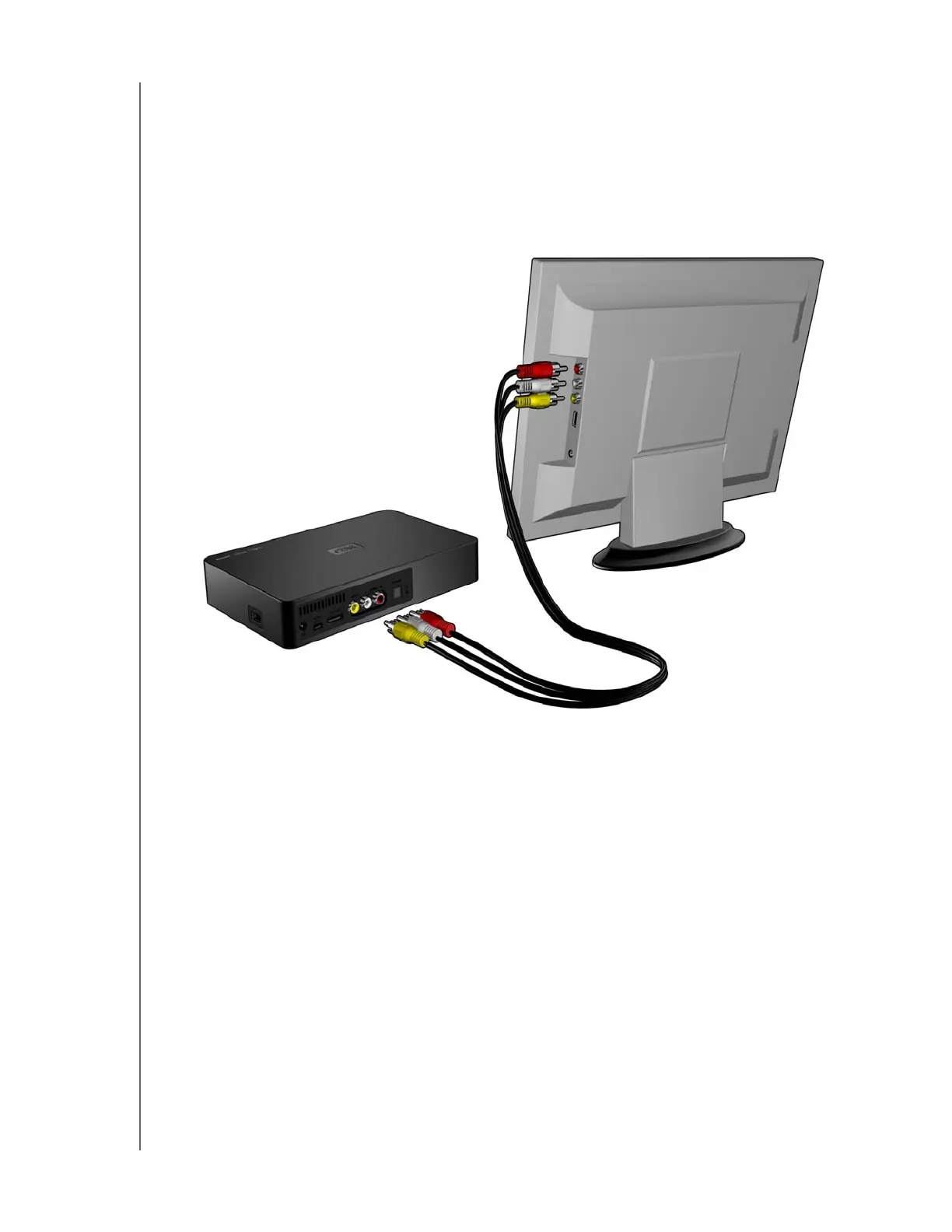
Composite AV Connection (Standard Definition)
To use a composite connection (composite cable sold separately):
1. Plug the composite connectors into the input ports on your multimedia drive,
yellow to yellow, red to red, and white to white
2. Plug the opposite ends into the composite input ports on your TV, yellow to
yellow, red to red, and white to white.
3. Select the appropriate TV input source.
Wait a few seconds for your TV to detect the multimedia drive. If the multimedia drive
is not detected, you may need to change the input source on your TV to HDMI or
composite, depending on your connection. Check the user documentation of your
TV for more information.
Once the multimedia drive is detected, the splash screen displays to indicate system
bootup, then the home screen of the user interface opens. Go to “Using the
Multimedia Drive Menu” on page 19.












 To Next Page