WD ELEMENTS PLAY MULTIMEDIA DRIVE
USER MANUAL
FILE MANAGER – 23
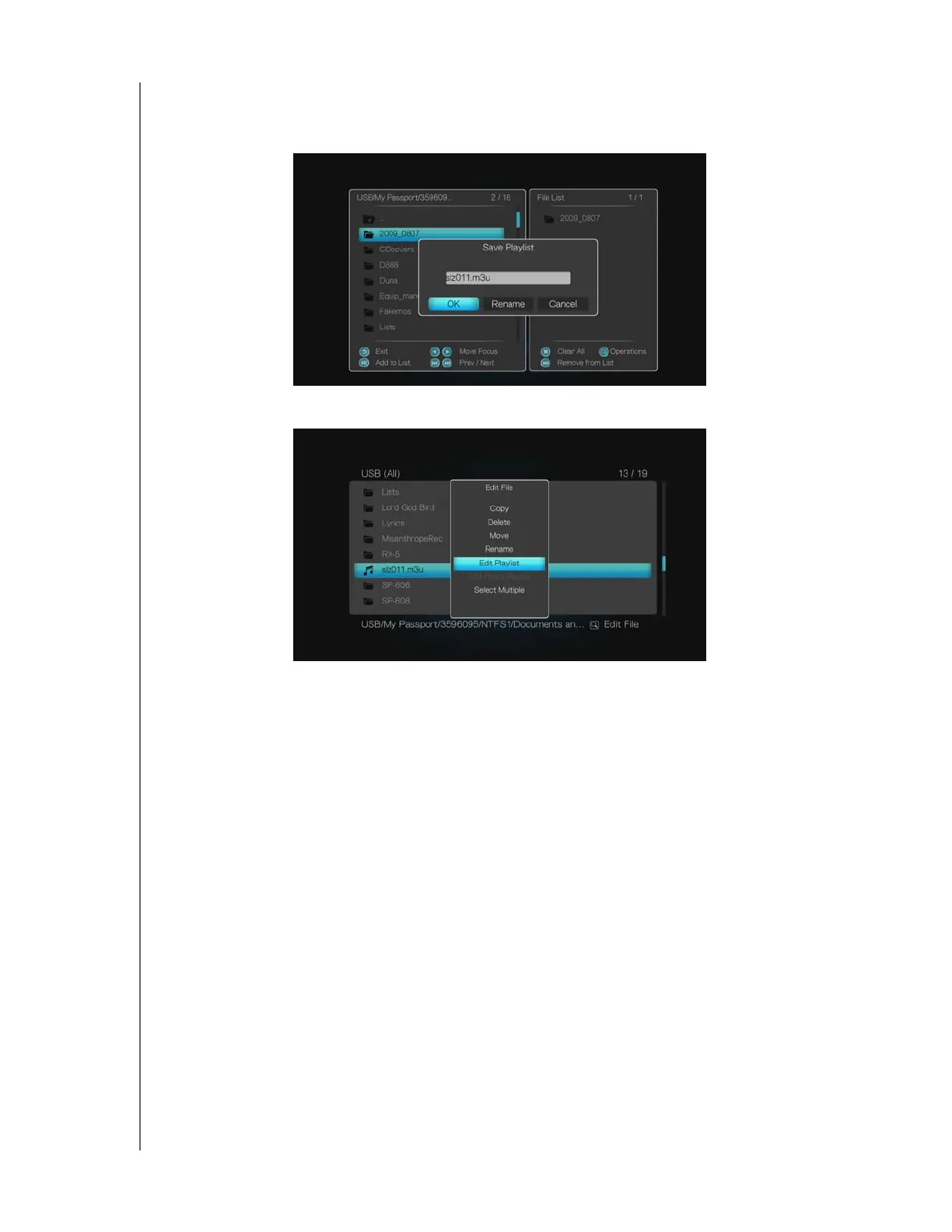
2. Accept the default playlist name by selecting OK, then press ENTER. To rename
the playlist, select Rename, press ENTER, then enter the new playlist name
using the on-screen keyboard. When finished, select OK, then press ENTER.
3. To edit an existing playlist, select Edit Playlist with a playlist selected (*.m3u file).
4. Select files to add to the playlist using the buttons on the remote as shown
on-screen. Repeat step 2 above.
Save & Edit Photo Album
Follow the same steps under “Save & Edit Playlist” on page 22. Be sure you are in a
location containing photos. Select Save Photo Playlist and Edit Photo Playlist;
name, rename, and edit the *.alb file as needed.












 To Next Page