EasyManua.ls Logo

Westinghouse iGen2550 - User Manual

Westinghouse iGen2550
76 pages
Print Icon
To Next Page IconTo Next Page
Loading...
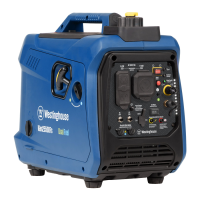
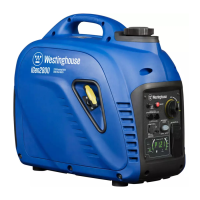
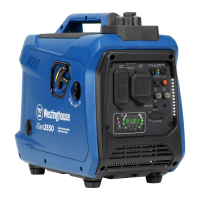
iGen2550
DIGITAL INVERTER GENERATOR
1800 RUNNING WATTS | 2550 PEAK WATTS
DO NOT RETURN THIS PRODUCT TO THE STORE
If you have questions or need assistance, please call customer
service at 855-944-3571.
USER MANUAL

Questions and Answers

  • N
    Natalie BarrettAug 6, 2025
    Why my Westinghouse iGen2550 engine will not start?
    • R
      richard35Aug 6, 2025
      If your Westinghouse Portable Generator engine won't start, several factors could be the cause. First, ensure that the generator has fuel. If the fuel is old, drain the tank and refuel with fresh gasoline. Check the air filter; a dirty air filter can prevent the engine from starting. Also, check the engine oil level. If the LOW OIL LED is illuminated, turn the engine/fuel control switch to the OFF position and add engine oil. If the spark plug is wet with fuel, wait five minutes, turn the engine/fuel control switch to the OFF position, and pull the recoil handle rapidly several times. If it still doesn't start, remove and dry the spark plug. Finally, inspect the spark plug for any faults; gap or replace it as necessary.
  • C
    Caleb LopezAug 13, 2025
    What to do if my Westinghouse iGen2550 Portable Generator starts, then shuts down?
    • J
      James ChoiAug 13, 2025
      If your Westinghouse Portable Generator starts and then shuts down, it could be due to several reasons. Make sure the fuel level is adequate by refueling if needed. Check the engine oil level and replenish if low. A dirty air filter can also cause this issue, so clean it. If the gasoline is contaminated, drain the fuel tank and refuel with fresh gasoline.
  • K
    Kathy AndersenAug 19, 2025
    Why does my Westinghouse Portable Generator engine lack power?
    • S
      Scott SmithSep 12, 2025
      If your Westinghouse Portable Generator engine lacks power, start by checking the air filter and clean or replace it if it's restricted. Another cause could be stale gasoline. If the generator was stored without treating or draining the gasoline, or if it was refueled with bad gasoline, drain the fuel tank and refuel with fresh gasoline.
  • D
    Danny LopezAug 25, 2025
    What to do if there is no power at AC receptacles of Westinghouse iGen2550?
    • C
      Cassandra SotoAug 26, 2025
      If there's no power at the AC receptacles of your Westinghouse Portable Generator, verify that the OUTPUT READY LED is ON and the OVERLOAD LED is OFF. If the OVERLOAD LED is ON, check the AC load, then stop and restart the engine. Also, check the air inlet, then stop and restart the engine. Inspect the AC circuit breakers and reset them if they've tripped. Lastly, if you are using a faulty power tool or appliance, replace or repair it, then stop and restart the engine.
  • J
    Julia HendricksAug 31, 2025
    How to fix a Westinghouse iGen2550 that runs rough or bogs when load applied?
    • S
      Steven LewisAug 31, 2025
      If your Westinghouse Portable Generator runs roughly or bogs down when a load is applied, start by checking the air filter and clean it if it's dirty. Ensure that the generator is not overloaded by unplugging some devices. A faulty power tool or appliance could also be the cause; replace or repair the tool or appliance, then stop and restart the engine.

Summary

INTRODUCTION

Product Registration

Guide to registering your Westinghouse generator for warranty coverage.

Disclaimers

Important information regarding manual content and specifications at time of publishing.

Updates

Information on how to find the latest user manual for Westinghouse products.

Specifications

Detailed technical specifications of the iGen2550 generator.

SAFETY

Safety Definitions

Explains the meaning of hazard words like DANGER, WARNING, CAUTION, NOTICE.

Safety Symbols

Illustrates and describes safety symbols used throughout the manual.

Important Safety Instructions

Essential guidelines to prevent injury, death, fire, and electrocution when operating the generator.

Gasoline and Vapor Safety

Precautions for safe handling and storage of gasoline and prevention of fire hazards.

Safety Labels and Decals

Explains the information found on the generator's labels and decals for safe operation.

ELECTRICAL

Generator Capacity

Understanding the generator's wattage and amperage limits for safe operation.

Managing Generator Power

Best practices for adding electrical loads sequentially to extend generator life.

Extension Cords

Guidelines for safe and effective use of extension cords with the generator.

Extension Cord Sizing

How to select the correct size and length of extension cords for optimal performance.

COMPONENTS

Power Outlets and Circuit Protection

Details AC receptacles, USB ports, and circuit breakers for safe power distribution.

Generator Controls and Monitoring

Covers switches, data center, LEDs, and service access for operation and monitoring.

Fuel System and Grounding

Information on the fuel tank, vented fuel cap, and the generator's ground terminal.

COMPONENTS

Muffler and Spark Arrestor

Explains the function of the muffler and spark arrestor and their maintenance.

Generator Status Indicators

Covers the meaning of Output Ready, Overload, and Low Oil LEDs.

Operation Controls and Resets

Details buttons for lights, overload reset, and parallel operation outlets.

Starting and Fueling Features

Explains the recoil handle, spark plug access, USB ports, and vented fuel cap.

ASSEMBLY

Removing Carton Contents

Steps to unpack and inspect the generator and its accessories.

Included List

Lists all items included in the generator package.

OPERATION

General Operation Precautions

Key safety warnings and notices related to generator operation and modifications.

Safe Location and Operation

Guidelines for safely positioning and operating the generator outdoors.

Generator Regulations

Guidance on understanding and complying with local ordinances for generator use.

Adding and Checking Engine Oil

Instructions for filling and checking the engine oil level before operation.

OPERATION

Engine Oil Fill and Level Check

Step-by-step guide for adding and checking the engine oil level.

Gasoline Requirements

Specifies the type of gasoline to use and warnings against improper fuel.

OPERATION

Fuel Stabilizer Use

How to use fuel stabilizer to extend fuel life and prevent deposits.

Adding Gasoline Safely

Procedures for safely refueling the generator, including warnings against overfilling.

High Altitude Operation

Explains power reduction at high altitudes and the need for altitude kits.

OPERATION

Data Center Functions

Explains the various display modes and maintenance codes on the data center.

Generator Break-In Period

Guidelines for the initial break-in period to ensure optimal engine performance.

Pre-Starting Checks

Important checks to perform before starting the generator for safe operation.

Starting the Generator

Step-by-step instructions for starting the generator.

OPERATION

Starting Procedure Details

Continued steps for starting the generator, including choke usage and recoil handle.

Stopping the Generator

Procedures for safely shutting down the generator and emergency stop.

OPERATION

Low Oil Indicator and Eco Mode

Explains the low oil warning light and how to use the Eco mode for efficiency.

Overload Reset and Circuit Breakers

Procedures for resetting overloads and understanding circuit breaker functions.

USB Ports and Parallel Operation

Information on using USB ports for charging and linking generators for more power.

OPERATION

Transporting the Generator

Steps and precautions for safely moving and transporting the generator.

CARE AND MAINTENANCE

General Maintenance Precautions

Safety warnings and general advice before performing maintenance on the generator.

Cleaning the Generator

Instructions on how to properly clean the generator's exterior and vents.

CARE AND MAINTENANCE

Air Filter Cleaning and Replacement

Steps for cleaning or replacing the air filter to maintain performance.

Changing the Engine Oil

Detailed procedure for draining and refilling the engine oil.

CARE AND MAINTENANCE

Spark Plug Cleaning and Replacement

Guide to inspecting, cleaning, gapping, and replacing the spark plug.

Spark Arrestor Cleaning

Procedure for cleaning the spark arrestor to ensure proper engine performance.

CARE AND MAINTENANCE

Draining Fuel Tank and Carburetor Bowl

Instructions for draining fuel for storage to prevent corrosion and buildup.

CARE AND MAINTENANCE

Fuel Filter Replacement

Steps for replacing the fuel filter to prevent engine failure.

Valve Clearance Adjustment

Procedure for checking and adjusting valve clearance for optimal engine operation.

CARE AND MAINTENANCE

Generator Storage Procedures

Guidelines for storing the generator properly to maintain its condition.

Maintenance Schedule Overview

Summary of recommended maintenance tasks and intervals for optimal performance.

TROUBLESHOOTING

Common Problems and Solutions

A guide to diagnosing and resolving common issues with the generator.

Westinghouse iGen2550 Specifications

General IconGeneral
BrandWestinghouse
ModeliGen2550
CategoryPortable Generator
LanguageEnglish

Related product manuals