8 PROGRAMMING PROCEDURE
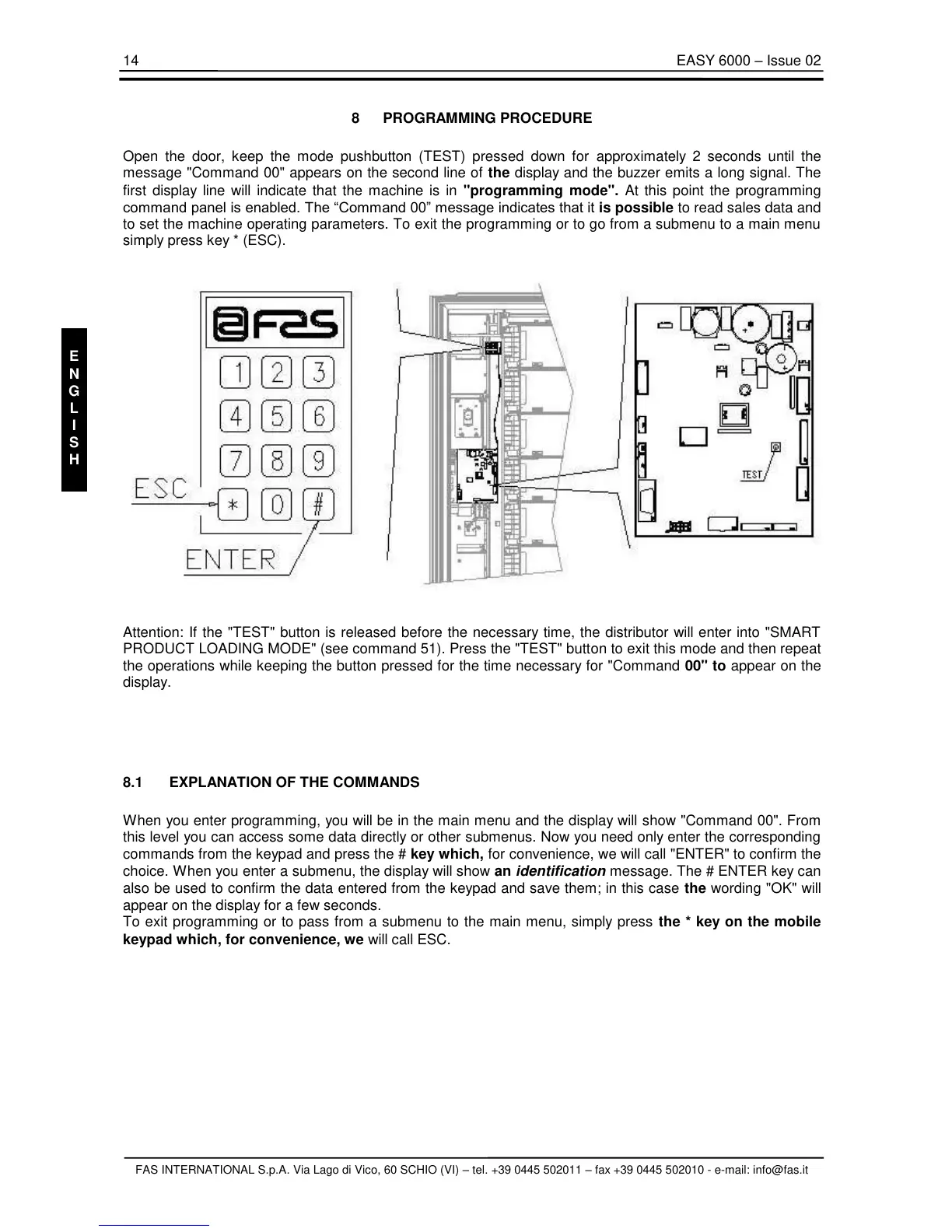
Open the door, keep the mode pushbutton (TEST) pressed down for approximately 2 seconds until the
message "Command 00" appears on the second line of the display and the buzzer emits a long signal. The
first display line will indicate that the machine is in "programming mode". At this point the programming
command panel is enabled. The “Command 00” message indicates that it is possible to read sales data and
to set the machine operating parameters. To exit the programming or to go from a submenu to a main menu
simply press key * (ESC).
Attention: If the "TEST" button is released before the necessary time, the distributor will enter into "SMART
PRODUCT LOADING MODE" (see command 51). Press the "TEST" button to exit this mode and then repeat
the operations while keeping the button pressed for the time necessary for "Command 00" to appear on the
display.
8.1 EXPLANATION OF THE COMMANDS
When you enter programming, you will be in the main menu and the display will show "Command 00". From
this level you can access some data directly or other submenus. Now you need only enter the corresponding
commands from the keypad and press the # key which, for convenience, we will call "ENTER" to confirm the
choice. When you enter a submenu, the display will show an identification message. The # ENTER key can
also be used to confirm the data entered from the keypad and save them; in this case the wording "OK" will
appear on the display for a few seconds.
To exit programming or to pass from a submenu to the main menu, simply press the * key on the mobile
keypad which, for convenience, we will call ESC.



 To Next Page