38 EASY 6000 – Issue 02
FAS INTERNATIONAL S.p.A. Via Lago di Vico, 60 SCHIO (VI) – tel. +39 0445 502011 – fax +39 0445 502010 - e-mail: info@fas.it
10.5 ADJUSTING OPENING OF THE DELIVERY DOORS
Having varied the dimensions of the compartments, opening of the delivery doors must also be modified.
To perform this operation correctly, follow the instructions below:
1) With the power supply cut off after turning the main switch to OFF.
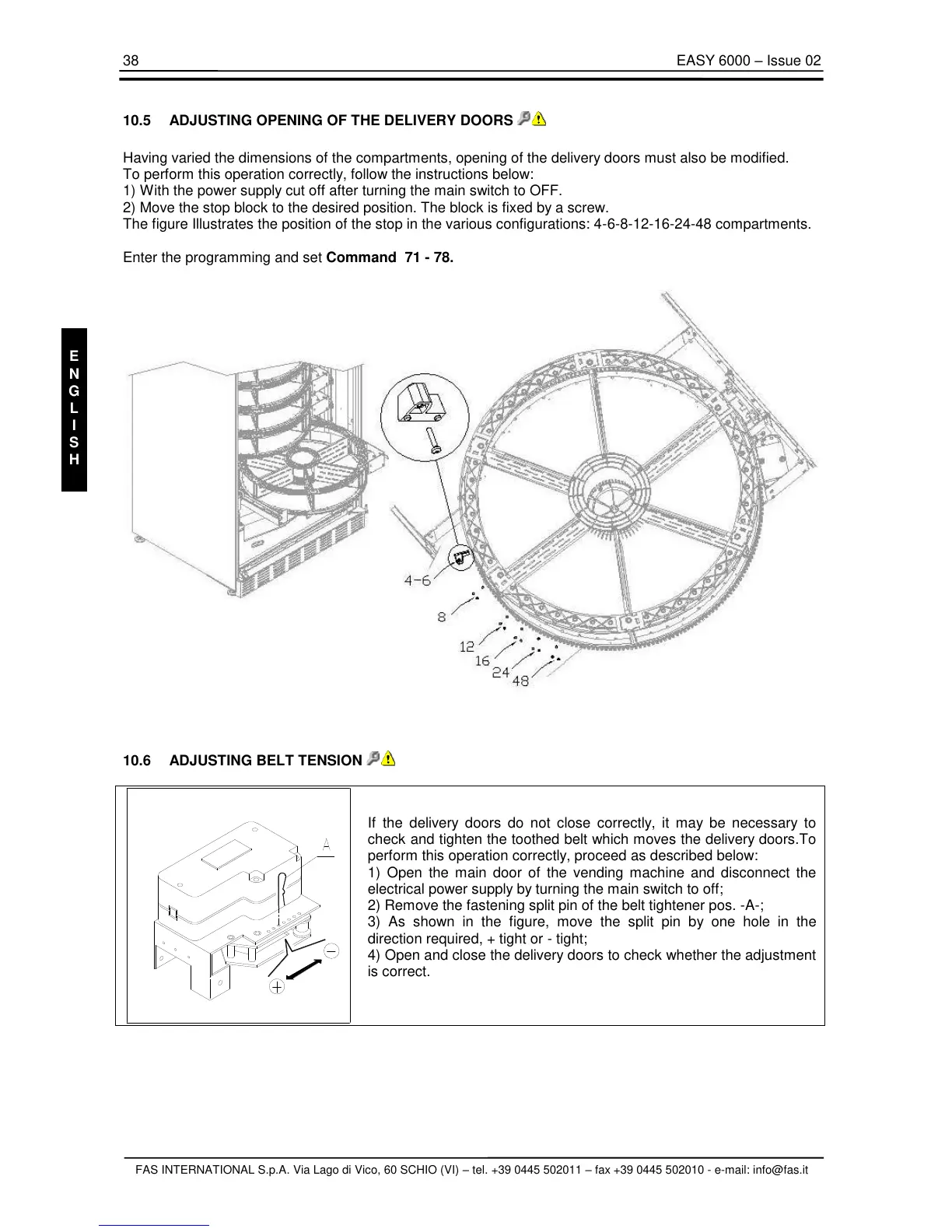
2) Move the stop block to the desired position. The block is fixed by a screw.
The figure Illustrates the position of the stop in the various configurations: 4-6-8-12-16-24-48 compartments.
Enter the programming and set Command 71 - 78.
10.6 ADJUSTING BELT TENSION
If the delivery doors do not close correctly, it may be necessary to
check and tighten the toothed belt which moves the delivery doors.To
perform this operation correctly, proceed as described below:
1) Open the main door of the vending machine and disconnect the
electrical power supply by turning the main switch to off;
2) Remove the fastening split pin of the belt tightener pos. -A-;
3) As shown in the figure, move the split pin by one hole in the
direction required, + tight or - tight;
4) Open and close the delivery doors to check whether the adjustment
is correct.



 To Next Page