EasyManua.ls Logo

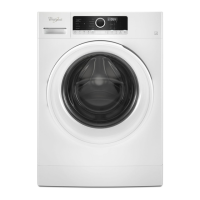
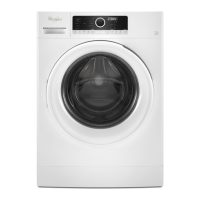
Whirlpool WFW72HEDW - User Manual

Whirlpool WFW72HEDW
49 pages
Print Icon
To Next Page IconTo Next Page
Loading...
Washer
Whirlpool WFW72HEDW
For warranty issues, please contact Trail Appliance at
604-777-3300 or request a service call online
www.trailappliance.com and provide the following
information:
Your name, contact number and full address
Serial number of your washer
Completion Date

Questions and Answers

  • S
    Shawn BrownAug 21, 2025
    What to do if my Whirlpool WFW72HEDW won’t run or fill, or stops working?
    • N
      nashdanAug 21, 2025
      If your Whirlpool washer isn't running, filling, or stops mid-cycle, consider the following: * Water Supply: Ensure both hoses are connected and the water is flowing to the inlet valve, and that both hot and cold water faucets are fully open. * Electrical Supply: Confirm the power cord is correctly plugged into a grounded outlet. Avoid using extension cords. Check the outlet for power and verify that the circuit breaker hasn't tripped. * Washer Operation: Ensure the door is completely closed and latched. Note that the washer pauses during certain phases of the cycle. * Suds Reduction: The washer might pause to reduce suds. Allow the cycle to continue.
  • X
    xrodriguezAug 25, 2025
    What does “Sd” (Excess suds) mean on my Whirlpool WFW72HEDW Washer display?
    • P
      Paul WaltonAug 25, 2025
      If your Whirlpool washer display shows “Sd” (Excess suds), it means there are too many suds in the washer. The washer is running a suds reduction routine. Allow the washer to continue. Use only HE detergent. Always measure detergent, and base detergent quantity on load size. Follow detergent manufacturer’s instructions.
  • M
    Maria CampbellAug 26, 2025
    How to fix F5 E2 (door will not lock) on Whirlpool WFW72HEDW Washer?
    • W
      williamscharlesAug 26, 2025
      If your Whirlpool washer displays the error code F5 followed by E2, it means the door will not lock. Touch POWER to cancel the cycle. Make sure the door is closed completely and latching. Check for items in the washer drum that may be keeping the door from closing completely.
  • J
    jenniferhillAug 28, 2025
    Why is my Whirlpool Washer vibrating or off-balance?
    • A
      Alexa SuttonAug 28, 2025
      If your Whirlpool washer is vibrating excessively or seems off-balance, check these potential causes: * Leveling: Make sure the front and rear feet are firmly on the floor and the washer is level. Tighten the jam nuts against the cabinet. * Load Balance: Avoid tightly packing the load or washing single items. Balance single items like rugs with a few extra items. * Check the floor for flexing or sagging. * Shipping Bolts: Ensure that the shipping bolts are removed from the back of the washer. * Objects in Drain System: Empty pockets before washing to prevent items from blocking the pump.
  • G
    gbensonAug 30, 2025
    Why does my Whirlpool WFW72HEDW show error code Lo FL or F8 E1 (water supply error)?
    • A
      aaron78Aug 30, 2025
      If your Whirlpool washer displays the error code "Lo followed by FL or F8 followed by E1," it indicates a water supply issue. Here's what to check: * Water Supply: Ensure both hoses are attached and water is flowing to the inlet valve. Both hot and cold water faucets must be fully open. * Hose Condition: Remove any kinks in the inlet hose. * Inlet Valve Screens: The inlet valve screens on the washer may be clogged. The unit will drain for 8 minutes while the door remains locked. When complete, touch POWER once to clear the code, and then touch POWER again to restart the washer. If the code reappears, call for service.
  • D
    Dr. Alison Davis MDSep 1, 2025
    Why is there water or suds leaking from the door or rear of my Whirlpool WFW72HEDW?
    • J
      Jeffrey NelsonSep 1, 2025
      If you notice water or suds leaking from the door or rear of your Whirlpool washer, consider the following: * Detergent Type: Ensure you are using only HE (High Efficiency) detergent. Regular detergents can create excessive suds, leading to leaks. * Detergent Quantity: Always measure detergent and follow the manufacturer's directions based on your load requirements. * Residue on Door Glass: Periodically clean the underside of the glass window to avoid potential leaks.
  • M
    Margaret RichardsSep 3, 2025
    How to fix F9 E1 (drain pump system error) on Whirlpool WFW72HEDW?
    • R
      Rhonda MurphySep 3, 2025
      If your Whirlpool washer displays the error code F9 followed by E1, it indicates a drain pump system error. To resolve this: * Check Drain Hose Installation: Ensure the drain hose is correctly installed and not extending too far into the standpipe (more than 4 1/2"). * Inspect Drain Hose: Make sure the drain hose is not kinked, pinched, or blocked. Remove any clogs from the drain hose. * Detergent type: Use only HE detergent and always measure detergent, following manufacturer’s directions based on load size and soil level.
  • G
    glassrebeccaSep 5, 2025
    What does “rL” (remove load) mean on my Whirlpool Washer display?
    • J
      Jessica ThompsonSep 5, 2025
      If your Whirlpool washer displays “rL” (remove load), it means a load was detected in the drum during the Clean Washer with affresh® cycle. Remove items from the washer drum and restart Clean Washer with affresh® cycle.
  • J
    Jeff MillerSep 7, 2025
    What to do if my Whirlpool Washer is beeping when START is touched?
    • T
      Timothy WarrenSep 7, 2025
      If your Whirlpool washer beeps when you touch START, it indicates that the door is not closed completely. Close the door completely.
  • L
    Lori JohnsonSep 9, 2025
    What does “nt” (interrupted) mean on my Whirlpool WFW72HEDW display?
    • K
      Kelly UnderwoodSep 9, 2025
      If your Whirlpool washer displays “nt” (interrupted), it means the cycle was paused or canceled. The washer can take 20 to 30 minutes to stop spinning and drain, and it will display this error code during that time. Touch POWER once to clear the code. Then touch POWER again to restart the washer.

Summary

Washer Safety

Safety Alert Symbols and Warnings

Explains safety alert symbols, DANGER, and WARNING.

Important Safety Instructions

California Proposition 65 Warnings

Warnings about chemicals known to cause cancer or reproductive harm.

Product Accessories

Details on optional accessories like pedestals and stack kits.

Control Panel and Features

Control Panel Overview

Explains the layout and functions of the washer's control panel.

Operating the Washer

Power, cycle selection, start, pause, and delay wash functions.

Understanding Settings and Options

Adjusting wash temp, spin, soil, and using cycle options.

Dispenser Drawer Usage

How to add and use detergents, softener, and bleach.

Interpreting Cycle Information

Understanding cycle status lights, Eco Monitor, and TumbleFresh.

Cycle Guide

Detailed Wash Cycle Explanations

Covers Normal, Whites, Heavy Duty, Sanitize, Eco Sanitize, Clean Washer, Drain & Spin, Quick Wash, Delicates, Cold Wash.

Load Size and Cycle Matching

Recommendations for load sizes and matching them to cycles.

Using Your Washer

Preparing and Loading Laundry

Sorting, preparing, and loading clothes into the washer.

Using Laundry Product Dispensers

Adding HE detergent, fabric softener, and chlorine bleach.

Selecting Cycles and Options

Choosing wash cycles, adjusting settings, and selecting options.

Setting a Delayed Wash

How to delay the start of a wash cycle.

Starting and Completing a Wash Cycle

Starting the cycle, pausing, adding garments, and removing laundry.

Washer Maintenance

Water Inlet Hose Care

Instructions for replacing and inspecting water inlet hoses.

Routine Washer Cleaning

Procedures for cleaning the washer interior and door seal.

Cleaning the Door Seal

Detailed steps for cleaning the door seal area.

Internal Washer Cleaning

Using cycles/chemicals to clean the washer drum and interior.

Dispenser and Exterior Cleaning

Cleaning the dispenser drawer and the washer's outer surfaces.

Seasonal and Storage Care

Non-Use and Vacation Preparation

Steps for unplugging and turning off water for periods of non-use.

Winter Storage and Winterizing

Steps to prevent freezing damage during winter storage.

Transporting the Washer

Procedures for preparing the washer for transport, including securing it.

Troubleshooting

Error Code Resolution

Guides users through identifying and resolving washer error codes.

Vibration, Noise, and Leak Issues

Addresses common problems related to washer movement, sounds, and water leaks.

Operational and Performance Problems

Troubleshoots issues like not running, filling, or stopping unexpectedly.

Load and Cycle-Related Issues

Solves problems with draining, spinning, load balance, and cleaning effectiveness.

Dispenser, Time, and Control Issues

Addresses dispenser malfunctions, cycle time variations, and unresponsive controls.

Limited Warranty Information

Obtaining Warranty Service

Steps and information required for warranty service calls.

Warranty Coverage Details

Outlines what is covered and not covered under the limited warranty.

Legal Disclaimers and Limitations

Includes disclaimers for implied warranties and consequential damages.

Whirlpool WFW72HEDW Specifications

General IconGeneral
Capacity4.5 cu. ft.
TypeFront Load
Energy Star CertifiedYes
Spin Speed1200 RPM
ColorWhite
Steam CycleYes
Sanitize CycleYes
StackableYes
Voltage120V

Related product manuals