Power on
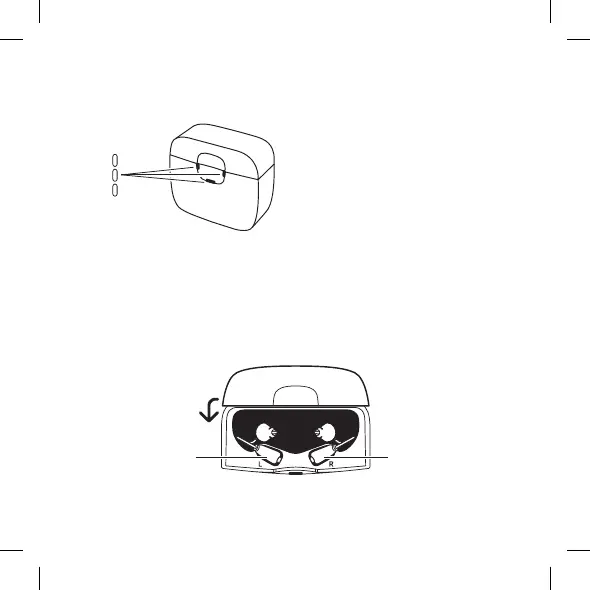
When the charger is connected to the power supply, the indicator lights
flash white 5 times and then turn off:
8
The charger is now in standby mode and ready to charge your hearing aid.
Power on
When the charger is connected to the power supply, the light indicators flash
white 5 times and then turn o:
5X
Right hearing aidLeft hearing aid
Charging the hearing aid
Gently place your hearing aids in their respective charging wells and the
receivers in the maintenance compartment. The hearing aids turn o
automatically. Then close the lid.
The charger is now in standby mode and ready to charge your hearing
aid.
Charging the hearing aid
Gently place your hearing aids in their respective charging wells and the
receivers in the maintenance compartment. The hearing aids turn off au-
tomatically. Then close the lid.
8
The charger is now in standby mode and ready to charge your hearing aid.
Power on
When the charger is connected to the power supply, the light indicators flash
white 5 times and then turn o:
5X
Right hearing aidLeft hearing aid
Charging the hearing aid
Gently place your hearing aids in their respective charging wells and the
receivers in the maintenance compartment. The hearing aids turn o
automatically. Then close the lid.
Left hearing aid
Right hearing aid
9



 To Next Page