BAIARDO L OPERATION MANUAL
BAIARDO L OPERATION MANUAL
7 8
CLAMPS AND CLAMP BASES
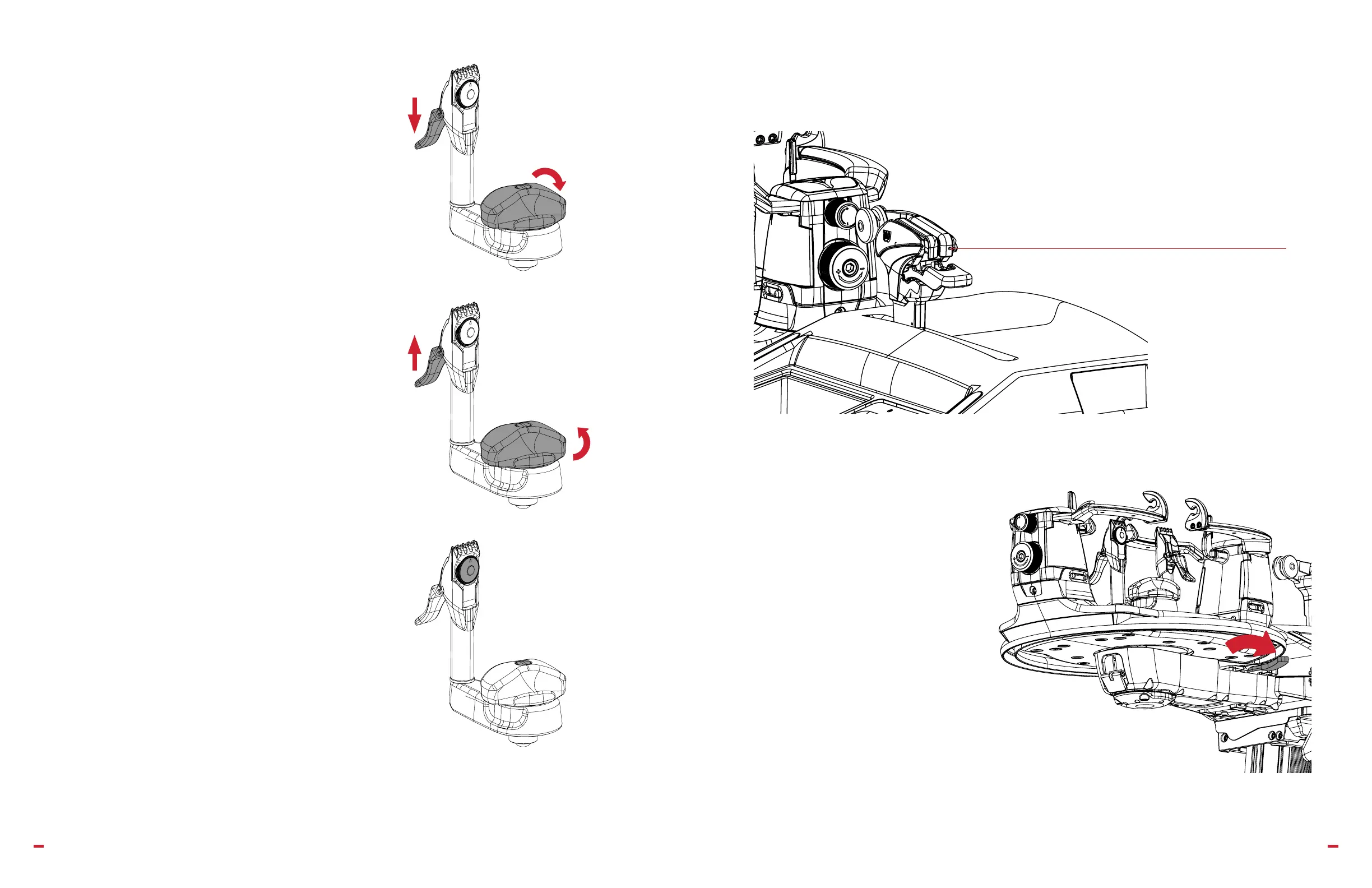
ENGAGING THE CLAMP AND CLAMP BASE
• Position clamp on string.
• Push down clamp lever.
• Turn clamp base lever clockwise until tight.
RELEASING THE CLAMP AND CLAMP BASE
• Lift the clamp lever up.
• Turn clamp base lever counterclockwise.
ADJUSTING THE CLAMP AND CLAMP BASE
• Turn knob by clamp teeth to apply proper pressure to string.
• Clamp base is factory set to proper setting.
• Over time, the clamp base may require adjustment. Remove clamp base lever
from top using adjustment screw.
• Make slight adjustments of not more than 1/8 turn at a time.
6.2 BASICS
ADJUSTING THE PULLER HEAD
The 2.5mm adjustment screw can increase or decrease
the pressure on the string in the puller head. Use this
adjustment for dierent string diameters.
TURNTABLE BRAKE
The brake activation handle is under the right
side of the turntable. Pull to activate and lock
the turntable in place.


 To Next Page