support01@wimius.com support01@wimius.com
EN EN
22 23
Note:
When the projector is connected to the DVD player via the HDMI cable, if there is no sound, it may be that the
output signal of the HDMI port of the DVD player is not compatible with HDCP, please try to connect your Sound bar/
Speaker.
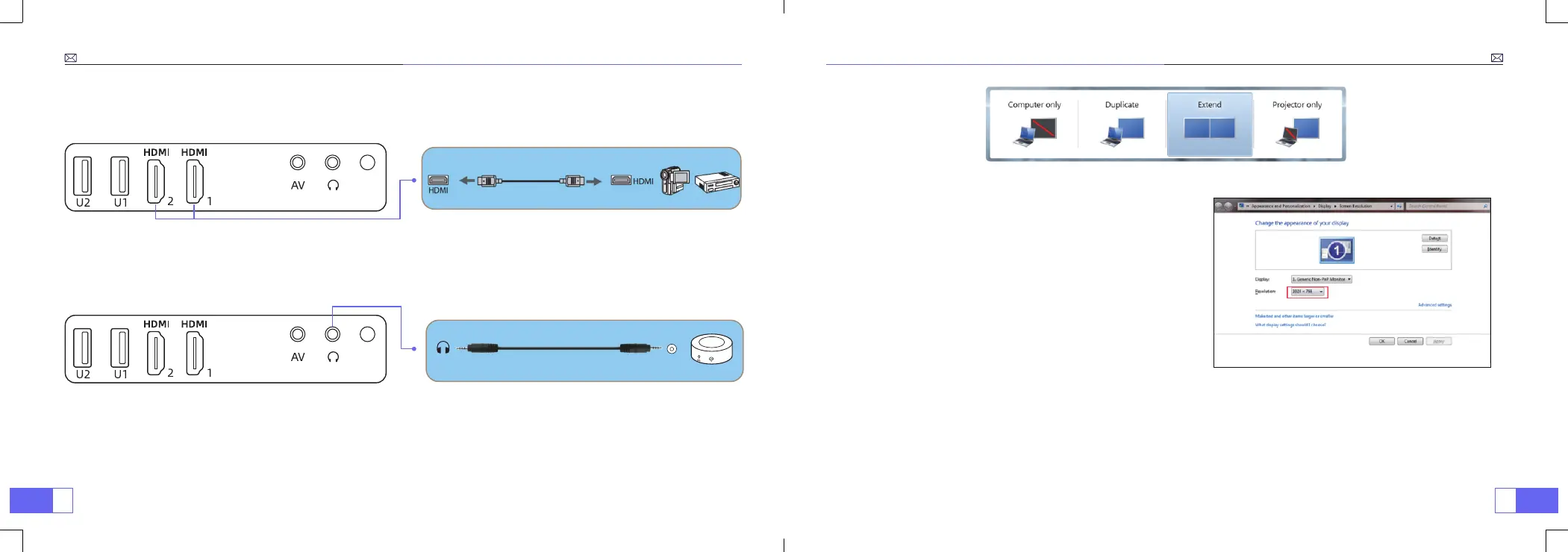
If your speaker has AUX port, please use your 3.5mm audio cable connect the projector and your speaker as the
picture shows.
3. Connect to the Sound bar/Speaker
Audio out Aux port
1. Connect to the computer and P63 projector with the HDMI cable (Included).
2. Select the HDMI source to project any les on your computer;
3. On your laptop, hold down the key “Win+P” board keys to change your display mode.
4. Connect to the Computer
Computer only:
it is the default option – only displays on
the main monitor.
Duplicate:
makes all of the monitors display the same thing
duplicating the desktop on each monitor.
Extend:
makes all of your monitors act like one big monitor
extending the desktop across all of them.
Projector only:
Displays only on the secondary monitor like
a projector.
You can change the screen resolution on the Projector Only
Mode:
Step:
Start > Control Panel > Appearance and
Personalization > Adjust Screen Resolution



 To Next Page