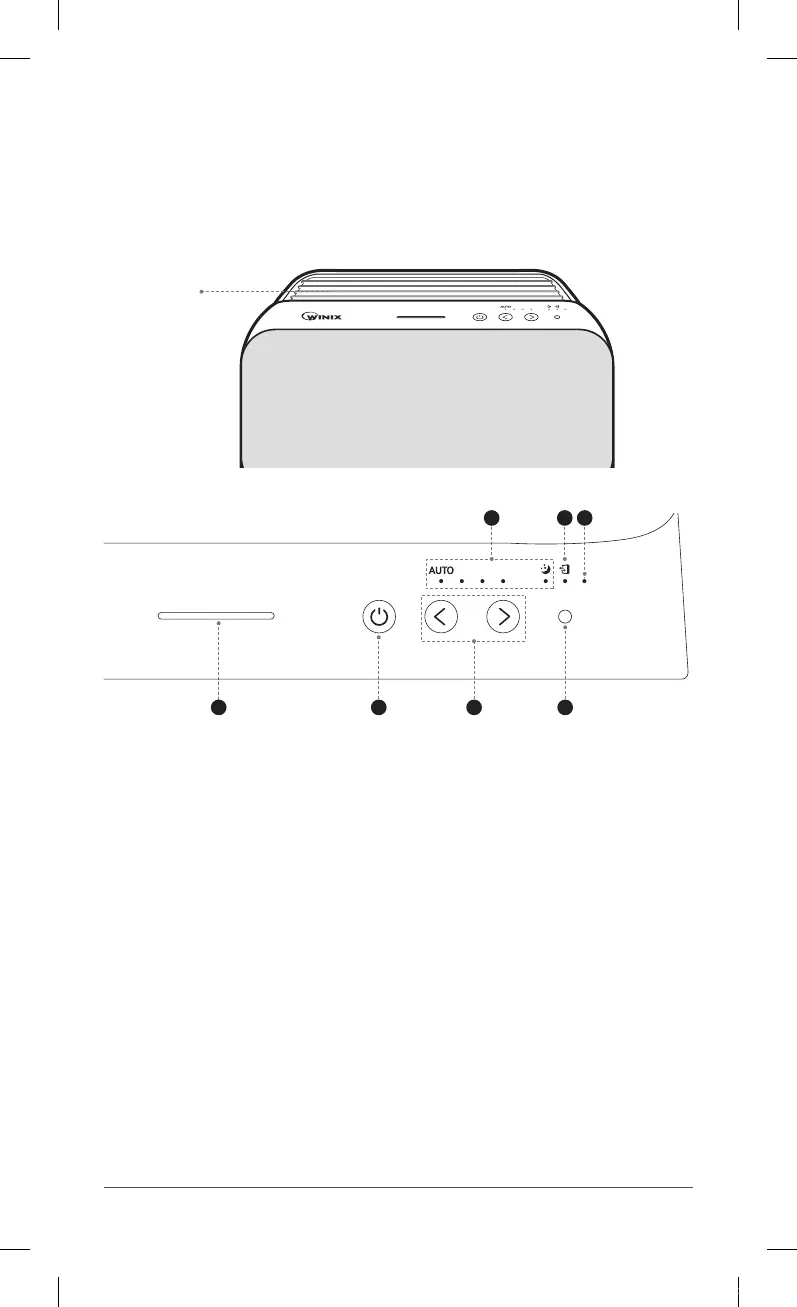
CONTROLS
Air
Outlet
Vent
4 5 6
1 2
7
3
①
Fan Speed Indicator
Indicates the current fan speed.
②
Change Filter Indicator
LED light indicates when it is time to change the filter.
③
Reset Button
After replacing a filter, press the RESET button for at least 5 seconds.
④
Air Quality Indicator
Color-coded LED indicates one of three levels of air quality.
⑤
Power Button
Turns the unit on or off .
⑥
Fan Speed Button (UP/DOWN)
Enables Manual operation of the unit. Press to cycle through and set the desired
fan speed (Low, Medium, High).
⑦
Light Sensor
Detects the amount of ambient light within the environment, to adjust the
brightness of the LED indicators.
ZERO-N.indb 4 2018-04-26 오후 5:38:47



 To Next Page