blueCompact Cleaning and maintenance 07/2021 V 01
Insert batteries
Insert new batteries
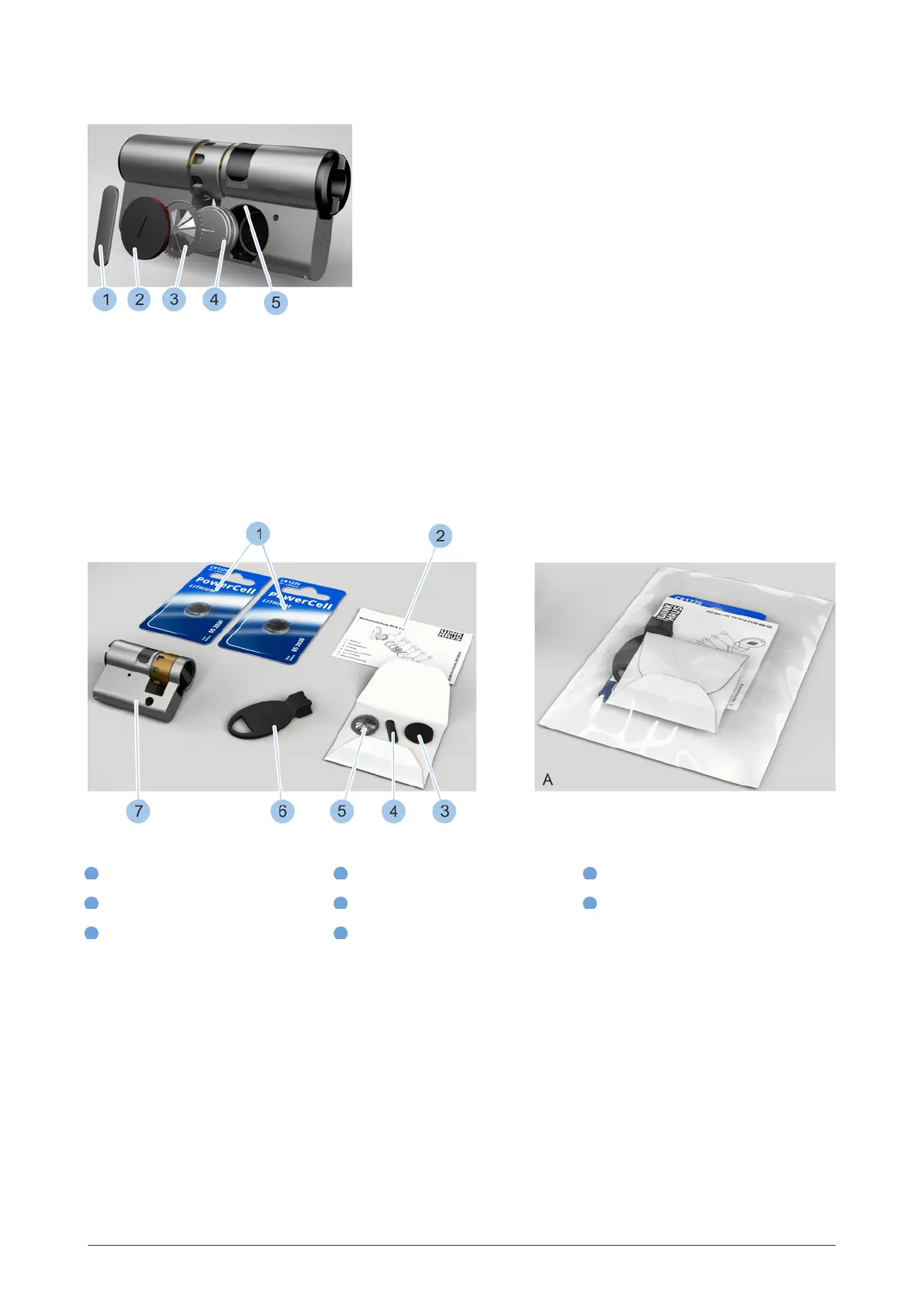
7. Insert two new batteries (4) from the battery replacement set with
their positive terminal pointing downwards.
8. Insert new contact strip (3) into the battery compartment with
toothed ring pointing outwards.
9. Insert battery compartment lid (2) into the battery compartment.
10. Insert retaining spring (1) into the battery compartment groove (5).
11. Place replacement tool onto the retaining spring (1).
12. Use the replacement tool to turn retaining spring (1) 90° in the
groove (5).
ü
The batteries have now been replaced and secured in the battery
compartment.
13. Fit cylinder.
see "Install cylinder type 01, type 02 and type 05", page 43
14. Synchronise the time of the cylinder with the Masterkey.
see "Identify cylinder", page 70
10.6 Replace batteries in cylinder type 02
Battery replacement set
1
Batteries
4
Retaining spring
7
Cylinder (not part of the battery
replacement set)
2
Replacement instructions
5
Contact strip
A
Battery replacement set in
packaging
3
Battery compartment lid with O-ring
6
Replacement tool
The battery replacement set is supplied in a package (A) and contains the
components in the photo (1-6).
136
blueCompact electronic locking system



 To Next Page