blueCompact Manage locking system 07/2021 V 01
7.5 Add and manage reader
7.5.1 Add and manage reader
Tip
To code the reader, the Masterkey must be held
in the centre in front of the reader. For longer
programming processes, particularly for carrying
out any necessary software updates, the supplied
programming device can be used.
see "Reader", page 22
7.5.2 Add reader to locking system
Prerequisites:
•
Masterkey has been linked to the app.
see "Log in with password ", page 59
Link cylinder with Masterkey
Add reader to locking system
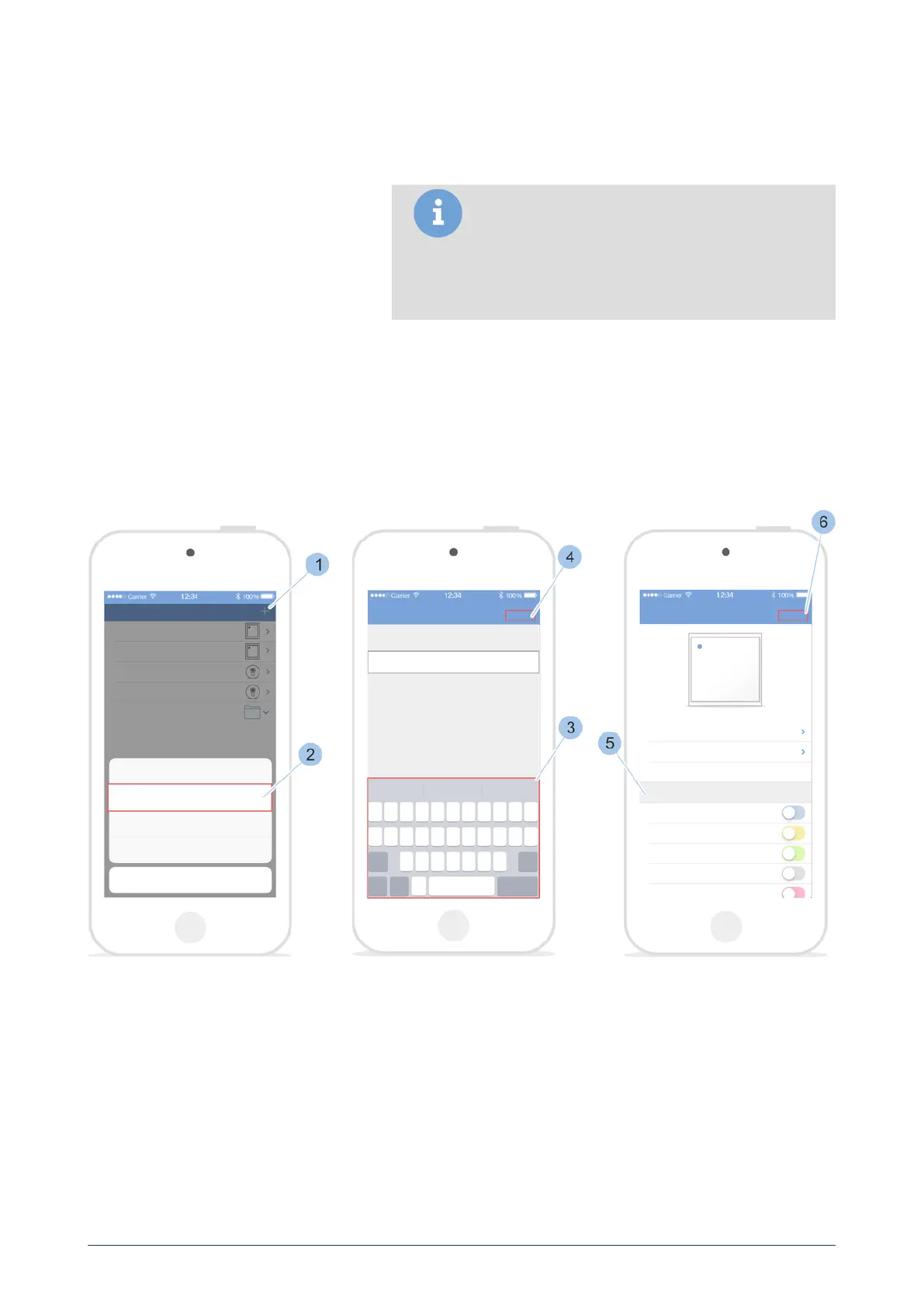
1. Call up the Cylinder menu.
2. Touch '+' in the Cylinder menu (1).
3. Bring Masterkey to the reader.
Enter reader specifications
4. Touch Add reader (2).
5. Name reader (3).
6. Confirm Information (4).
7. Issue access authorisations (5).
8. Confirm (6) information.
blueCompact electronic locking system
85



 To Next Page