blueCompact Cleaning and maintenance 07/2021 V 01
10.9 Replacing batteries in padlock 85
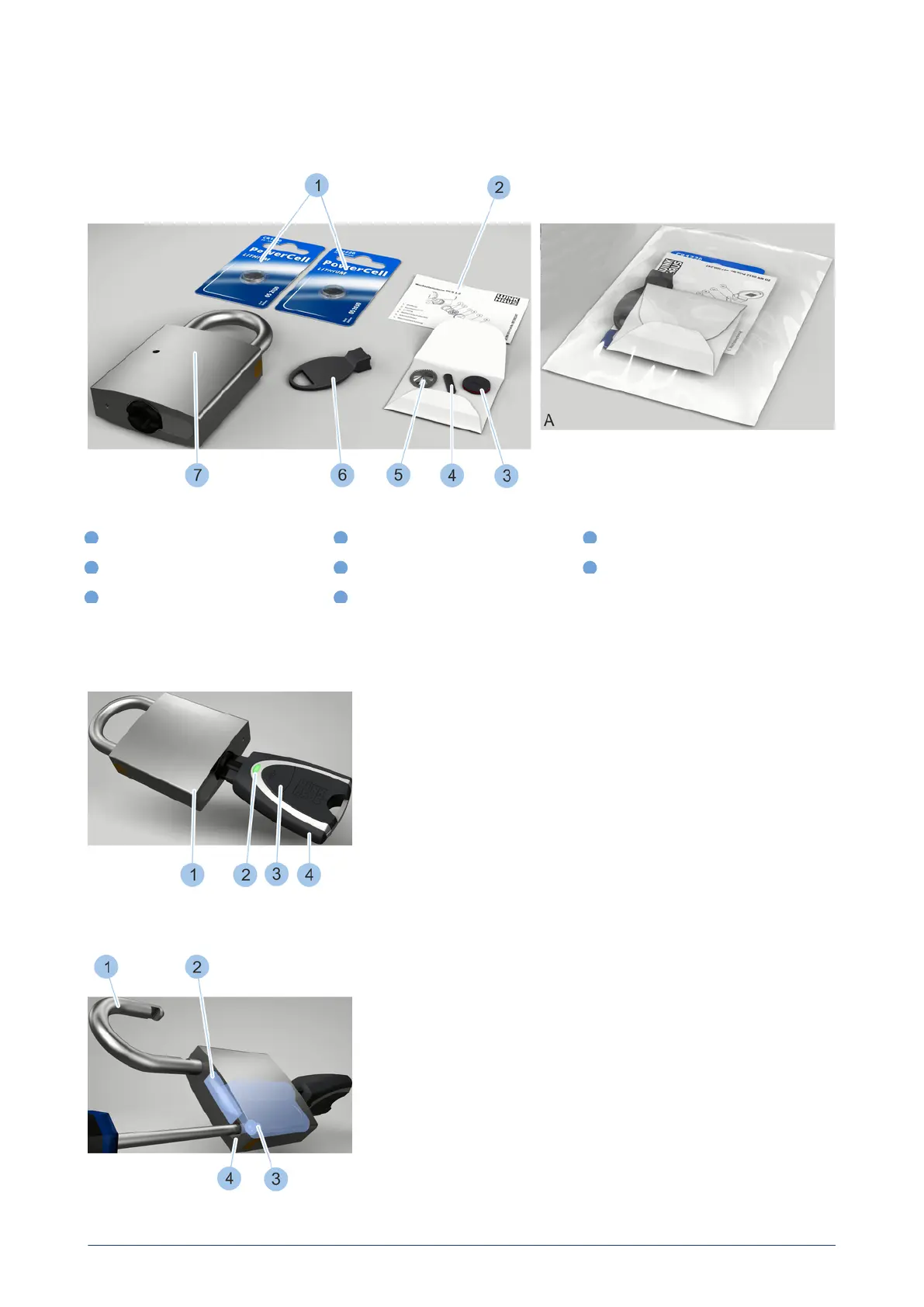
Battery replacement set for type 85
1
Batteries
4
Retaining spring
7
Padlock (not part of the battery
replacement set)
2
Replacement instructions
5
Contact strip
A
Battery replacement set in
packaging
3
Battery compartment lid with O-ring
6
Replacement tool
Activate key
Activate key
The battery replacement set is supplied in a package (A) and contains the
components in the photo (1-6).
1. Insert active key (4) into the padlock (1) cylinder.
2. Activate active key (4) by pressing on the button (3).
ü
The LED display (2) on the active key lights up green and the cylinder
can be locked.
Undo fixing screw
Undo fixing screw
3. Unlock cylinder.
ü
The cross bar (2) releases the shackle (1) and the lock opens.
4. Swing shackle (1) to the side.
5. Undo fixing screw (3) and remove from the shackle hole (4).
blueCompact electronic locking system
143



 To Next Page