EasyManua.ls Logo

Winmate IB70 - Page 54

Winmate IB70
110 pages
Print Icon
To Next Page IconTo Next Page
To Previous Page IconTo Previous Page
Loading...
IB70 Motherboard User Manual
46
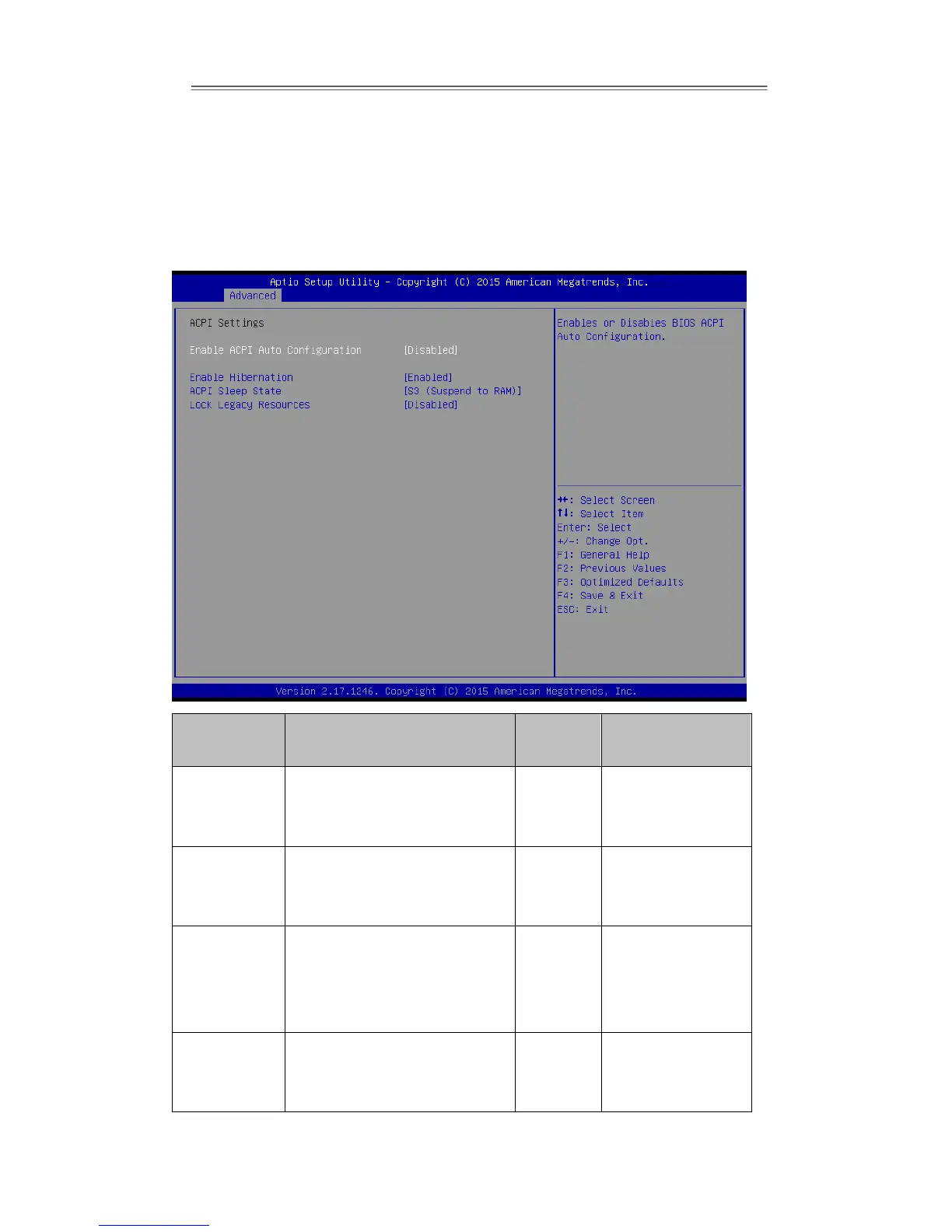
ACPI Settings
Advanced Configuration and Power Interface (ACPI) settings allow to control how the
power switch operates. The power supply can be adjusted for power requirements.
You can use the screen to select options of ACPI configuration. A description of the
selected items will appear on the right side of the screen.
BIOS Setting
Description
Setting
Option
Effect
Enable ACPI
Auto
Configuration
BIOS ACPI Auto Configuration
Enable/
Disable
Enables or
Disables this
function
Enable
Hibernation
Control hibernation
Enable/
Disable
Enables or
Disables this
function
ACPI Sleep
State
This option allows you to
specify which mode will be
used during the transition to
energy saving mode
S1 (POS)/
S3
(Suspend
to RAM)
Select ACPI
Sleeping State
Mode
Lock Legacy
Resources
This option enables or
disables lock of legacy
resources
Enable/
Disable
Enables or
Disables this
function