MTP60 mul-band bodypack transmier
10
RECORDING
Open the battery door and insert the SD card into the card slot
SEL
EXIT
GAIN
CH
REC
ON
OFF
MENU
The MTP60 records on SD card FAT32 or ExFAT formatted.
If the SD card is FAT32 formatted, the limit of recording is 4GB.
If the SD card is exFAT there is no limit.
The MTP60 doesn’t format the SD card.
Recording short cut:
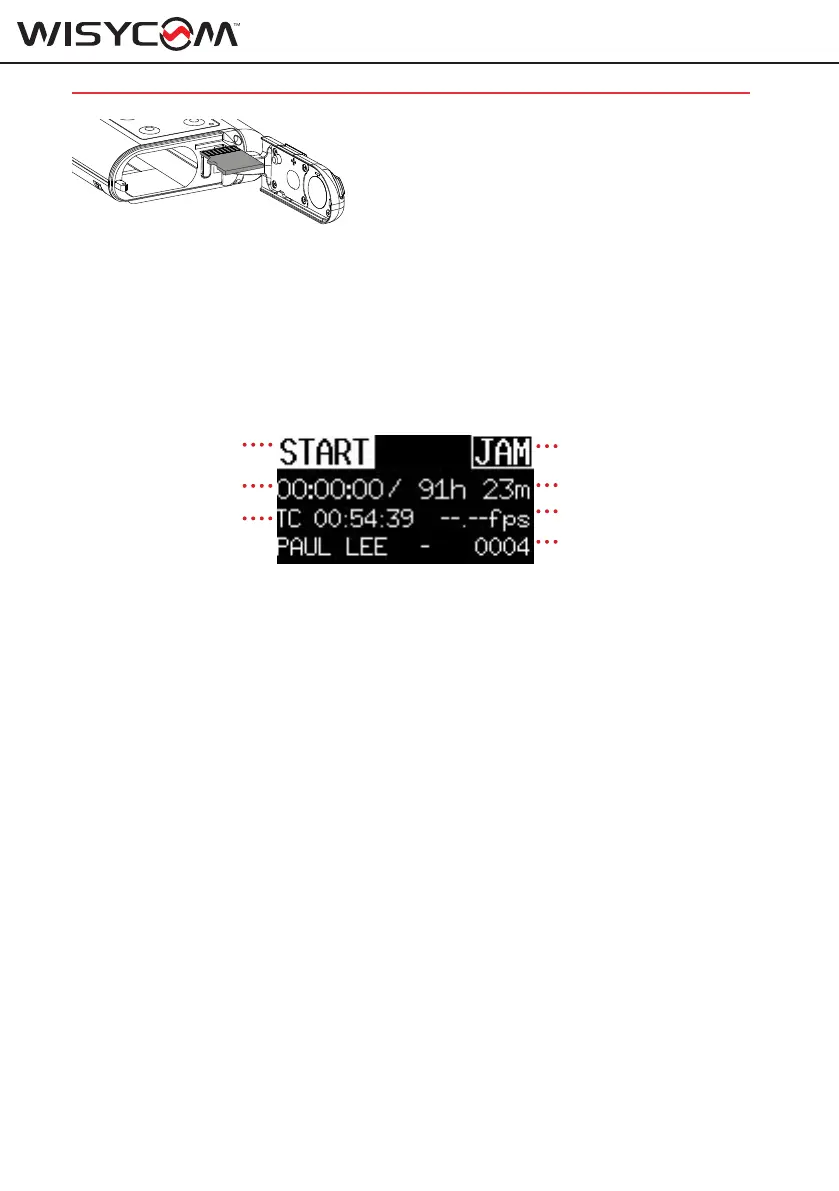
Push UP and DOWN arrows together to enter on the quick RECORDING menu.
to activate the JAM
remaining time
Frame rate
recording lename
to start recording
elapsed time
time code
Use arrows to move the cursor between START/STOP and JAM function.
Push SEL button to activate the function.
The MTP60 records 32-bit float RF64 WAV (over 4 GB) files at 48 kHz sampling rates.
Bit Depth can be change to 24 bit using “Recorder > BitDepth” menu.
The file name format is “Transmitter name-<sequential number>.WAV or Transmitter name-
T<trace number>S<sequence number>.WAV according to the Name setting on Recorder>SD
Card menu.
All files are recorded in a folder with the tranmsitter name.
example:
Transmitter name: PAUL LEE
Recorder trace 4 is saved in the folder PAUL LEE with the name PAUL LEE-0004.WAV
Jamming Timecode
The MTP60 accepts timecode from external LTC sources. The timecode value and frame rate are
taken from incoming LTC source. If timecode has not been jammed, the MTP60 uses Internal
time code that can be set manually using the “Recorder >TC Setup>Set Clock” menu.
Jammed timecode values are held for up to six hours after powering off (with batteries inside),
and up to one hour after the battery has been removed. This allows for time to swap batteries
without having to re-jam timecode.
To jam timecode, connect a valid LTC source to the LEMO audio connector of MTP60.
Audio cable with LEMO 3pin to Stereo jack connector:
• LEMO pin 3 (AF) to the Left (tip) of Stereo jack



 To Next Page