Page 10 Analyzer Q1 Witschi Electronic Ltd
5 GENERAL OPERATION
5.1 Switching the Analyzer Q1 On and Off
The mains switch for switching the instrument on and off is located on its rear panel.
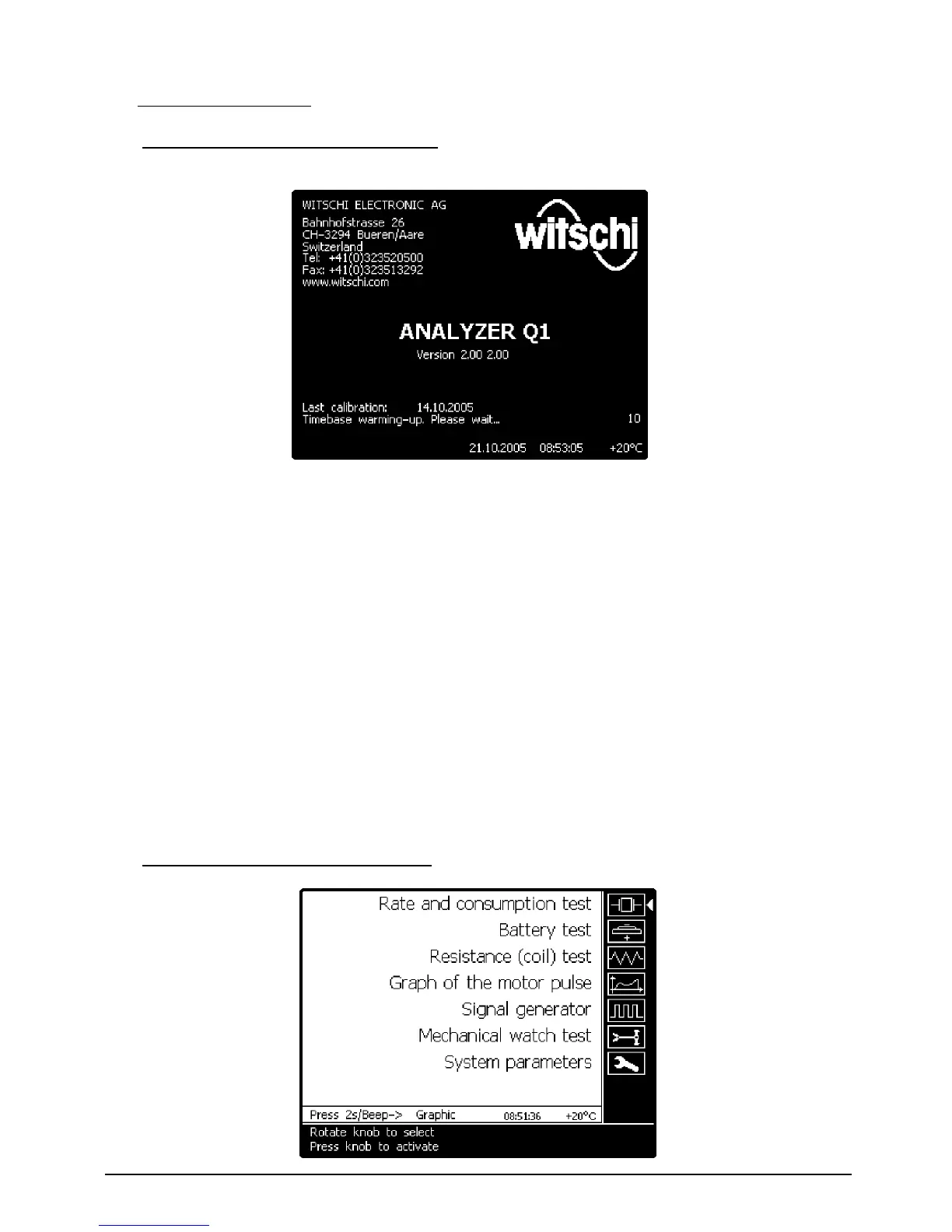
Whenever the instrument has been switched on, the following information appears during the
stabilisation period of the time base: Name and address of the manufacturer, instrument type,
firmware version, date of last calibration, time and date, as well as ambient temperature (if
temperature display switched on).
The instrument jumps to the main menu and is ready to function at the end of the stabilisation
period (20 s).
If no measurement is performed for a long time (can be set in
System parameters
menu), the
instrument automatically switches to standby mode in which the display lighting is switched off. The
consumption of < 2 W in standby mode is negligible.
The instrument can be “woken up” from the standby mode by pressing any key.
We recommend only switching off the instrument during longer idle periods. Switching often the
instrument on and off influences the stability of the time base.
Shouldn’t you need to use the device for an extended period (e.g. vacations), it is recommended to
disconnect the mains adapter from the mains.
5.2 Selection of a Measurement Function


 To Next Page