Witschi Electronic Ltd Analyzer Q1 Page 35
To select the next character, press again the rotary knob; the cursor jumps to the next
character.
To leave the edit mode, press the rotary knob several times until the last character has been
reached.
PORT
PC
ON The RS232 PC port is activated. The suitable baud rate is set by the installed PC software.
OFF The RS232 PC port is deactivated; data exchange with the PC is disabled.
PRINTER
ON The RS232 printer interface is activated.
OFF The interface is deactivated; data are not sent to the printer.
GPS RTC
ON If the Witschi GPS receiver (available as an accessory) is connected, the minutes and
seconds of the watch are automatically synchronised.
OFF The real time clock (Real Time Clock) is not synchronised.
GPS SYNC
ON If the Witschi GPS receiver (available as an accessory) is connected, it continuously
synchronises the time base of the instrument, thus offering the highest possible accuracy.
OFF The time base synchronisation is turned off.
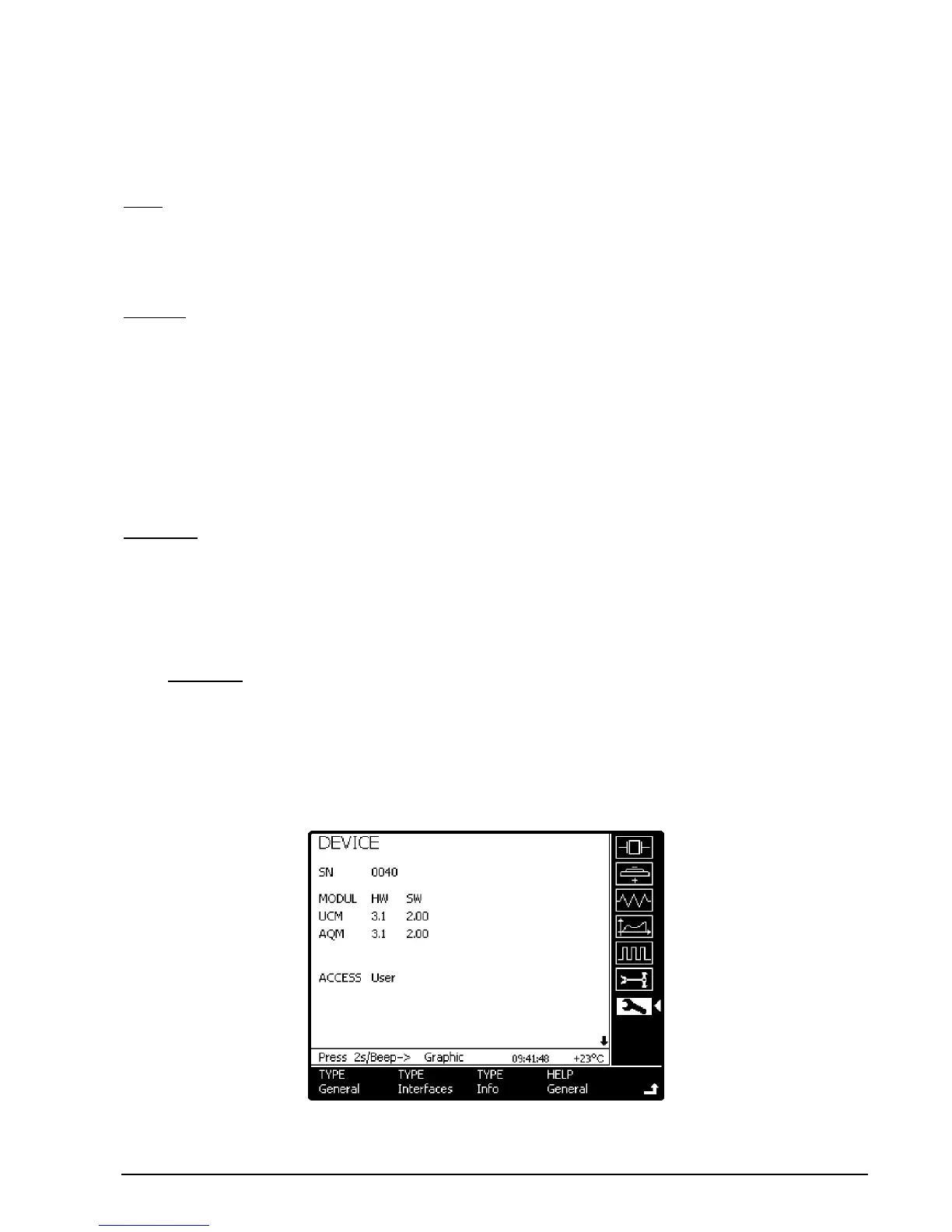
17.4 TYPE Info
This page contains product information such as the serial number of the instrument as well as of the
hardware and firmware versions.
The information can only modified by the Witschi customer service when hardware or firmware
updates have been carried out. The access is only granted with a password.


 To Next Page