4.3| SETTING THE APPLIANCE
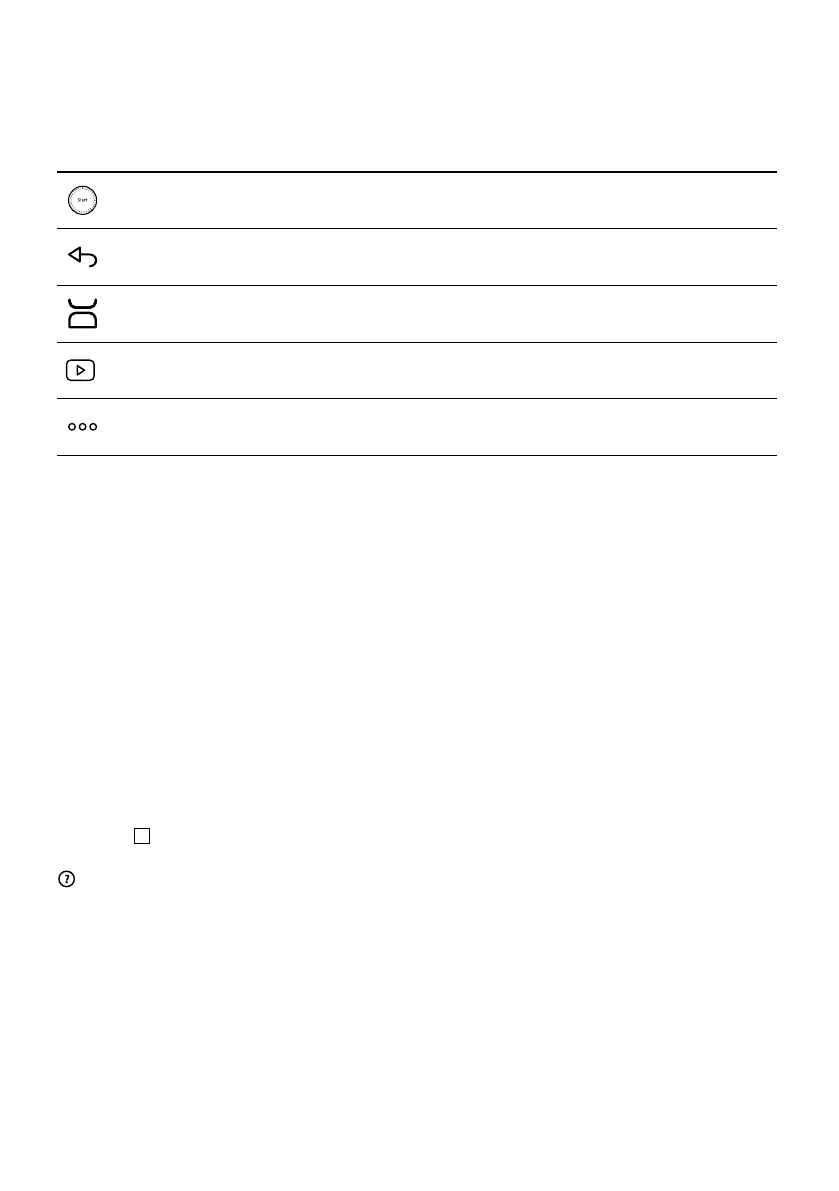
The following control buttons will light up when they are ready for use:
BUTTON DESCRIPTION/FUNCTION
The middle button has 11 functions. These functions vary depending on the steps to be followed
(start, pause, next step, confirm, stop, etc.)
Cancel/Back
Start integrated scale
If a video is available for the recipe being prepared, you can play it by tapping this button.
Settings (changes to settings, WiFi connection, recipe ingredients, etc.)
Using for the first time
The WMF Avantgarde is an intelligent food pro-
cessor and will help you make every meal a suc-
cess. It offers a wide range of recipes at the
touch of a button. Thanks to the intuitive, inter-
active touchscreen, you can prepare all your
dishes easily and safely.
The WMF Avantgarde takes care of the prepara-
tion, mixing and cooking of your ingredients. It
guides you step-by-step through all phases of
the recipe. Simply follow the steps – it couldn’t
be easier!
Switch on the WMF Avantgarde with the on/
off switch
11
and follow the instructions on the
display. During each individual step, the symbol
provides help in completing this step. You
can also find a FAQ page at www.wmf.com
Country-specific settings
When using the appliance for the first time, go
to the language settings:
1| Select your country.
2| Select your language.
After completing this step, a welcome
screen appears.
Internet connection
You can now connect your WMF Avantgarde
to the Internet at home. Complete this step by
selecting Now, or if you want to wait, select
Later. You can also carry out this step later by
accessing the settings for your WMF Avantgarde
from the home screen.
An Internet connection is required to use the
following features:
Access to all WMF recipes, My recipe book, In
my fridge, photos and videos, as part of step-
by-step instructions for your recipes, as well
as product updates for a personalized product
experience.
42


 To Next Page