821016: AMPx-E8 Series User Guide
© 2011 Wohler Technologies, Inc. All rights reserved.
33
Chapter 3 Audio Configuration
Muting the Speakers
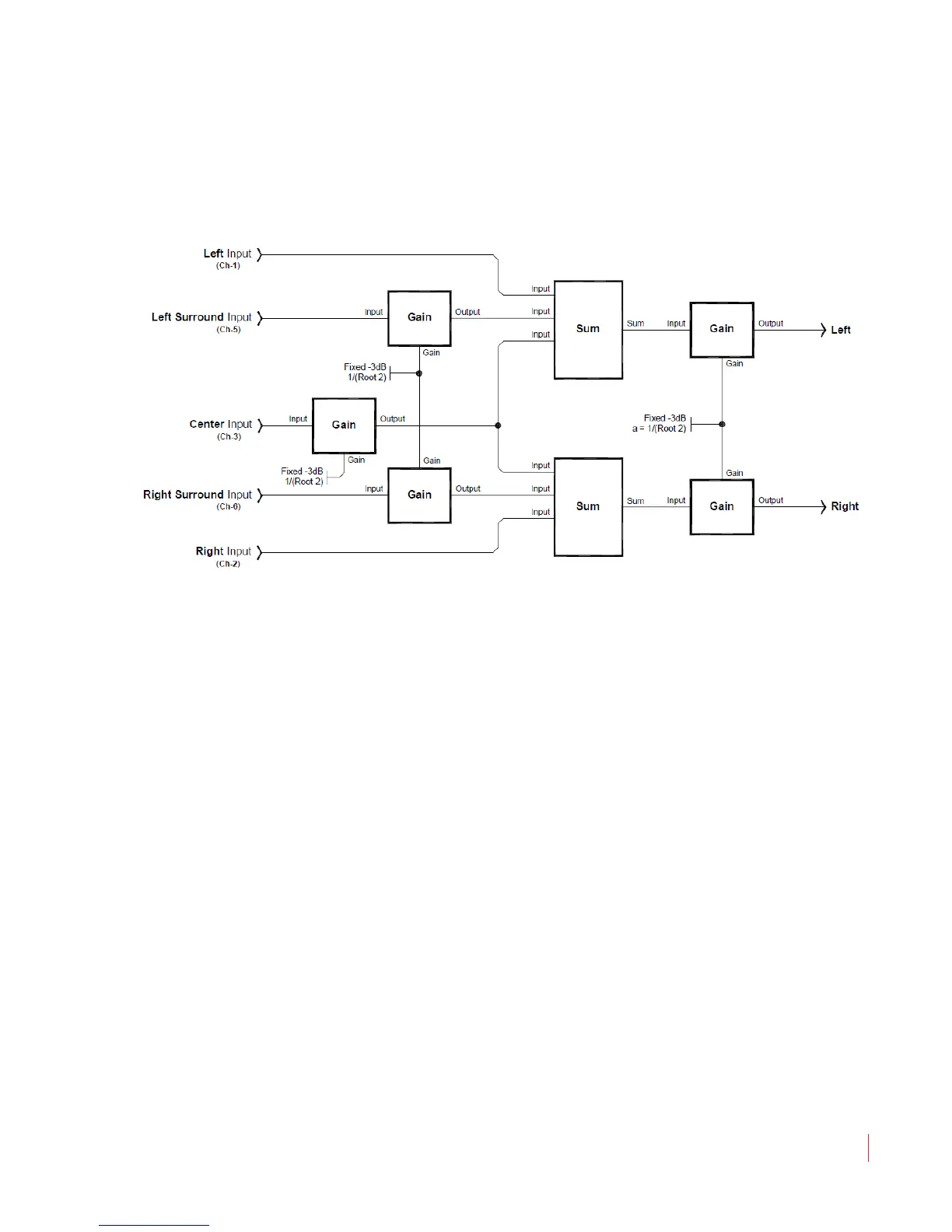
• DM3: This downmix is the same as DM1 except that the
surround level is fixed at –3 dB. DM3 is equivalent to the
Japanese ARIB Set 3 downmix formula. See Figure 3–9 below.
Figure 3–9 DM3 Mix Diagram
• 4+4: In this downmix Channels 1 through 4 are summed to
the left speaker and Channels 5 through 8 are summed to the
right speaker.
• MXA and MXB: Select one of these two downmixes to
custom mix by adding Channels 1 through 8 into the left or
the right speakers using the Speaker Assign buttons.
• MIX: This mode appears whenever the Speaker Assign
buttons are pressed. The selection made in this mode is lost
whenever another mode is selected, or a preset is recalled.
Presets saved in MXA or MXB mode are recalled in this mode.
Muting the Speakers
The AMPx-E8 Series monitor provides two methods for muting the
internal speakers:
1. Plug in a pair of headphones, or
2. Press the
Mute button.


 To Next Page