EasyManua.ls Logo

Wolf e Series - Page 4

Wolf e Series
21 pages
Print Icon
To Next Page IconTo Next Page
To Previous Page IconTo Previous Page
Loading...
Page 4
24” E Series Oven (SO24)
Electronics
2-4
#826752 - Revision A - June, 2016
Demo-Modus (Showroom Mode) - continued
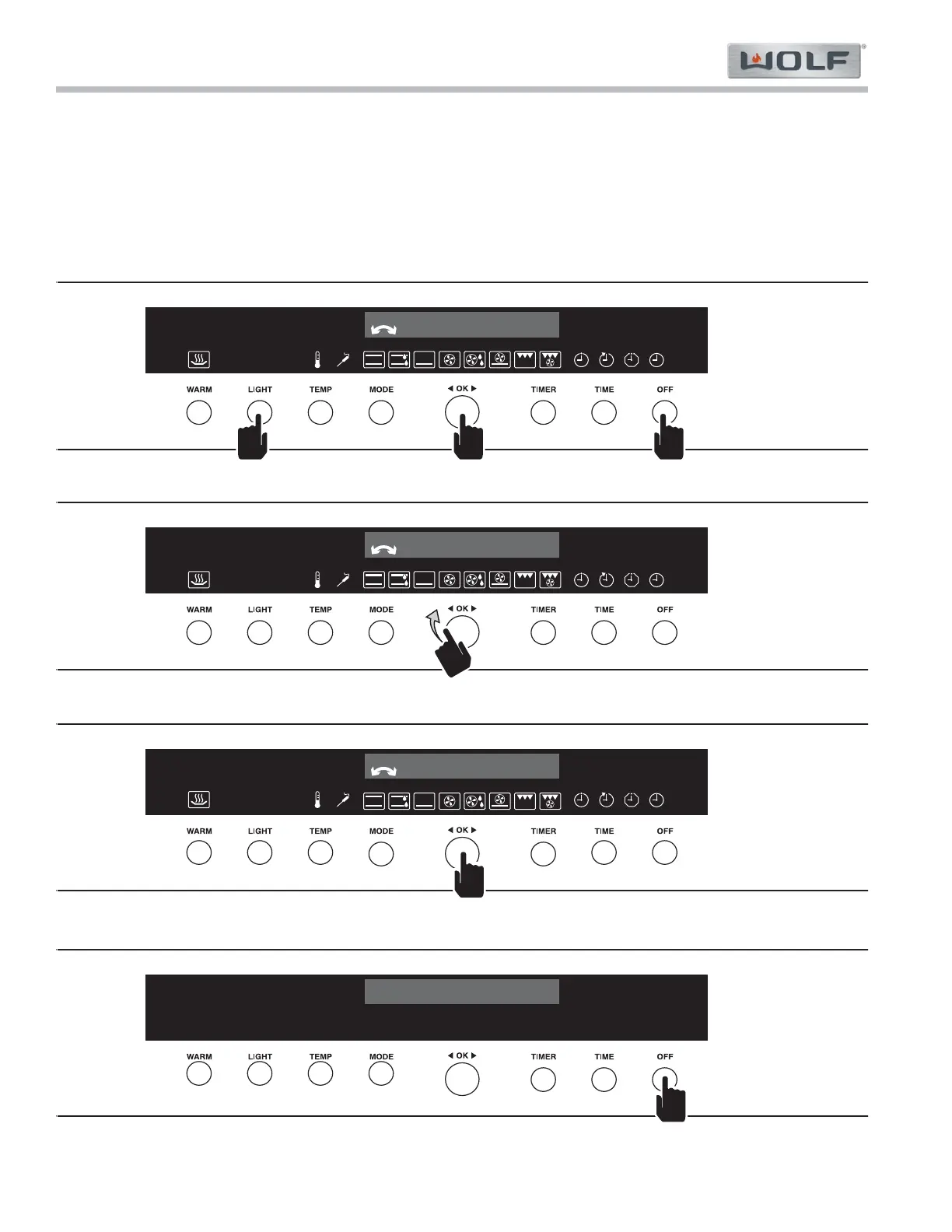
To turn Demo-Modus off, the oven must be off, with only the time displayed.
Press and hold in order Light, OK knob, and Off buttons for ten seconds. Demo-Modus - On appears in the1.
display.
Rotate the OK knob until Demo-Modus - Off appears in the display.2.
Press the OK knob to exit Demo-Modus. 3.
Press the Off button to exit the configuration mode.4.

???
8
:
30375
°
F
Demo-Modus
Off
Figure 2-2. Turn On Demo-Modus - Press and Hold LIGHT + OK + OFF (in order) for 10 Seconds
???
8
:
30375
°
F
Demo-Modus
On
Figure 2-3. Switch Demo-Modus to ON Position
???
8
:
30375
°
F
Demo-Modus
On
Figure 2-4. Press OK Knob to Set Demo-Modus
???
8
:
30
Figure 2-5. Exit Mode Configuration

Other manuals for Wolf e Series

Related product manuals