4-12 Using the Tools Page Rev AB
Wolke m600 Universal Operator Manual
Horizontal Print Density
Navigate to Tools > Diagnostics > Printhead > Horizontal Print Density.
Shows the current horizontal print density.
Note: To modify this setting navigate to Tools > Setup > Printhead.
Vertical Print Density
Navigate to Tools > Diagnostics > Printhead > Vertical Print Density. Shows
the current vertical print density.
Note: To modify this setting navigate to Tools > Setup > Printhead.
Inputs
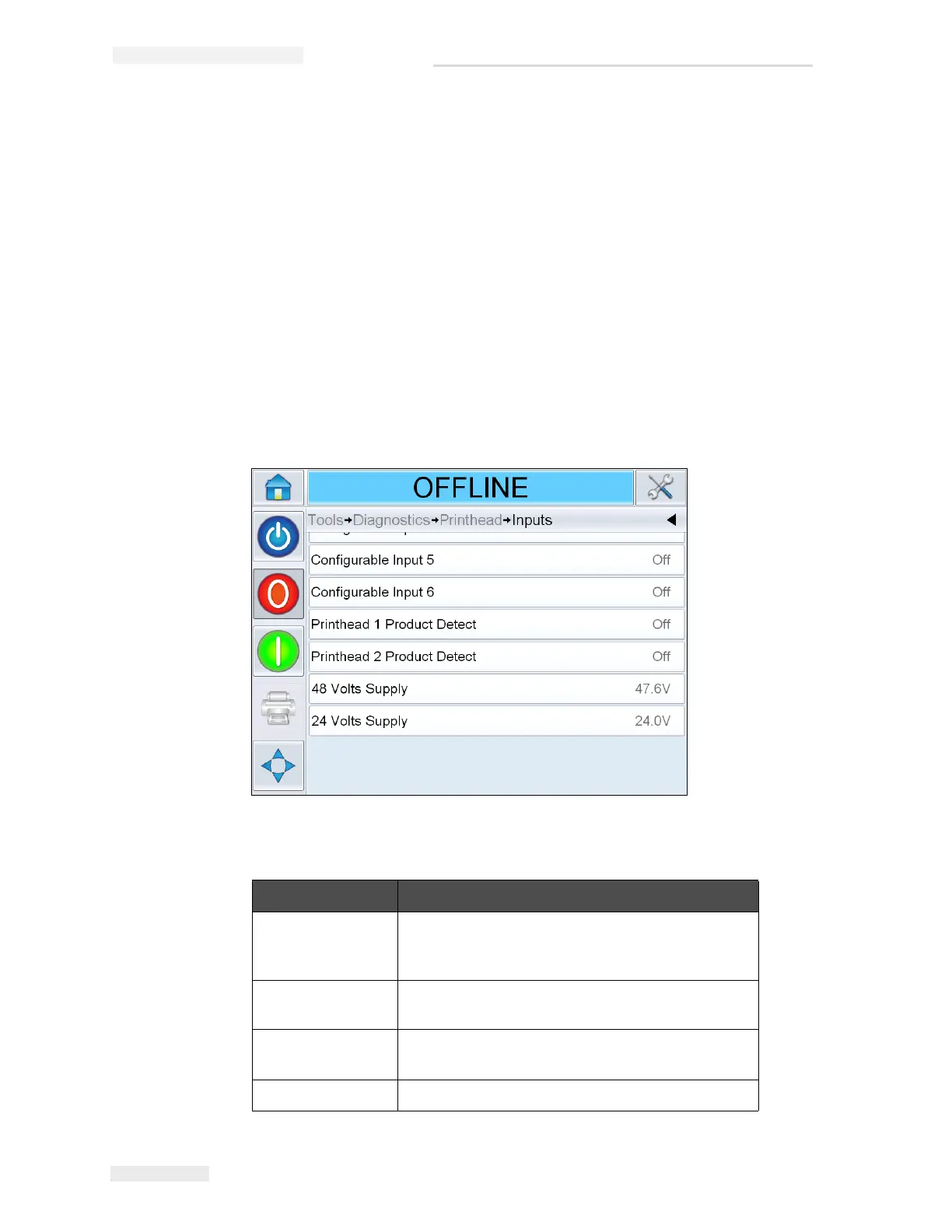
Navigate to Tools > Diagnostics > Printhead > Inputs (see Figure 4-9).
Buttons Description
Printer present Confirms that internal components of the
controller hardware/software are communicating
properly.
Configurable Input
1-6
Shows the current status of the printer's
configurable inputs
Printhead
Product Detect
Shows the current status of the product
detector connected to each printhead (on or off).
48 Volts Supply Displays the voltage of the 48 V supply.
Table 4-5: Inputs Diagnostics Page
Figure 4-9: Printhead Inputs Diagnostics Page



 To Next Page