COMMISSIONING
6 720 803 800 (2012/11)32
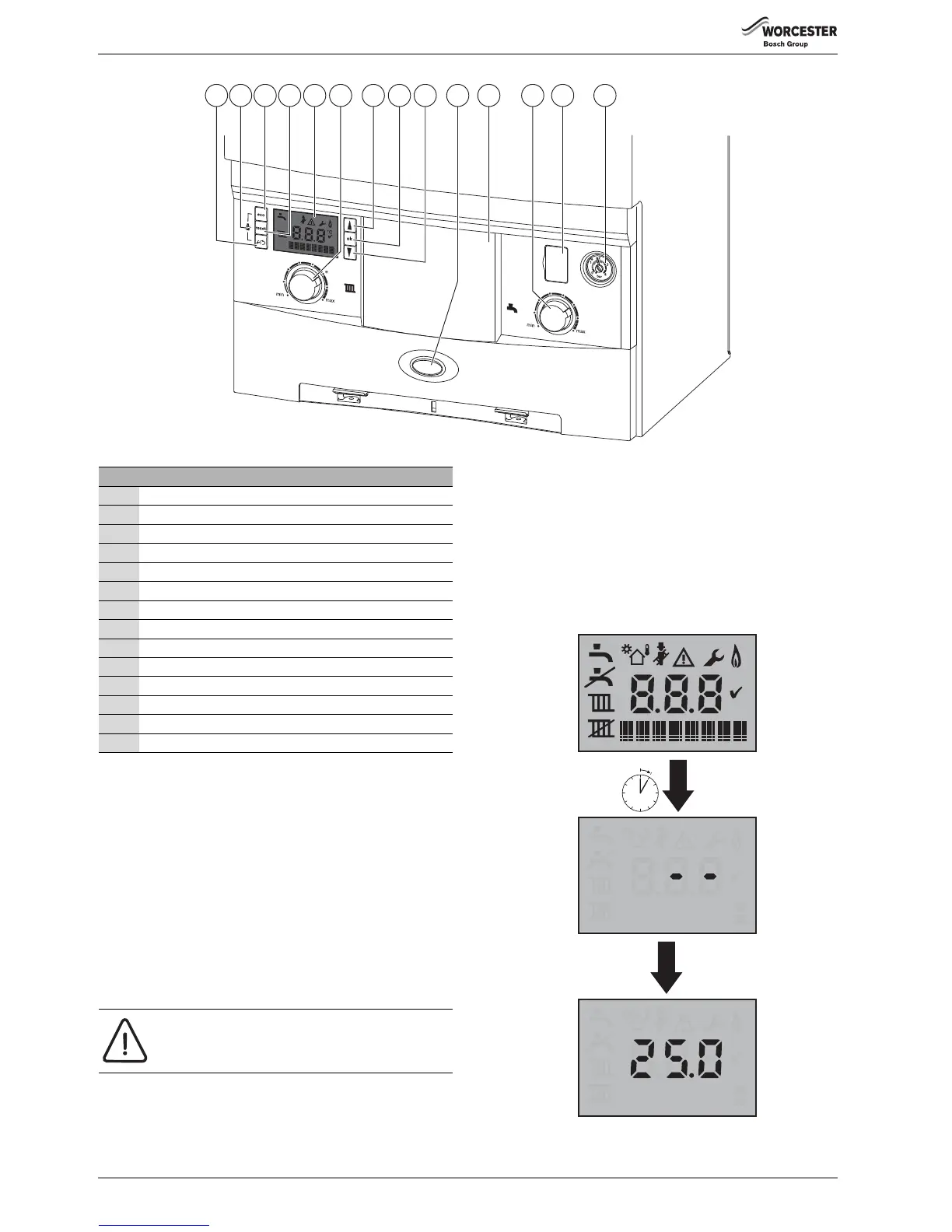
Fig. 60 Control panel
Switching the appliance on/off:
▶ Turn on the mains power supply, initially the “Boiler start up screens”
will be displayed (refer to figure 61).
▶ Turn on any external controls
▶ Set the thermostatic radiator controls to maximum temperature
▶ Set the clock/programmer to continuously ON and the room
thermostat to maximum temperature
The blue Operation and fault indicator light will be illuminated when
there is a demand for heat or hot water.
Turn the boiler CH temperature control (6) to maximum.
The “burner on” flame symbol will be shown on the boiler display after a
successful ignition sequence.
If the boiler fails to light, a flashing fault code will be displayed.
To reset the boiler, press the reset button (4) , the tick symbol will be
displayed briefly for a successful reset.
5.4.1 BOILER START UP SCREENS
On initial start up, the following screens are displayed:
1. All the symbols are displayed for approximately two seconds.
2. The control will run an internal test for approximately 30 seconds.
3. When the internal test has been successfully performed, this screen is
displayed:
– The boiler is in stand-by.
– The flow temperature sensor indicates the primary temperature
from the heat exchanger (not the target set point).
Fig. 61 Boiler start up screen
▶ If no adjustments are made for 30 seconds the back light is turned off.
Key to figure 60
1 Spanner/return button
2 Service engineer symbol
3 Eco button
4 Reset button
5 Boiler display
6 Central heating temperature control
7 Scroll up button
8 OK - Select/confirmation button
9 Scroll down button
10 Operation and fault indicator (blue)
11 Position for optional programmer
12 Hot water temperature control
13 Diagnostic port
14 System pressure gauge
NOTICE: RESET
▶ Do not press the blue operation/fault diagnostic
indicator (10) to reset the boiler.



 To Next Page