HANGZHOU BLUE WHALE MUSIC TECHNOLOGY CO.,LTD HANGZHOU WORLDE MUSIC ELECTRONIC CO., LTD
WEBSITE: WWW.WORLDE.COM.CN EMAIL:SALES@WORLDE.COM.CN TEL:86 571 88730848
- 18 -
6.1.8 Using Ableton Live’s Mixer
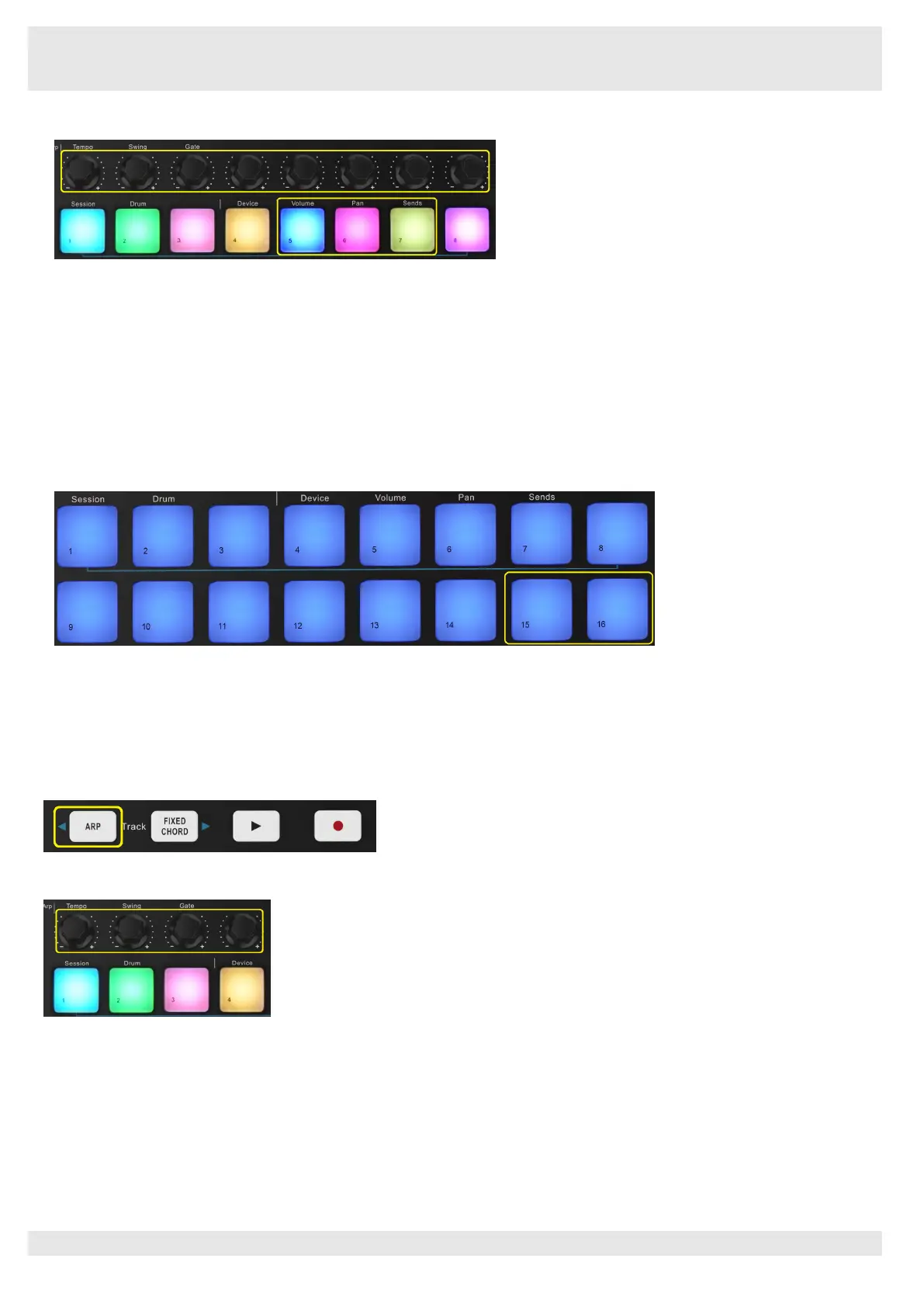
The Orca mini 25 8 knobs give you hands-on control of Live’s mixer. Hold Shift, then press either the Volume, Pan or Sends pads to
control those respective parameters with the knobs.
Volume
- This mode allows for volume control over the 8 selected tracks currently inside Live’s coloured rectangle. Holding the Shift
button and pressing the Volume pad (the 4th from the top right) selects this mode.
Pan
- This mode allows you to pan the 8 selected tracks currently inside Live’s coloured rectangle. Holding the Shift button and
pressing the Pan pad (the 3rd from the top right) selects this mode.
Sends
- This mode allows you to control the send levels of tracks in Ableton Live. Hold Shift and press the Sends pad (2nd from the top
right) to enter this mode.
When in Sends mode two blue pads on the bottom row will switch between Send A or Send B. The left blue pad chooses Send A, and
the right blue pad selects Send B.
Sending audio to return tracks is a great way to use fewer audio effects. For example, instead of putting the same reverb on many
tracks, you can put one reverb on a return track and send multiple tracks to it.
6.1.9 Arp
Pressing the Arp button on Orca mini 25 enables the Arpeggiator. After engaging Arp the Orca mini 25 takes your chords and creates an
arpeggio – ie it plays each note of the chord one after another. The Arpeggiator will run as long as keys are held, at the rhythmic value
specified by the Arp Rate.
Orca mini 25’s Arp is a great way to come up with interesting melodies and progressions with ease.
Arpeggiator Rotary Knobs
When you hold the Arp button the rotary knobs can transform your arpeggios.
Tempo
–
This knob speeds up or slows down your arpeggio relative to the Arp Rate. When synced with Ableton Live, this knob will have
no effect.
Swing
–
This knob sets the amount that every other note is delayed, resulting in a swung rhythm. To change the Arpeggiator’s Swing,
press and hold the Arp button, and then turn the knob labelled Swing. By default (centre position), swing will be set to 50% (meaning no
swing), with extremes of 80% (very swung) and 20% (negative swing). Negative swing means every other note is rushed, instead of
delayed.
Gate
–
Adjusting this knob will create longer or shorter MIDI notes, resulting in either a more ‘staccato’ arpeggio, or a more fluid, ‘legato’
one. This knob goes from 1% to 200% of the space between notes. For notes that have swing applied, both notes retain the same gate



 To Next Page