EasyManua.ls Logo

Worx WX572L - User Manual

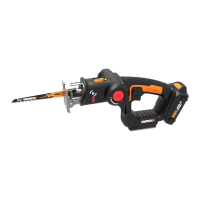
Worx WX572L
32 pages
Print Icon
To Next Page IconTo Next Page
Loading...
WX572L
BladeRunner
®
X2 EN
BladeRunner
®
X2 F
BladeRunner
®
X2 ES
P09
P16
P24

Questions and Answers

  • P
    Patrick HammondJul 27, 2025
    Why is the cut quality poor with my Worx WX572L?
    • C
      clarkjustinJul 28, 2025
      Poor cut quality with your Worx Saw can occur for several reasons: * The blade may be worn out, so ensure the blade is sharp. * The feed rate might be too fast, so feed the material more slowly.
  • J
    Jason WongAug 3, 2025
    What to do if Worx WX572L tool will not start?
    • O
      olsonlisaAug 3, 2025
      If your Worx Saw tool won't start when switched on, the power cord may not be plugged in. Check to make sure the power cord is well connected into a working outlet.
  • I
    ianfrazierAug 8, 2025
    Why is the work efficiency low with my Worx WX572L?
    • V
      Vanessa CombsAug 8, 2025
      Low work efficiency with your Worx Saw may be due to a worn-out blade, so ensure the blade is sharp. Also, the feed rate might be too fast, so feed the material more slowly.
  • W
    Wendy NicholsAug 14, 2025
    What to do if the blade is not clamped tightly by the Blade Holder of Worx Saw?
    • G
      George BrownAug 14, 2025
      If the blade is not clamped tightly by the Blade Holder, it might not be fully inserted. Use the blade grip to push the blade as far into the blade holder as possible before letting go of the Blade Release.
  • D
    Dr. Joseph GarciaAug 20, 2025
    Why does the Guard Arm vibrate too much on my Worx WX572L?
    • S
      Sheri LambAug 20, 2025
      Excessive vibration of the Guard Arm on your Worx Saw can be caused by loose screws fixing the Guard Arm on the work table. Tighten the screws as shown in Fig A1.

Summary

Technical Data

Accessories

Safety and Operating Instructions

General Precautions

Essential safety rules for tool operation, covering personal protection and work area maintenance.

Additional Safety Warnings

Symbols Guide

Operating Instructions

Before Putting the Machine into Operation

Steps to follow before starting the machine, ensuring proper fitting and functionality of all parts.

Maintenance

Troubleshooting

Worx WX572L Specifications

General IconGeneral
TypeReciprocating Saw
Power SourceBattery
Voltage20V
Battery TypeLithium-Ion
Battery Capacity2.0Ah
Weight2.2 kg

Related product manuals