EVOM™ Manual
World Precision Instruments 9
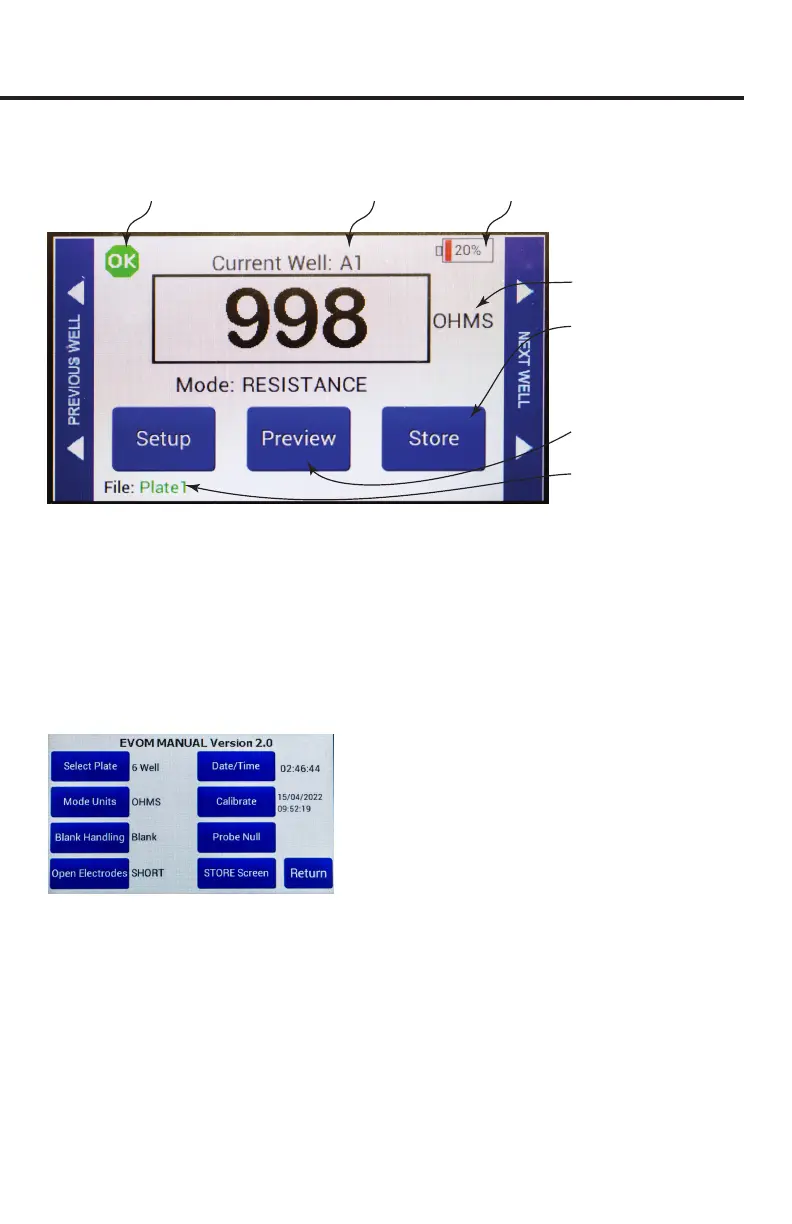
Main Display
Touch to short electrodes
Preview the plate by its
layout
File name, defined in the
storage options menu
Current cell in plate Battery indicator
Range (V, mV, Ω, KΩ)
Press to record and index
to the next well. Press and
hold to open the storage
options menu
Fig. 5—The main EVOM™ Manual display.
A negative resistance number will appear in red text. This can be caused by a faulty
electrode in media, (see "Troubleshooting" on page 26) or a blank setting that is
over the measurement (see "Blank Handling Page" on page 12). When the meter is
plugged into a power source, the battery icon shows a charging symbol.
Setup Page
Press
Setup
on the main screen to open the
Setup
page.
Fig. 6—Setup page
Select Plate – Select the number of wells and the sampling pattern.
Mode Units – Choose the Units for sampling. (Options include Millivolts, Volts, Ohms
and K Ohms.)
Blank Handling – Lets you subtract the control blank from the current resistance
measurement.
Short Electrodes – Shorts V
1
-V
2.
and is used to nullify the galvanic charge in the
electrodes when the electrodes are placed in a saline solution for 4–8 hours to
remove the charge. See also "Probe Null" on page 13.



 To Next Page