EVOM™ Manual
World Precision Instruments 23
should respond with “File saved” within 15 seconds. If “Saving le...” is still seen
after 20 seconds, press the
Return
key and use another USB drive. Once a le has
been saved, open the le on a computer to verify the contents.
NOTE: The le saving routine can take up to 15 seconds to complete. See the USB
cautions on page 5.
7. Remove the USB thumb drive to transfer the data le to your computer as a CSV
le (Excel).
Making Voltage Measurements
1. Power on the EVOM™ Manual using the power switch on the rear panel.
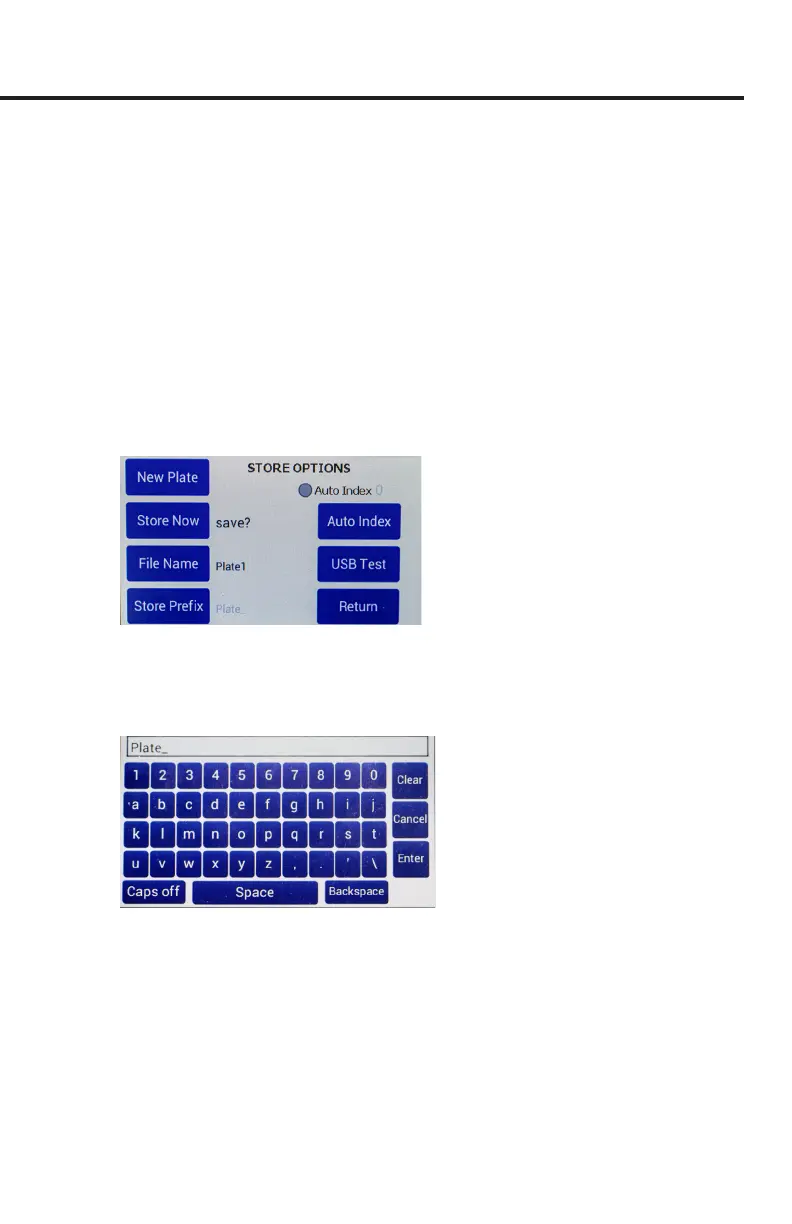
2. If a lename other than the default (plate1) is required:
• Press and hold the
Store
button on the main screen for 2 seconds or press
Store Screen
on the
Setting
screen to congure your stored data les.
Fig. 42—Store options screen.
• To use a prex and auto-indexing, activate the
Auto Index
radio button.
Then, press
Store Prex
to enter a le name. Or, to use a unique le name,
deactivate the
Auto Index
radio button. Then, select
File Name
to enter a new
name.
Fig. 43—Keyboard to enter a unique le name.
• Press
Clear
.
• Use the on screen keypad to enter a new name.
• Press
Enter
.
NOTE: Auto indexing changes the name to a numeric sequence formatted with
the name, a prex and a sequential number (name_prexN).



 To Next Page