22 World Precision Instruments
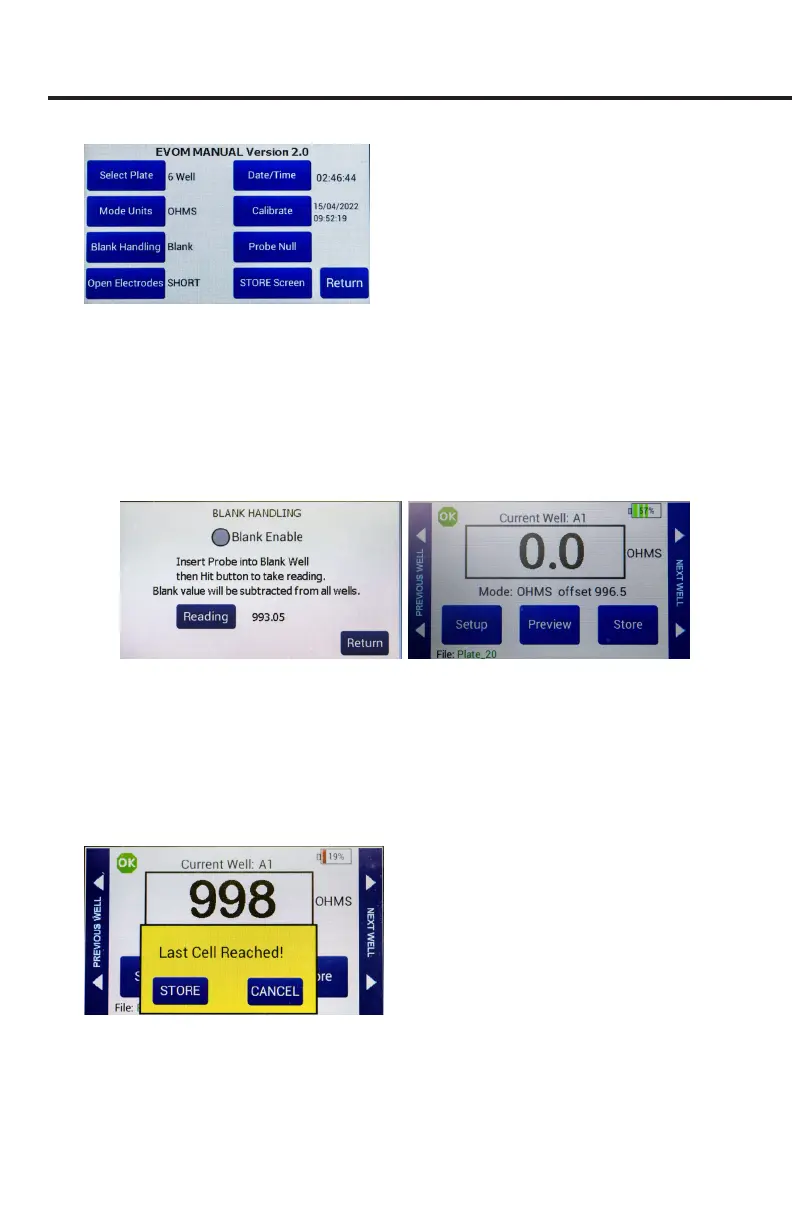
Fig. 38—Setup page
• Select Plate–Choose the plate size.
• Select Mode Units – Choose OHMS or KOHMS for making resistance
measurements. Select the resistance range (auto or 10,000 ohms).
• Ca
librate–Press Calibrate to calibrate the electrode. (This uses a 10 KΩ 0.1%
resistor). See "Instrument Diagnostics and Calibration" on page 20.
• Blank Handling
– To subtract a blank well (including the uid and electrode
resistances), place the electrode in a blank well and press
Reading
. Press the
Blank Enable
radio button to subtract the blank value.
Fig. 39—(Left) Blank Handling window.
Fig. 40—(Right) The main screen shows the oset underneath the reading.
• Press
Return
to navigate back to the main menu.
4. Insert a USB drive into the USB port on the side of the EVOM™ Manual and
begin measuring by pressing the foot switch or touching the
Store
button on the
screen. Tap the
Next Well
area on the right side of the screen to advance to the
next well. Repeat the sampling process.
5. Once the last well has been recorded, the le storing selection notication appears.
Fig. 41—Warning that the last cell measurement was taken.
6. Press
Store
. A system message will report if the USB thumb drive is usable,
or it will display an error. If the USB thumb drive is not plugged in or it is not
recognized, a warning message will appear. Press
Cancel
and try another drive.
The
Store
function cannot be used on an unrecognized drive. EVOM™ Manual



 To Next Page