The XTR3 is a Sirius Sportster Receiver designed for satellite radio reception, offering a range of features for tuning, searching, and managing channels, as well as personalized alerts and display options.
Function Description:
The primary function of the XTR3 is to receive and play Sirius satellite radio broadcasts. It allows users to navigate through various program streams, search for content by category, channel, artist, or song title, and store favorite channels as presets. The device also includes a built-in FM transmitter for broadcasting audio to a car's FM radio. Advanced features include game alerts for sports teams, song seek (S-Seek) for tracking favorite artists or songs, and time-based functions like an alarm clock and auto shutdown.
Important Technical Specifications:
- Presets: Up to 30 channel presets, organized into 3 banks (A, B, C) with 10 presets each.
- S-Seek Memory: Stores up to 20 Artist/Song Title combinations, sports teams, or traffic cities.
- FM Transmitter Frequency Range: 88.1 MHz to 107.9 MHz (bandwidth: 200KHz).
- Display: LCD with auto-sizing/scrolling text for song title and artist name, 3-digit stream number, 8-character category name, signal strength indicator, clock, and band/preset bank number.
- Audio Output Level: Adjustable, with a 10-segment horizontal bar graph.
- Sirius ID (SID): 12-digit unique identifier for service activation.
Usage Features:
Channel Tuning and Navigation:
- Channel up/down Encoder Knob and Select Button: Used for sequential tuning through program streams (clockwise for up, counterclockwise for down) and scrolling through menus/lists. Pressing the Select Button enters a selection; holding it tunes to the previously selected stream.
- Category Buttons: Allows advancement through stream groups based on content category. The Channel knob then scrolls through streams within that category.
- Direct Tuning: Pressing and releasing the Rotary Knob, then using 0-9 keys to enter a desired channel number. The channel changes immediately after three digits are entered, or after 3 seconds for one or two digits.
- Previous (PREV) Button: Tunes to the previous channel.
Presets:
- Setting Channel Presets: Press the BAND button to activate a preset bank (A, B, or C). Select the desired channel, then hold a numbered preset button (0-9) for at least 2 seconds to store it. The preset number will flash and then remain lit.
- Recalling Channel Presets: Press the BAND button to activate the desired preset bank, then press the corresponding numbered preset button (0-9) to recall the channel.
- Jump Preset Button: Quickly tunes to a specific channel (e.g., traffic, weather, news, sports) and then back to the original. If set for traffic, it can display alerts when a selected city's traffic report is broadcast.
- Preset Tune Mode (P.TUNE): Press and hold the BAND button to enter. Use the Rotary Knob to scroll through all stored presets. Presets are grouped by bank and number (e.g., A-1, B-2).
- Preset Tune List Mode: While in P.TUNE mode, press the DISP button for 2 seconds to view a list of up to 6 preset channel names, artist names, or song titles.
Searching and Alerts:
- Searching Categories: Push CATEGORY buttons to activate the Category Select screen. Use CATEGORY buttons to scroll through categories, then the Rotary Knob to search channels within the category. DISP button toggles between Channel Name, Artist Name, and Song Title previews.
- Searching Channels (Channel List Mode): Press and hold DISP button for 2 seconds. The screen shows all available channels. DISP button toggles between Channel Name, Artist Name, and Song Title.
- Memory (MEMO) and Song Seek (S-Seek) Functions: Stores current program data (Artist/Song, sports team, traffic city) up to 20 listings. Continuously searches incoming channels and alerts the user when a saved program is playing.
- Storing Song Titles or Traffic City: Momentarily press MEMO button in default display mode.
- Storing Sports Games: If tuned to an NFL, NBA, NHL, or College play-by-play broadcast, press MEMO to select a team. Choose "Initial Game Alert" (alerts when playing) or "All Score Updates" (alerts when playing and scores are updated).
- Viewing Program Information: Press and hold MEMO for 3 seconds to enter S-Seek Mode. Use Rotary Knob to scroll through stored information.
- Activating S-Seek Alert: In S-Seek Mode, press Rotary Knob, highlight "S-Seek," and select "On." The receiver will automatically search for matches and display an "S-Seek Alert" pop-up with an audible beep.
- Game Alert: Automatically identifies when a favorite team is playing. Displays a "Game Alert" screen with tuning information. Configurable in Menu Options.
Display and Audio:
- Display (DISP) Button: Toggles between artist name/song title and large character text display. Holding it enters channel list mode.
- Display Settings: Adjust Contrast Control, Dimming Control (Manual/Automatic), and Font Type.
- Audio Level: Adjusts the audio output level for line output and FM output.
Customization and Control:
- Menu (MENU) Button: Accesses Menu Options for user setup and function adjustments.
- Channel Add or Skip: In Menu Options, select "Add or Skip" to skip selected channels when changing with the Rotary Knob. Skipped channels can still be accessed via Direct Tuning.
- Lock Options: Lock specific channels to prevent unauthorized access. Requires a 4-digit code (default "0000").
- Changing Lock/Unlock Code: In Lock Options, select "Edit Code" to change the default code.
- Confirm Tone Options: Turns ON/OFF audible "Tone" alerts for power ON/OFF and S-Seek activation.
- FM Transmitter Options: Turn ON/OFF the built-in FM transmitter and select a frequency (0.1 MHz increments with Rotary Knob, 1 MHz increments with Category Buttons).
Time-Based Features:
- Clock: Set format (12/24 Hour), time zone (Alaska, Pacific, Mountain, Central, Eastern, Atlantic, Newfoundland), and Daylight Savings Time (DST) Observance.
- Alarm Clock: Set the unit to turn on at a specific time to the last selected channel.
- Program Alert: Program the unit to switch to a selected channel at a specific time and day.
- Auto Shutdown: Automatically shuts off after 1 hour of inactivity. A "Cancel Auto Shutdown" prompt appears after 59 minutes.
- Sleep Mode: Program the unit to shut down after a selected period (15, 30, 45, 60 Minutes, or Off).
Maintenance Features:
- Antenna Aiming: For optimal performance with Home Docking Station or Boombox, use the Antenna Aiming option in Menu Options. Displays SAT and TER signal strength bar graphs to aid in antenna placement.
- Memory Options: Turn Automatic Memory Search (S-Seek) ON/OFF. Clear All Memory Locations.
- Factory Default: Restores all original factory settings, including clearing presets, game alerts, memory locations, resetting display/audio settings, and turning off time-based features.

 Need help?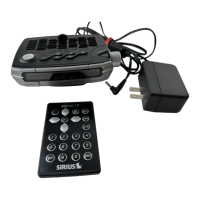

 To Next Page
 General