www.xa.com/en
16
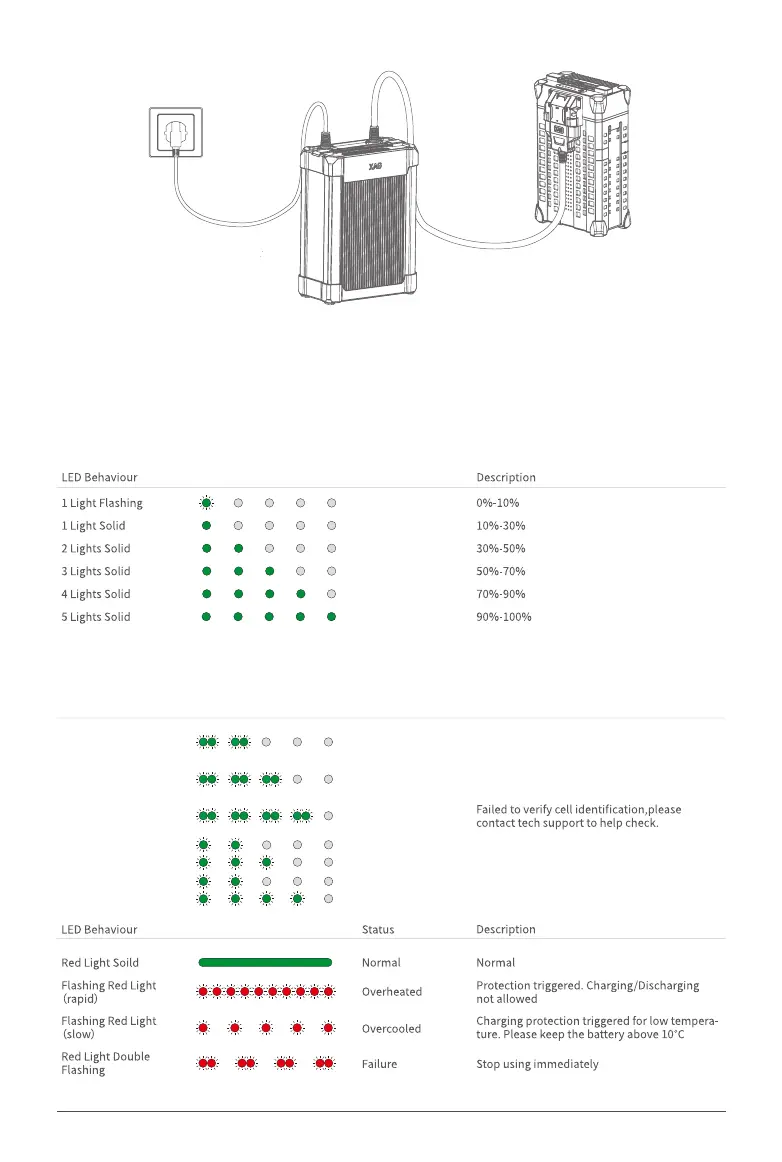
Charge with Intelligent SuperCharger
Check Battery Level
When the battery is OFF, short-press the power button once to check the battery level.
When the battery is ON, the battery level indicators will be on solid.
Check Battery Status
When the battery is on, check the battery status on the screen.
2 Lights Double Flash
Fault Lock
Battery locked for the low battery,please
contact tech support to unlock the device.
Battery locked remotely,please contact
tech support to unlock the device.
Protection triggered by overcurrent,please
contact tech support to unlock the device.
Dual-battery power on disabled,voltages of bo
th
batteries should be roughly equal before use.
Remote Lock
3 Lights Double Flashing
2/4 Alternate Flashing
2/3 Alternate Flashing
Lights
Anti-dismantling
Lock
Over current
Protection
Dual-battery
4 Lights Double Flashing



 To Next Page