Configuration
3–4 975-0082-01-01
Viewing the Auto Gen Start menu
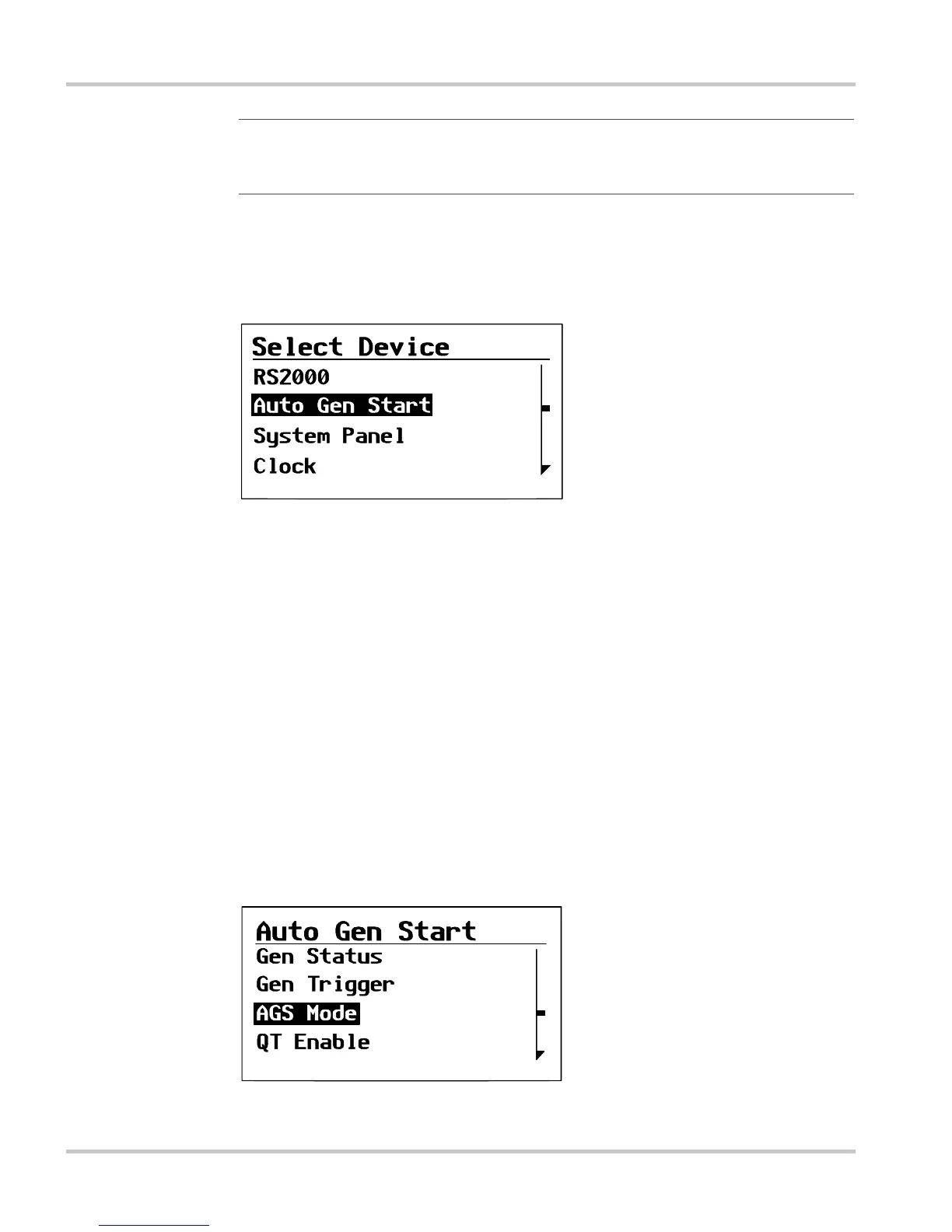
On the Select Device menu, select the Auto Gen Start to view and change
its settings.
To select the Auto Gen Start from the Select Device menu:
1. On the Select Device menu, use the down arrow button to highlight
Auto Gen Start.
2. Press Enter.
The Auto Gen Start menu appears.
Selecting and adjusting the changeable setting
On the Auto Gen Start menu, you can view and change Auto Gen Start
settings, and monitor generator starting activity.
Changeable settings are identified by the square brackets [ ] around the
values along the right side of the screen.
Important:
You can always identify the System screen by the menu arrow in
the bottom left corner of the screen. The menu arrow indicates the Enter button
on the System Control Panel, which you press to view the Select Device menu.
Figure 3-3
Selecting the Auto Gen Start
Figure 3-4
Auto Gen Start menu (basic menu shown)
Off
NotOn
[ManualOff]
[On]


 To Next Page