9
How to Install
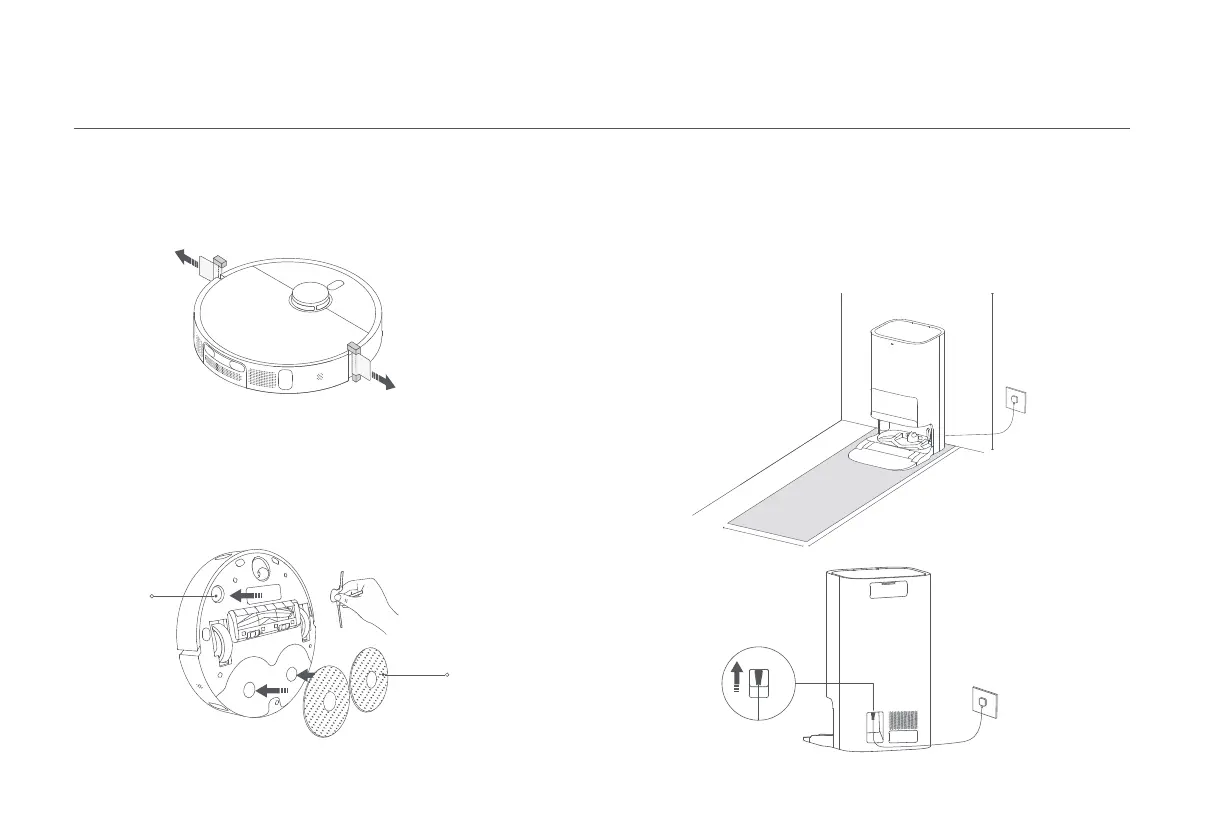
Removing Protective Coverings
Installing the Side Brush and the Mop Assembly
Before using the robot vacuum, remove the protective strips from both sides.
Install the side brush and the mop assembly respectively as illustrated. They are
properly installed when you hear a "click".
Side Brush
Mop Assembly
(Mop Pad Holder +
Mop Pad)
Placing the Omni Station
Firmly insert the connector
upwards into the power port
until the indicator on the
station remains white.
Place the omni station against a wall on a flat and hard-surfaced floor, such as a
wooden or tiled floor. Make sure there is empty space of more than 0.82 meters
in height, more than 1.93 meters in length, and more than 0.44 meters in width.
Ensure the omni station is in an area with a good Wi-Fi signal near an electrical
outlet, and then connect it to power.
> 0.44 m
> 1.93 m
> 0.82 m









 To Next Page