10
- MAX -
MAX
How to Use
Fill the clean water tank with clean water up to the maximum water level mark.
Maximum Water Level Mark
Water Tank Capacity: 4 L
· Do not add water above the maximum water level mark (MAX).
· Do not add hot water to the water tank, as this may cause the tank to become
deformed.
· Do not add any substance like detergents other than clean water to avoid damaging the
robot vacuum.
Notes:
Adding Water to the Clean Water Tank
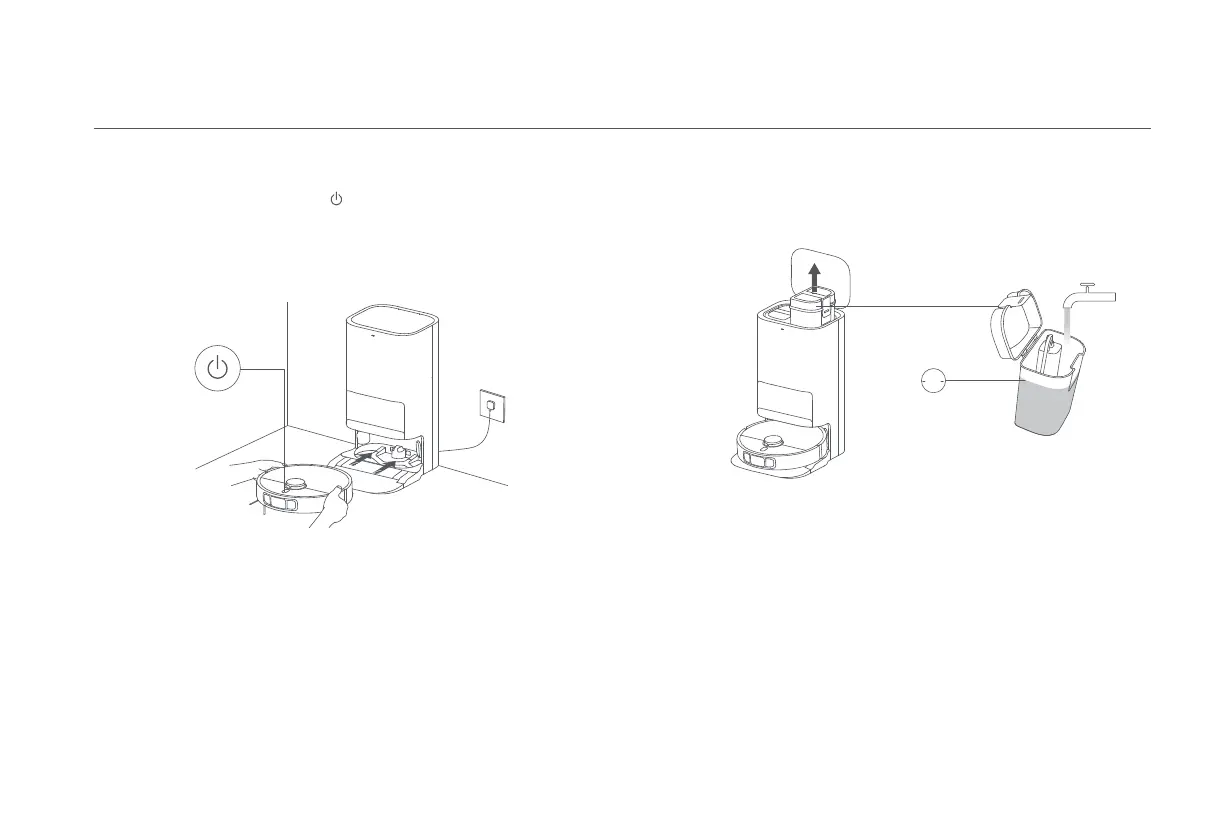
Before use, press and hold the button on the robot vacuum for three seconds
to turn it on. Once the robot vacuum is on, place it onto the omni station, and
make sure the charging contacts on the robot vacuum and the station are fully
aligned. The robot vacuum connects to the omni station successfully when you
hear a voice prompt for starting charging.
Notes:
· Before the first use, it is recommended to fully charge the robot vacuum. If the robot vacuum
cannot be turned on due to low battery level, manually place the robot vacuum onto the
omni station to charge it for a while.
· When the robot vacuum is being charged, it will automatically turn on and cannot be turned off.
Placing the Robot Vacuum









 To Next Page