NetDisk User Manual Network Direct Attached Storage / NDAS
—————————————————————————————————————————————
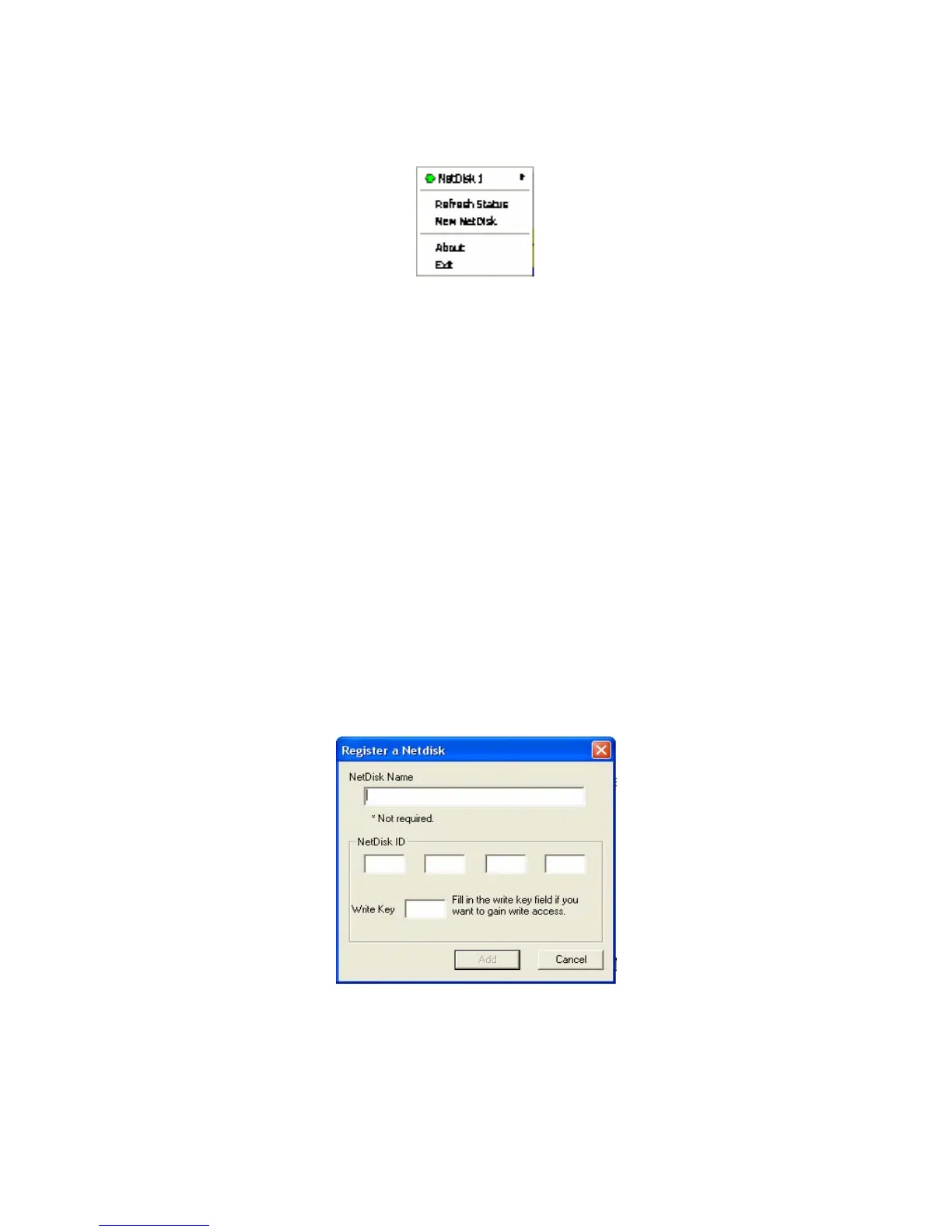
NetDisk Administrator Tool Menu
Click NetDisk™ Administrator Tool. All the registered NetDisk will be displayed on the NetDisk
Administrator Tool Menu.
- NetDisk - Displays all the functionality of a specific NetDisk.
- If you named your NetDisk at the registration step, the new name will be displayed in place of the
word NetDisk X.
• Refresh Status - Updates the status of NetDisk that are connected to the network.
- If a NetDisk IS displayed with a Black Colored Circle, it means the network cable or power cable
NetDisk is disconnected. This will cause operation of other NetDisk to slow down. We recommend
you remove the Black NetDisk. You can remove the NetDisk by selecting the Black colored
NetDisk and choosing remove.
New NetDisk - Registers a new NetDisk to your computer. •
- Each time a new NetDisk is added, it must be registered. Found New Hardware Wizard will
automatically register the new NetDisk. Some systems will register a NetDisk without going
through this step.
- NetDisk Name is optional
- Enter NetDisk ID.
- Enter Write Key; it is needed to enable write access to NetDisk.
www.XIMETA.de
—————————————————————————————————————————————
19



 To Next Page